
Smart Editor is an AI-powered editor for writing documents inside a project. You can ask CoSchedule AI for help as you write, go back to an earlier version, export the document and run brand checks from the sidebar. Available on every plan, including the free plan.
Add a Smart Editor document to a project
- From your calendar, open a project.
- Click Add Attachment.
- Choose Smart Editor.
- Type your content in the document, or ask for help in the chat bar above the document.
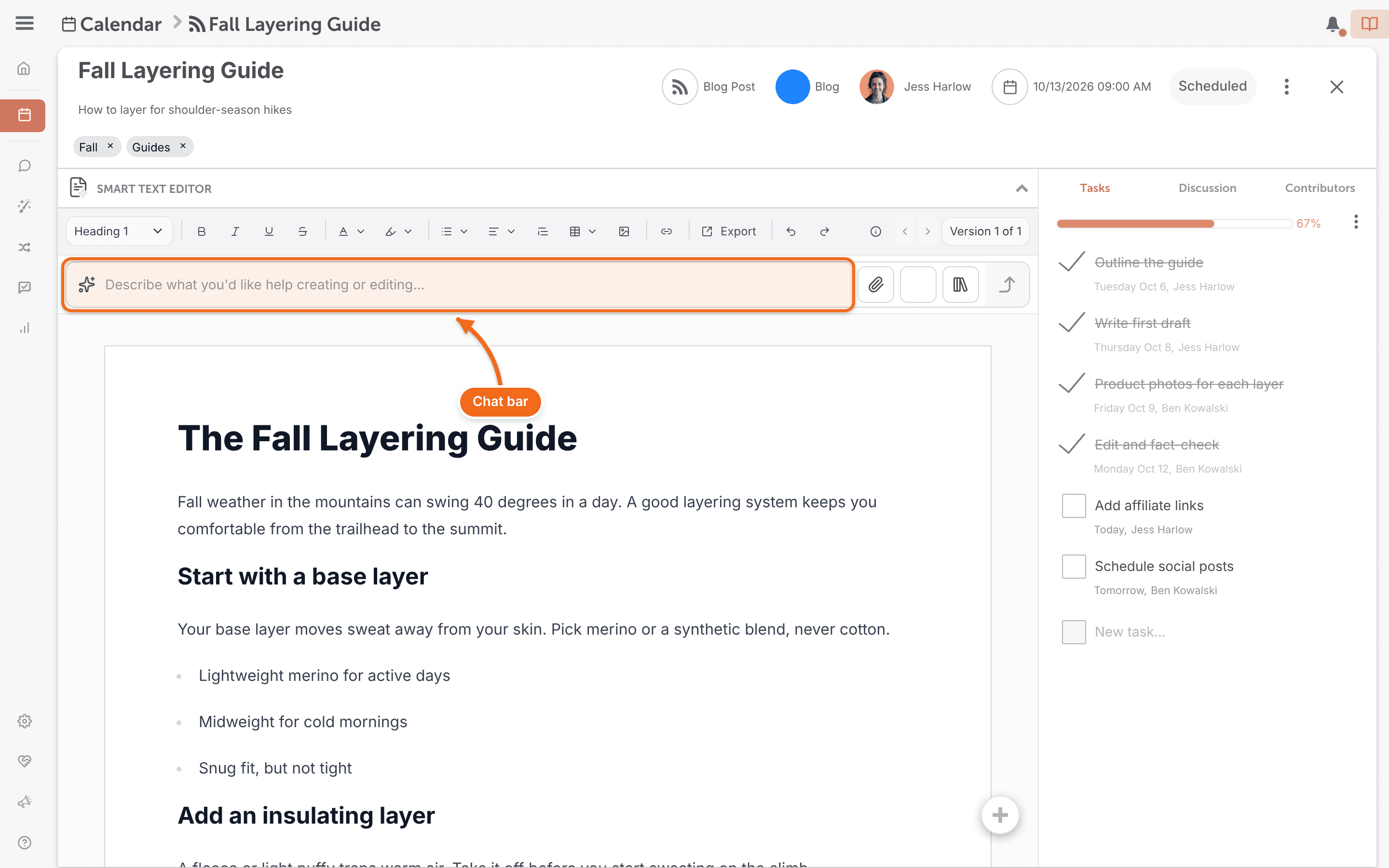
Get AI help as you write
Use the chat bar above the document to ask CoSchedule AI for a draft, headline ideas, a longer or shorter version, a summary or repurposed copy. Smart Editor's AI tools can also change the tone, improve clarity, turn text into bullet points, make copy sound more human and fix grammar.
For ready-made prompts, click the book-stack icon in the AI toolbar (tooltip "AI Prompt Library") to open the Prompt Library. See Use the Prompt Library and create custom prompts.
To choose which AI provider writes content in Smart Editor, see Choose your preferred LLM.
Restore an earlier version
Smart Editor keeps past versions of each document.
- In the Smart Editor document, click the button that reads "Version X of Y" to open the version list.
- To see one person's versions only, filter the list with All Versions.
- Select the version you want to look at. You can also step through versions with the arrows beside the button (tooltips "Previous Version" and "Next Version").
- While you're viewing the older version, click Restore Version.
Run SEO Enhancer or Compliance Check
If the SEO Enhancer or Compliance Check module is turned on in your brand profile, you can run it from the sidebar in Smart Editor. Brand Profiles are a paid add-on for Suite. See Set up and use Brand Profiles.
Export or copy your content
Copy the document to your clipboard, or download it as a PDF or HTML file.
- In the Smart Editor document, click Export (tooltip "Export Document").
- In Export Document, click Copy to Clipboard, Download PDF or Download HTML.
Download HTML downloads a .zip file.
Smart Editor doesn't convert documents to WordPress. For copy you want to send to WordPress, use a Text Editor attachment or a Google Doc instead.
For WordPress, see Work with WordPress posts.