
Connect Headline Studio to your CoSchedule calendar to score headlines in Headline attachments without leaving your projects. The integration is available on Starter, Professional and Suite, and uses a Headline Studio account with its own Free, Basic or Premium plan.
Before you start
The Headline Studio account you connect must have logged in at headlines.coschedule.com at least once and finished setup. If you don't have an account yet, sign up at coschedule.com/headline-studio.
Turn on the integration
- Open Settings.
- Click Integrations.
- In the Tools section, click Headline Studio.
- Click Enable, then Set up Headline Studio.
- Click Connect Headline Studio, then log in with the Headline Studio account you want to connect.
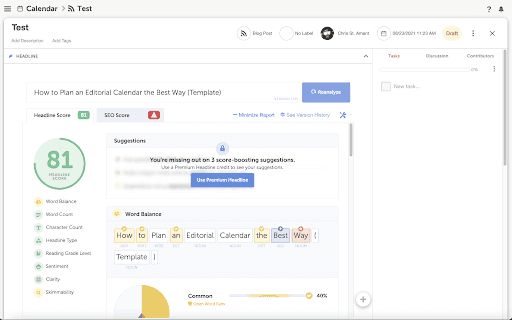
Analyze a headline in a project
- Open or create a project.
- Add a Headline attachment.
- Type your headline and click Analyze.
- To score a new version, change the headline and click Reanalyze.
Who can use it
- Each calendar connects to one Headline Studio account.
- Everyone on your calendar team can analyze headlines in projects with the connected account, and shares its plan and credits.
- That sharing works only inside your calendar's projects. If a team member logs in at headlines.coschedule.com themselves, they get their own Free account.
- If Headline Studio Premium came with your CoSchedule calendar, it belongs to the calendar owner's email and works only in Headline attachments on calendar projects.
- Scores don't show in a read-only view of your calendar. Only the headlines do.
Turn off the integration
If you disable the Headline Studio integration, Headline attachments show the headline without its score and analysis. You can turn it back on at any time from Settings > Integrations.
If the attachment shows "Error Loading Headline Studio"
This error, or a message that parameters are missing, usually means the connected Headline Studio account never finished setup.
- Do a hard refresh of the page.
- Log in at headlines.coschedule.com with the connected account and finish setup.
- Reconnect the account in Settings > Integrations > Headline Studio.