
Link in Bio gives an Instagram or TikTok profile its own page, hosted by CoSchedule, that lists the links from your social messages. Put the page's URL in the profile's bio so followers find every link in one place. Available on Starter, Professional and Suite.
You can turn it on for any connected TikTok profile and any connected Instagram Business or Creator profile. TikTok decides which of its accounts can add a website to their profile.
Turn on Link in Bio
- From your calendar, open Settings.
- Click Social Profiles.
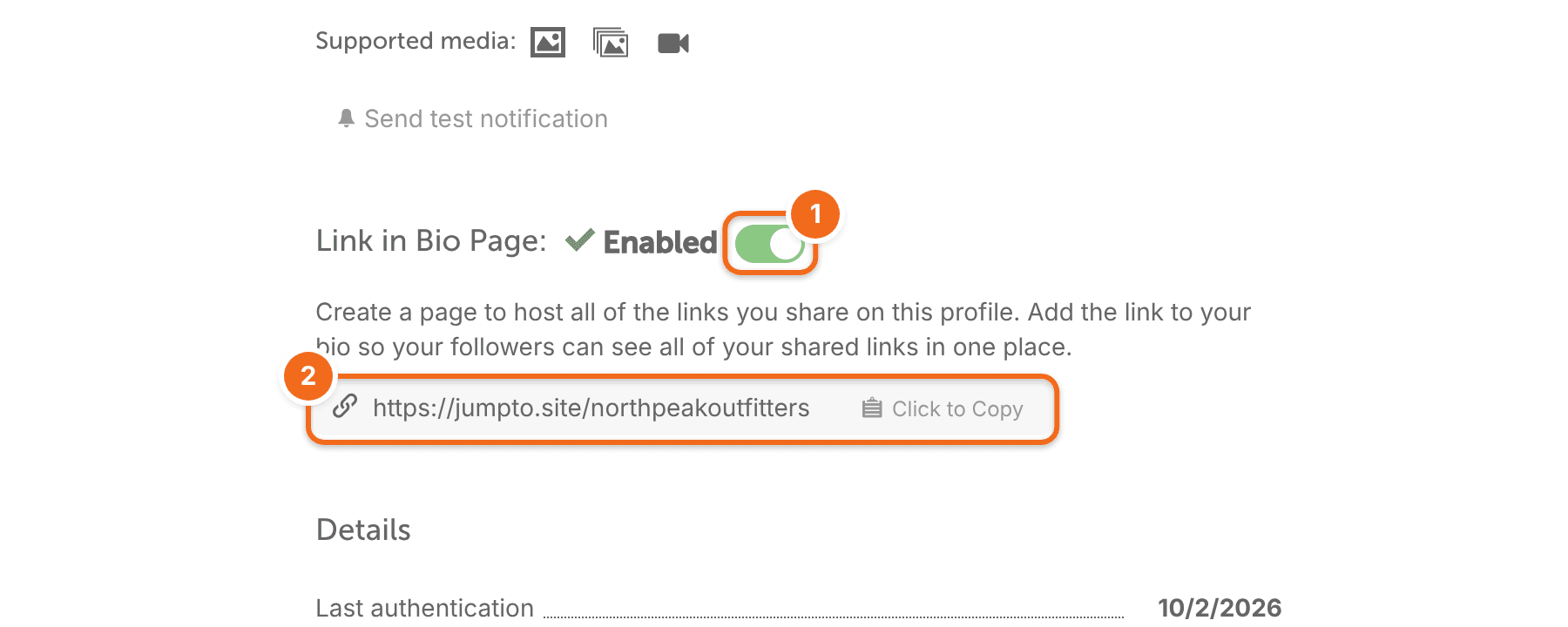
- Under the Instagram or TikTok profile, turn on Link in Bio Page.
- Copy the page URL.
- Add the URL to that profile's bio in Instagram or TikTok.
For how to add a link to your bio, see Instagram's help on adding a website to your bio and TikTok's help on linking a website to your profile.
Each profile has its own page. Turn on Link in Bio for each profile you want a page for, and add that profile's URL to its own bio.
Add a link to your page
- Create or open an Instagram or TikTok social message.
- Turn on Add to Link in Bio.
- Check the link field that opens. If the message text already has a URL, it fills in for you. If not, enter the URL.
- Schedule the message.
- Click Save.
The link appears on your Link in Bio page after the message publishes.
Every link on the page comes from a social message. You can't add a link to the page without a scheduled or published message.
Change or remove a link
You can't edit links on the Link in Bio page itself. Change them in the social message that added them:
- On your calendar, open the social message with the link.
- To change the link, click the pencil icon.
- Edit the URL. Changes save as you type, unless the URL isn't valid.
- To take the link off your page, click the trash icon.
If you delete the social message from your calendar, its link comes off the page too.
Frequently asked questions
Why is my Link in Bio page empty?
Links show up only after their message publishes. A message that is scheduled but hasn't published yet isn't on the page.
Can I change how the page looks or the order of the links?
No. The page is read-only, and links appear in the order they were added.
Can I see how many people click my links?
Link in Bio doesn't have its own analytics. To track clicks, add UTM tags to your links or shorten them with Bitly. See Track social links with UTM tags and Shorten links with Bitly.
Can I use a different link-in-bio service?
CoSchedule doesn't connect to other link-in-bio services. The Link in Bio page is CoSchedule's own and is hosted by CoSchedule.
What happens to my page if the profile disconnects or is removed from my calendar?
The page still exists, but you can't manage it until you reconnect the profile. When you reconnect, the profile links back to the same page.