
Most marketing agencies hit their limit earlier than they expect. They haven’t built systems that can be repeated easily so each new client adds exponential project management. HubSpot reports that many marketers still struggle to share data across teams or operate in a truly data-driven way.
Teams waste time chasing approvals, reworking deliverables, and adjusting timelines when they don’t have good systems in place.
This guide shows you how to manage multiple client projects with a system that holds as you scale.
Why Client Project Management Breaks At Scale

At a low client count, a lot of things still work without a system. People remember what’s pending, follow up when something feels off, and fill in gaps as they go.
That breaks once you’re running several accounts at the same time. Not all at once, but in small, compounding ways.
Missing Context
Everyone on the team needs to understand where things stand: what’s been approved, what changed, what version is current. When that context isn’t stored in one place, it’s split across Slack, email, docs, and calls, so it has to be pieced together each time.
That time isn’t easily tracked, but it accumulates across clients and quietly stretches timelines.
Broken Handoffs
This is where most work actually stalls. Not during execution, but immediately after. A draft is finished, but no approval is triggered. Feedback comes in across channels and doesn’t fully align. Revisions are made, but no one confirms whether it’s final.
The work sits in between steps until someone notices and pushes it forward. Without a defined transition, progress depends on someone intervening.
Read More: The Best Way To Manage Client Campaigns Across Multiple Channels
Uncontrolled Scope
Scope creep builds through small additions that get absorbed into the existing work. A quick tweak gets folded in. Then another. Then something slightly outside scope, but close enough that no one pushes back.
At no point does anyone reset the timeline or re-evaluate effort. The project management plan stays fixed, even as the workload increases. That gap is what shows up later—as delays, rushed work, or margin loss.
What Good Client Project Management Looks Like
Effective project management makes sure work moves smoothly across each stage of a project, from initial draft to final delivery, especially when you’re handling multiple clients at once.
It Defines What Happens After Each Step
Once a deliverable is completed, the next step is already established. The reviewer is known, feedback is collected in a specific place, approval criteria are defined, and the transition to the next stage is clear.
As a result, work moves forward as part of the process.
It Creates Boundaries Around Work, Not Just Plans
When deliverables, revision limits, and change handling are set upfront, additional work either fits within those boundaries or triggers an update to timeline or cost. Without that, extra requests get absorbed into ongoing work, which slows down delivery across accounts.
It Surfaces Risk While There’s Still Time To Act
Delays usually start as small signals: work that hasn’t moved, feedback that hasn’t come in, or a dependency that hasn’t been addressed.
When progress is tracked consistently, those signals are visible before they turn into missed deadlines. That visibility gives you room to step in and resolve issues before they affect delivery or require client follow-up.
How To Manage Client Projects Without Losing Control
To manage client projects without losing control, you need a system that defines scope, standardizes execution, and makes timelines and risks visible.
Here’s how to build a system that holds up under that pressure.
Step 1: Lock The Scope Before Work Starts
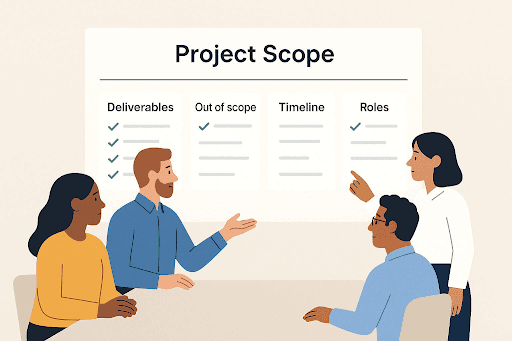
Think of scope as a set of conditions that determine how the work moves.
If those conditions are vague, the client keeps redefining the project while the team is already executing it.
Before work starts, you need clarity on what gets delivered, how success is measured, when each stage moves, and how approvals are handled.
Client response time is where most projects break. Teams set internal deadlines, but leave feedback open-ended. One delayed approval pushes everything that follows.
A usable scope accounts for that. If a draft goes out on Tuesday, feedback is due within a defined window. Revisions are consolidated, and final approval has a clear turnaround.
Now the timeline reflects how work actually happens.
That’s what keeps delivery predictable as you add more clients.
Step 2: Standardize Task Workflows
Most teams customize their process for every client. That flexibility feels helpful, but it’s where execution starts to slow down.
When the workflow isn’t defined, your team keeps making decisions mid-project—who reviews first, when to bring in the client, whether something is ready for feedback, how revisions are handled.
Individually, none of this feels like a problem. Across accounts, it adds friction to every step.
The fix is to standardize how work moves.
Define a fixed production path for each service line and use it across accounts.
For example, a content workflow can look like this…
brief approved → outline → draft → internal edit → client review → revision → final approval → publish → report
…and a paid media workflow can be this:
strategy sign-off → asset request → copy/design production → internal QA → client approval → launch → weekly optimization → monthly reporting
With that structure in place, the sequence is already set. Only inputs change, and your team stops deciding what happens next while the work is happening.
Step 3: Plan Around Bottlenecks, Not Ideal Timelines
In client work, delays happen at the points where work changes hands. They show up in approvals, internal reviews, handoffs, and missing inputs like briefs or access.
If those aren’t accounted for, the timeline looks fine until one stage slips, then everything compresses.
Build the project timeline backward from the delivery date and assign time to each milestone/project stage. Add enough buffer to absorb delays without pushing everything else off track.
For example:
- Launch date: March 30
- Final client approval: March 27
- Revisions complete: March 25
- Client feedback due: March 22
- First draft delivered: March 19
- Internal review complete: March 18
This shows you exactly where the project is exposed and you can take steps to protect the project timeline.
Step 4: Separate Status Communication From Day-To-Day Conversation
More communication doesn’t necessarily improve visibility. It usually creates more places for context to get lost.
Your clients need a consistent way to understand where things stand. That means every account should have:
- one main channel for active discussion (e.g., Slack or email)
- one place where project status lives (e.g., project board or calendar)
- one recurring cadence for updates (e.g., every Thursday)
The update itself should be structured. It needs to answer:
- what moved this week
- what’s currently in review
- what’s blocked
- what’s needed from the client
- what’s due next
Once this is in place, ad hoc check-ins drop because the information is already available in an expected format. You also remove a lot of internal drag. Without a fixed structure, account managers spend their time translating status across tools and conversations. It looks like client service, but it’s really a broken client project management system.
Step 5: Use Tools To Reduce Coordination Work
To manage multiple clients, you need coverage across planning, execution, and visibility. Each requires a different tool.
- A shared calendar handles planning. It shows how timelines overlap, where deadlines cluster, and when capacity gets tight. Tools like CoSchedule work well here because they bring campaigns, tasks, and deadlines into a single calendar view. Rather than managing each client separately, you’re managing workload across all of them.
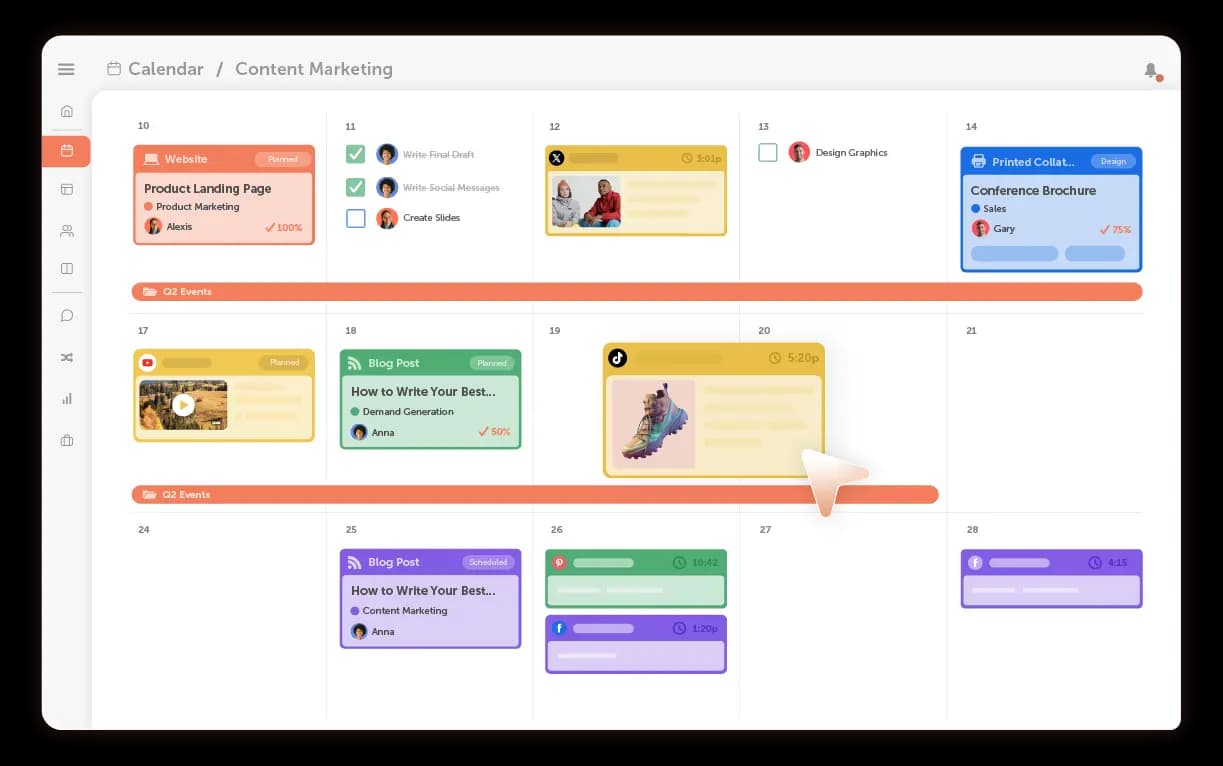
Read More: Working With Multiple Clients/Brands in CoSchedule
- A project management tool handles execution. This is where tasks live, ownership is clear, and work moves through defined stages. Tools like Asana, ClickUp, or monday.com help you manage dependencies, reviews, and handoffs without losing track of ownership.
- Communication tools keep day-to-day work moving. Slack or Microsoft Teams work well for discussion, but they shouldn’t become your source of truth for project status.
Even more important is how these tools connect.
If each tool reflects a different version of the project, your team spends time reconciling them instead of moving work forward. Your setup should make the current state obvious, without needing to cross-check multiple places.
Read More: The 7 Best Marketing Project Management Software For Success
Step 6: Build Scope Control Into The Workflow
Even with the right tools and structure, projects start slipping when new work enters without control.
New requests will always come in—changes, extra variations, shifting priorities. But what breaks timelines is letting them go straight into execution.
To prevent that, you need a checkpoint between request → work starting.
Log the request, check it against scope, and make the impact clear before anything moves forward. Usually, that means pushing the deadline or swapping out an existing deliverable.
Most teams absorb the work silently. It feels faster in the moment, but it compounds across clients and starts affecting delivery everywhere.
A better response is straightforward:
“This can be added. It’ll affect the timeline or scope—let’s confirm how you want to handle it.”
Now the trade-off is visible, and the decision is shared.
Step 7: Review Risk Weekly, Not Just Performance Monthly
Most teams review results after the fact. By then, the operational issues have already affected delivery.
So alongside campaign reporting, you need a weekly delivery review.
At minimum, look at:
- what’s overdue
- what’s waiting on client input
- what’s stuck in internal review
- what account is consuming more time than planned
- what deliverables are at risk in the next 7 days
That visibility gives you room to act before delays become visible externally and there’s still time to adjust. And that’s what keeps you in control as client load increases.
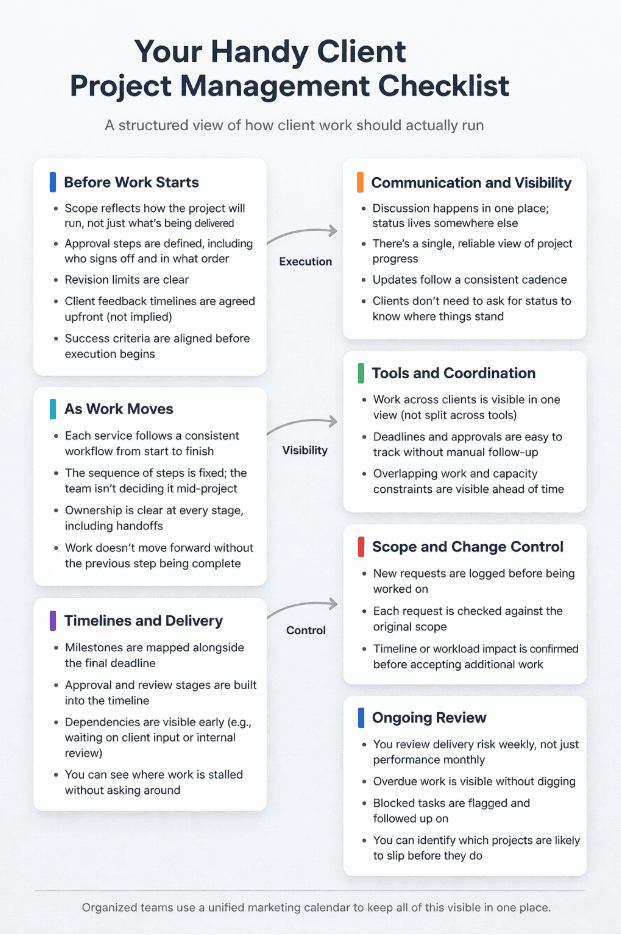
Client Project Management Checklist For You
Run This System Inside CoSchedule
Once you have the system, you need a place to run it.
CoSchedule gives you a single view of how work is moving across clients. You can use it to:
- Plan across clients with a shared calendar. Put all campaigns and deadlines in one calendar so you can see where work overlaps. You can spot weeks where approvals will pile up or where the team is already at capacity before anything starts slipping.
- Standardize execution with workflow templates. Create one workflow per service and reuse it. The steps and approval points are already defined, so your team follows the same sequence every time instead of rebuilding it for each client.
- Track ownership and progress without chasing updates. Assign every task to a specific person and track it against a deadline. You can see what’s in progress, what’s waiting for review, and where work has stopped without digging through messages.
- Streamline approvals with a client-facing dashboard. Have clients review and approve work in one place. Feedback stays attached to the deliverable, which cuts down back-and-forth and avoids missed comments.
- Align reporting and delivery. Keep timelines and reporting in the same system so updates reflect what’s actually been completed. You don’t have to piece together status at the end of the week.
Ready to simplify client management?
Book A Demo Of CoSchedule
Start Free With CoSchedule
