
If you could double conversions without doubling your traffic, would you?
That’s exactly what conversion rate optimization (CRO) is designed to do. It helps you turn more of your existing visitors into customers, leads, or subscribers by improving their on-site experience, rather than spending more on ads or SEO.
Even small changes, like an actionable headline or simpler contact form, can lead to thousands in extra revenue.
Running these experiments requires coordination across content, design, analytics, and marketing teams. CoSchedule keeps that process organized, helping you plan, assign, and track tests in one place.
What Is Conversion Rate Optimization?
Conversion rate optimization is the practice of improving your website or marketing funnel so more visitors take meaningful action, such as making a purchase or subscribing to your mailing list.
CRO combines data, user experience, copywriting, and psychology to understand what motivates users and what holds them back. When done well, you refine every touchpoint so visitors move naturally toward conversion. That can mean simplifying navigation, rewriting unclear copy, adjusting design elements, or streamlining forms.
The focus is on increasing the percentage of visitors who convert, not necessarily the volume of traffic.
For example, if your landing page gets 1,000 visits a month and 25 people sign up, your conversion rate is 2.5%. Improve that to 5%, and you’ve doubled results without buying more clicks or impressions.
Is Conversion Rate Optimization Part Of SEO?
CRO and SEO are often seen as separate strategies, but the two work best together.
SEO brings qualified visitors to your site through targeted keywords and optimized content. CRO ensures those visitors take action once they arrive. Together, they create a full-funnel system—one attracts, the other converts.
Optimizing for both means thinking about search intent and user experience. A page that ranks high but doesn’t persuade users to act wastes its potential. Likewise, a page that converts well but isn’t discoverable won’t get seen.
Suppose you’re optimizing a landing page for “best time-tracking software.” Implementing the right SEO tips gets you the click. CRO makes sure that once visitors land, they find clear messaging, social proof, and a strong call to action that nudges them to start a free trial.
Consequently, your site attracts visitors who bounce less and convert more, and in doing so, improves rankings and drives revenue.
What Is A CRO Strategy?
A CRO strategy is the operating system that guides your experiments—what to test, why it matters, and how you decide which changes can influence revenue. It gives your team a shared way to make decisions based on user behavior instead of individual opinions about copy or design.
Here’s what a real CRO strategy looks like inside a marketing team:
1. Find Where Your Funnel Is Leaking
Before changing anything, you need to understand where visitors stop progressing. Look for patterns such as:
- Pages with heavy traffic but poor conversion
- Steps where users pause, hesitate, or abandon
- Points where intent drops sharply
Marketing metrics like bounce rate, scroll reach, form abandonment, and exit patterns show where attention fades. Use these engagement signals to shape your experiments.
2. Dig Into Why Users Hesitate
Behavioral data points you to the problem, but they rarely explain it.
To understand user hesitation, bring in real user feedback, aka qualitative inputs, that show a clearer picture of the moments that cause drop-offs. Like so:
- Session recordings that highlight hesitation points
- On-page surveys capturing objections in users’ own words
- Live chat transcripts revealing repeating questions
- Heatmaps showing where focus stalls
3. Build Hypotheses Tied To Real User Behavior
A strong hypothesis isn’t “change CTA color.” It should be specific and reflect what users are experiencing. For example:
“Visitors are scrolling but not taking action because the value prop is buried below the fold. Moving the value explanation above the form should help more users understand what they gain and complete the sign-up.”
Notice how your team now has (1) a testable idea with a reason behind it and (2) a clear expected outcome.
4. Run A/B Tests That Improve User Experience
Once you understand the problem and have a strong hypothesis, focus on tests that meaningfully change how users experience the page.
Here’s what action looks like:
- Rewrite your hero section so users understand the offer without scrolling.
- Move key benefits higher on the page if users aren’t reaching them.
- Shorten a form or split it into steps if recordings show hesitation at specific fields.
- Reorder sections so value comes before requests for effort (like sign-ups or pricing).
- Replace generic CTAs with ones tied to user motivation (“See pricing that fits your team,” “Compare plans”).
5. Build A Repeatable CRO System
Every experiment should inform the next. Document what worked, what didn’t, and what it teaches you about user motivation. Eventually, this becomes institutional knowledge that your team can rely on.
Start by logging every test the same way: hypothesis, rationale, setup, result, and learning. Keep these records somewhere permanent—a shared doc or a CoSchedule project—and review them before planning new tests so you don’t repeat low-value ideas.
As the library grows, group insights by themes such as friction, clarity, value, and trust. You can spot patterns worth exploring further. Then build a simple monthly cadence: identify opportunities → create hypotheses → run tests → analyze → archive learnings → plan the next round.
Conversion Rate Optimization Examples
1. Simplifying High-Intent Forms To Reduce Effort
Forms on pricing or lead-gen pages often ask for too much information upfront. When you present a long list of fields right away, users drop off even if they arrived with strong intent.
You’ll see better completion rates if you collect only the essentials first, then introduce the more detailed fields. For instance, splitting a form into a few short steps makes the process feel manageable, so users are more likely to finish.
2. Aligning Value Propositions With The Traffic Intent
A lot of friction comes from mismatched messaging. If someone searches “best marketing project management tools,” they’re evaluating fit, clarity, and reliability. You won’t win them over by presenting internal feature labels.
Rewrite your value prop to match what the visitor is actually trying to fix (e.g., coordination, visibility, fewer handoffs). This helps you connect their goal with your solution—and as the language reflects the visitor’s context rather than the company’s, engagement improves.
3. Showing Key Information Earlier In Page Hierarchy
Important elements like outcomes, proof points, and differentiators often sit too far down the page. By the time users reach them, many have already left.
A straightforward fix is adjusting the hierarchy. Place a concise proof point or a specific benefit directly below the headline. Your visitors will then have a reason to continue engaging with the rest of the page.
4. Adjusting Content For Returning Visitors Based On Past Behavior
Repeat visitors don’t need the same introduction as first-timers. If you reset the journey every time, they slow down and sometimes drop off.
Light content marketing personalization helps visitors continue where they left off, shortening the decision path and often increasing assisted conversions from users who are already partially committed. You can update the CTA to match their stage (“Continue your setup”), bring forward features they viewed previously, or show content tied to their last session.
Conversion Rate Optimization Tools
Behavior Tools
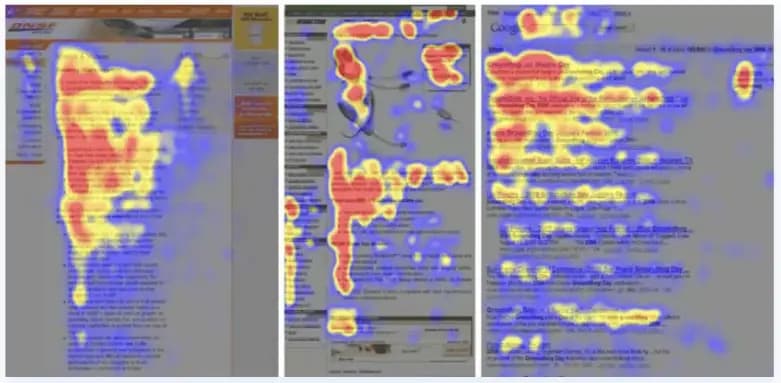
Heatmaps and session recordings show how far people scroll, where they pause, and which sections they ignore. These patterns reveal friction you won’t see in analytics alone.
Testing Platforms
A/B and multivariate testing tools help you compare different versions of a page layout or message and identify the better converting variation.
Voice-Of-Customer Tools
On-page surveys, exit prompts, and feedback widgets surface the questions and concerns users have before they convert. You can use this input to refine value props and messaging clarity.
Funnel And Form Diagnostics
Multi-step flows often break in unexpected places. Tools that track hesitation and field-level drop-offs help you streamline the path so fewer users abandon the process.
Workflow And Experiment Management

The tools above show you what’s happening. Workflow and experiment management tools like CoSchedule help you manage the work that follows. You can map experiments on a shared calendar, attach hypotheses and drafts, coordinate updates across teams, and keep results organized so learnings carry forward for an overall improvement system.
How CoSchedule Helps Marketers Improve CRO
You can have the right ideas, but without a system to organize them, tests stall or repeat. CoSchedule solves that by giving you one space to plan, run, and document every CRO A/B test from start to finish, so your entire team works from the same source of truth.
You start by creating a dedicated CRO project on your Marketing Calendar. This becomes the home for each experiment. Add the hypothesis, attach the analytics showing where users are stalling, drop in recordings or screenshots, and outline the changes you want to test.
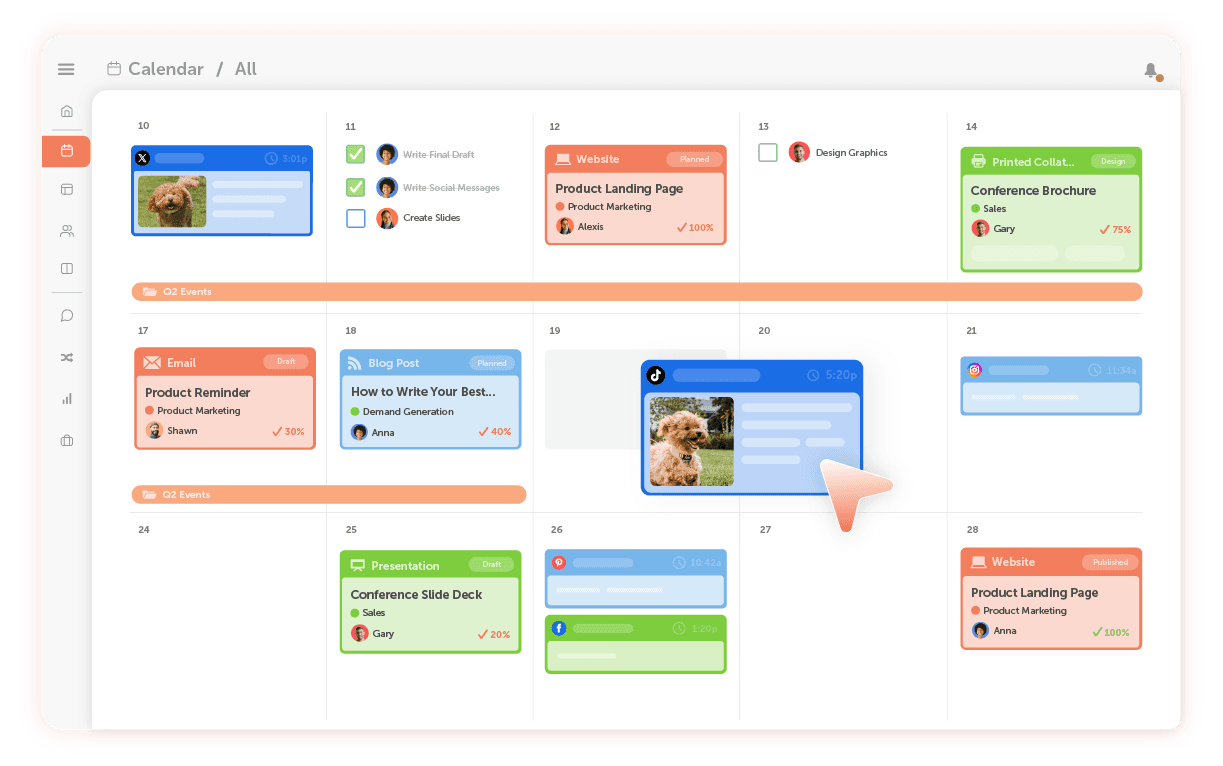
Because everything sits inside the same project, the whole marketing team sees the same brief instead of interpreting the problem differently.
As the experiment moves forward, the work stays connected. Designers upload hero mocks directly to the project. Developers add screenshots confirming the variants are installed correctly. Analysts attach sample-size checks and performance notes. Each step appears in order on the calendar and inside the project, making it clear what still needs attention and who owns it.
When the test ends, the results stay attached to the same project that housed the hypothesis and assets. You can add exported data, before-and-after screenshots, and notes on what changed user behavior. This creates a permanent record you can revisit before launching new tests, helping you avoid repeating low-value ideas and spot patterns like improvements tied to layout shifts or friction reduction.
As you run more experiments, your calendar naturally becomes a repeatable CRO system instead of a series of one-off tasks.
Each project moves through the same steps: find the problem, form a hypothesis, run the test, record what happened, and plan the next one. With a clear system, CRO becomes steady, not something you squeeze in when there’s time.
Getting Started: A CRO Workflow You Can Implement Today
Here’s a simple workflow you can start using right away, with CoSchedule keeping everything organized from start to finish.
- Choose a page with real traffic and a specific goal. Like a pricing page, signup flow, demo request, or a key landing page.
- Look at your analytics to see where users hesitate or drop off. This is you defining the problem. Then write one clear hypothesis explaining what you believe will improve conversions.
- Next, set up the experiment inside CoSchedule. Create a project on your Marketing Calendar. Add your hypothesis, the planned changes, analytics links, and a deadline. Assign tasks to your copywriter, designer, developer, or analyst so everyone works from the same starting point.
- When the CRO experiment ends, attach screenshots, data exports, and notes directly to the project. This gives your team a clean, shared record of what worked and what didn’t.
- Use your findings to choose the next test, whether you want to adjust messaging, simplify the layout, change the hierarchy, or reduce friction. Add the new experiment to your calendar so that your CRO work stays active and consistent.
If you want to keep your CRO work steady and well-documented, CoSchedule gives you the structure to do it. Plan tests, assign tasks, and review results from the same calendar your team already uses. Get started for free.
