The average user spends more than 50 minutes a day on TikTok. More importantly, they watch with intent. TikTok’s own research shows that 92% of users take action after seeing a video, whether that’s visiting a brand’s site or making a purchase.
There’s also a bigger trend unfolding. TikTok is starting to replace two things traditionally dominated by Google: product discovery and product research. TechCrunch reports that 40% of Gen Z now prefer searching TikTok or Instagram over Google when looking up products.
If you’re a marketer or social media manager, this has a simple implication: TikTok is influencing buying decisions. If your audience is here, and they almost certainly are, your content should be too.
Let’s start with the basics.
How To Use TikTok For Your Brand
TikTok marketers use short-form video to reach people, ideally, in a way that helps them remember your brand, understand it, and eventually buy from it. But what sets it apart from, say, Instagram marketing or YouTube marketing, is the way TikTok rewards raw creativity and authenticity.
The formats that usually perform well are:
- Short storytelling and narratives
- Trend participation (sounds, memes, formats)
- POV or “day in the life” style content
- Duets and stitches that build on others’ videos
- Creator-led or UGC-style content
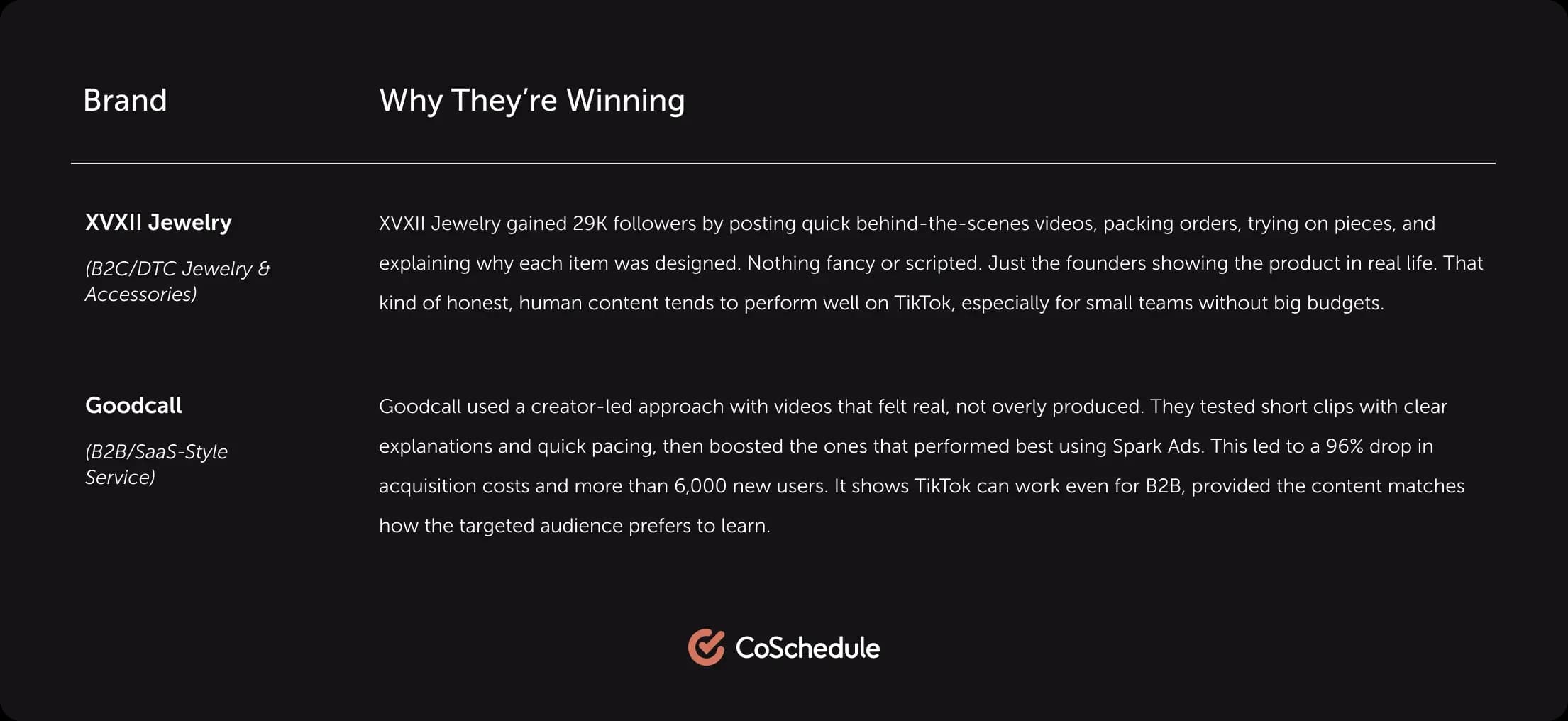
Below are two brands you may not have heard about (yet) that are proving TikTok works beyond the “viral dance or lip-sync” stereotype.
How To Set Up A TikTok Marketing Account
A standard personal profile works fine for scrolling and posting casually, but it won’t offer analytics, commerce tools, or advertising capabilities you’ll eventually need. A TikTok Business Account will.
Setup is straightforward:
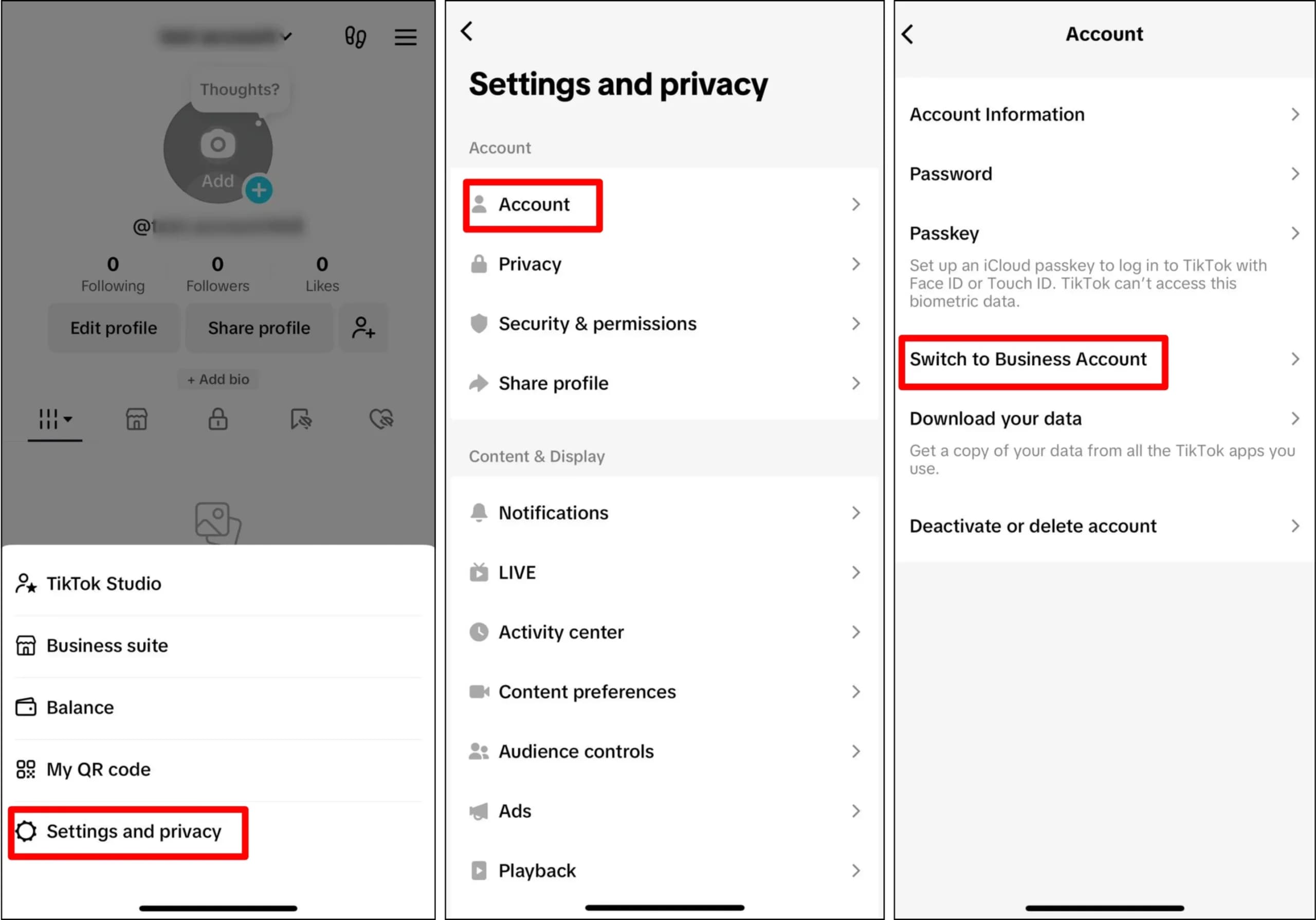
- Download TikTok on your phone. Or log in if you already have an account.
- Head to your profile, open the menu, and click: “Settings & privacy” → “Manage account.”
- Tap “Switch to Business Account.” Then pick the category that best fits your brand.
Once the business settings are in place, you’re ready. You can now post content, experiment with content formats, measure results, or start running paid campaigns.
What Is TikTok Shop And Why It Matters Now
TikTok Shop is TikTok’s built-in commerce feature that lets users purchase products directly in the app, without clicking out to a website. It merges entertainment, discovery, and checkout into one seamless loop.
Traditionally, the buyer journey looks like:
See → Want → Search → Compare → Buy
TikTok shortens that to:
See → Want → Tap → Purchase
That’s a big deal. Because it means TikTok is shifting from influencing purchases to owning them. In 2024, TikTok Shop drove more than $33 billion in global GMV, and 81.3% of sales came from repeat buyers,a sign that shoppers aren’t just impulse-buying; they’re coming back.
The window that makes this interesting is timing.
On mature platforms like Amazon or Meta’s ad ecosystem, competition is high and getting visibility means spending more money. TikTok Shop hasn’t reached that saturation point yet. Smaller brands, especially those with products that show well on camera, can still break through organically or with relatively low paid spend.
Does that mean every brand should rush onto TikTok? Not necessarily.
The platform favors products people can instantly understand, try, or react to. Like beauty, lifestyle, gadgets, home goods. If your product fits that pattern and you’re willing to experiment with the style of content TikTok rewards, you’ll have a rare early-mover advantage today that likely won’t exist two years from now.
How To Get Started With TikTok Advertising
TikTok’s ad ecosystem is built around a simple rule: show the right content to the right person based on behavior, not demographics alone.
The platform leans heavily on behavioral signals like watch time, rewatches, shares, and engagement. In practice, that means starting broad often performs better than trying to predict who’s going to care. TikTok figures that out quickly.
Because of this, the creative carries most of the weight. If an ad feels salesy or out of place, people scroll. The ones that perform feel like regular TikTok videos with a clear message and something genuinely worth watching.
If you’re coming from Meta or Google Ads, this shift can feel uncomfortable at first. Rather than polishing one perfect asset, you’ll create several versions and let the data tell you which direction to follow.
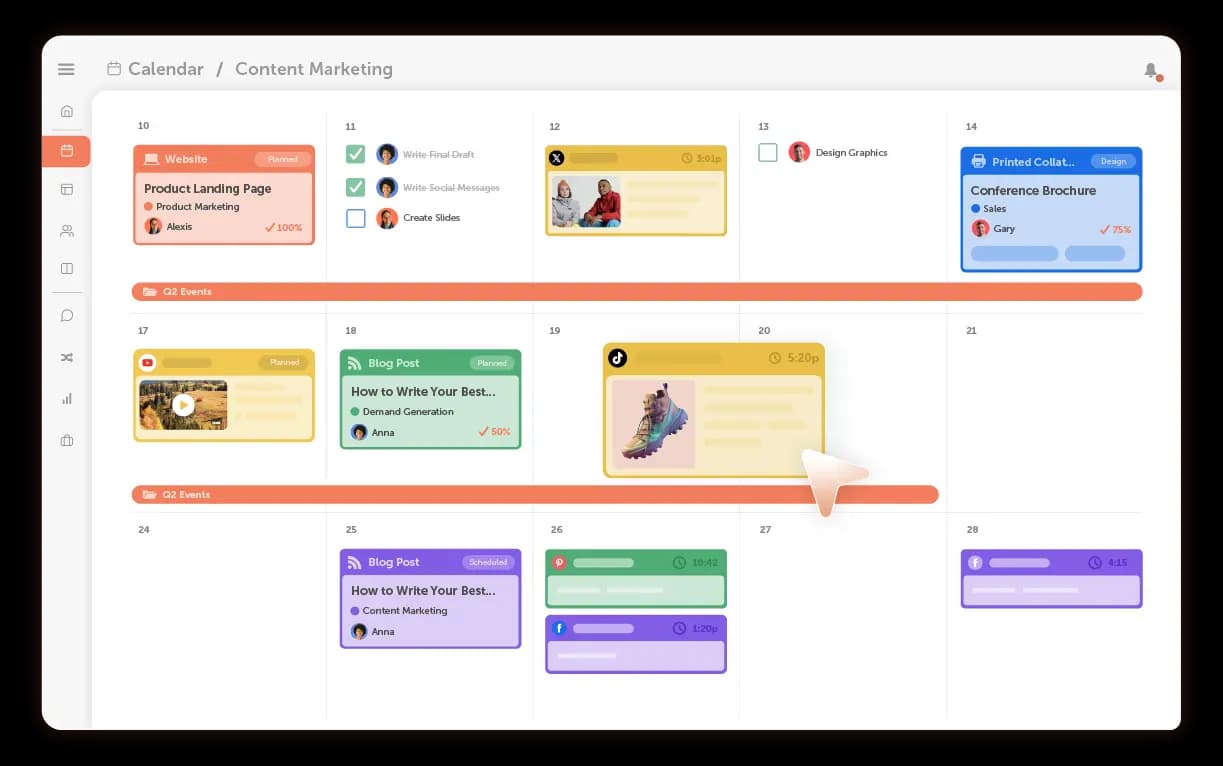
💡Top Tip: That workflow gets messy fast if you’re running multiple tests or working with creators, videographers, or approvers. CoSchedule’s Social Calendar and Marketing Suite put everything in one place, the content plan, drafts, approvals, and final files. You can see what’s done, what’s waiting, and what’s coming next. It keeps the process organized so it’s easier to manage as your TikTok efforts grow.
TikTok Ad Types
TikTok offers several ad formats, but there are two that make the most sense to start with:
- In-Feed Ads: The “bread and butter” format that appears in the ‘For You’ feed and looks like a regular TikTok.
- Spark Ads: TikTok’s most interesting format because you can take an existing organic TikTok (yours or a creator’s) and promote it while keeping the original likes, comments, and social proof intact.
For most brands, Spark Ads feel like cheating in the best possible way. You don’t have to guess what will perform,simply promote what’s already working.
Other formats, like TopView ads or Branded Hashtag Challenges, are also valuable. But they’re generally more effective after you know what type of content your audience responds to. Use them later to scale what’s already working.
Budgeting And Expectations
“How much should you spend to test TikTok ads?” Well, there’s no single answer.
Some brands learn enough from a few hundred dollars; others need more. What matters most is how quickly you test and iterate.
If you judge your brand’s early campaigns only on “paid media efficiency,” you’ll probably be disappointed. But if you treat the first phase as research, the platform becomes much more valuable. You’ll begin to spot trends, like hooks that consistently win attention or demo styles that lead to product curiosity.
Once those patterns repeat, that’s when you increase spend to boost sales.
How To Use TikTok Ads Manager (Step-by-Step)
TikTok Ads Manager can feel overwhelming at first, but the workflow itself is pretty logical once you understand the structure.
Everything is built around three layers: Campaign → Ad Group → Ad. Once that hierarchy clicks, the platform feels much less intimidating.
Here’s how to work through it:
Step 1: Create (or Connect) A TikTok Business Account
Ads can’t run through a personal profile, so your first step is making sure you have a TikTok Business Account connected to Ads Manager. (I’ve discussed how under How to Set Up a TikTok Marketing Account).
Take a minute to ensure your profile looks intentional. Use a clear profile image (often your logo), write a short bio that explains what you offer, and add a link to your website or store. That way, anyone clicking through from an ad immediately knows who you are.
Step 2: Choose Your Campaign Objective
The first decision inside Ads Manager is your objective, essentially telling TikTok what a successful outcome looks like.
Options typically include:
- Reach
- Traffic
- Leads
- App installs
- Engagement
- Conversions
- Product sales (Shop),if available in your region
💡Top Tip: If you’re still learning how your content behaves on the platform, starting with a lighter objective (like traffic or engagement) is less risky. Once you have signal strength (data on what works), start with conversion-focused campaigns.
Step 3: Build Your Ad Group
This layer controls how your ads run. It’s where you define:
- Who should see the ad
- How much you’re willing to spend
- Where the ad will appear
- How TikTok should optimize delivery
If you’re tracking actions like purchases or sign-ups, this is also where you assign that conversion event.
TikTok’s system generally performs best when targeting isn’t overly restricted. Start broad to give the algorithm room to identify performance patterns (hooks, formats, creators, topics).
Step 4: Add Your Creative
Next comes the part viewers actually experience. Here, you’ll upload or select:
- The video
- Caption text
- Call-to-action button
- Link destination (website, app store, or TikTok Shop if supported)
If your product catalog is connected, you’ll also have additional options like tags or dynamic showcases.
Step 5: Run And Learn From The Signals
Once live, TikTok will start delivering your ads based on the chosen objective. In Ads Manager, you can track impressions, engagement, cost metrics, and conversions if you’ve set them up.
Watch how performance develops instead of reacting to one result. A higher cost per click or fewer conversions doesn’t always mean something is wrong. What matters is whether certain hooks or formats keep performing better than the rest,and that’s your base to make good decisions.
Stop what isn’t working, improve what’s close, and scale once you see consistent results.
Building A Repeatable TikTok Content Process
What do we want to be known for, and why would someone care?
Once you can answer that honestly, TikTok content planning becomes far less chaotic.
Most successful teams don’t rely on one style of content. They combine formats and learn as they go. A structure I’ve seen work across industries looks like this:
- Evergreen content: explainers, tutorials, FAQs, product education
- Discovery hooks: stitches, duets, recognizable formats
- Proof: customers, creators, transformations, real use
- Brand personality: behind-the-scenes, decisions, humor, values
- Experiments: new pacing, new angles, unexpected creative directions
There’s no magic proportion here. The more consistently you publish, the more signals TikTok has to learn who responds and why.
A few principles guide most of the teams I’ve worked with:
- Lead with the point. TikTok doesn’t reward slow buildup.
- Write captions the way people search. Natural language beats hashtag dumps.
- If something works, build a series around it. Audiences love patterns they can return to.
Measuring TikTok Success
TikTok can throw you off if you measure it the same way you measure Instagram or Facebook. A post with fewer views can outperform one with 10x the reach,not because of luck, but because it reached the right people with the right message.
So, focus on TikTok analytics that actually mean something:
-
- Did people pay attention? (Watch time, completion rate, replays)
- Did they care enough to respond? (Shares, comments, saves, click-throughs)
- Did it influence behavior? (TikTok Shop actions, leads, conversions, add-to-cart events)
Once you’re tracking the right metrics, the next step is using them to make better decisions.
I like to think of TikTok data less as “performance reporting” and more as a set of clues.
If completion rate is high but clicks are low, the story held attention, but the ask wasn’t compelling or clear. If people comment or save but don’t convert, the content may be interesting, but not actionable.
Those signals make prioritization easier. You’ll know where to adjust, whether it’s pacing, hook, angle, format, or offer.
Streamlining TikTok Marketing With CoSchedule
TikTok feels effortless when you’re posting once in a while. Ideas come quickly, and managing drafts isn’t a big deal. But once the channel scales, more TikToks, more people involved, higher expectations, the cracks show.
CoSchedule gives you a single place to plan and execute. You can map out your posting schedule on a visual calendar, organize scripts and drafts within each project, and assign clear ownership so tasks don’t stall. When someone needs visibility into what’s happening, they find the context alongside the work, not buried in a chat thread.
Approvals become part of the workflow, too. Stakeholders can review drafts, leave comments, and mark posts approved without chasing status updates. Once your team is aligned, you can schedule TikToks directly inside CoSchedule, right alongside Instagram, YouTube Shorts, and every other channel you manage.
It’s still your creative judgment powering results. CoSchedule just removes the logistical friction so your marketing team can focus on ideas, testing, and performance.
Want to see how CoSchedule can fit your process? Get your risk-free trial to start.
