Want to start using LinkedIn, but feel awkward posting into the void?
Start smaller. Before you worry about thought leadership or impressions, make sure people can understand who you are when they land on your profile. Then start posting in a way that gives them a reason to come back.
LinkedIn works best when your profile and posts support each other. Your profile gives people context. Your posts show how you think, what you notice in your work, and why someone might want to keep hearing from you.
That’s where LinkedIn really starts.
I’ll show you how to get started on LinkedIn, from optimizing your profile to choosing what to post to using LinkedIn for lead generation, and improving your content over time.
Why Marketers Should Be On LinkedIn
LinkedIn is worth using because it gives people a public record of how you think about your work.
Helps People Understand What You Know
LinkedIn is built for work-related content, so it’s a natural place to share what you know.
You can post about how you approach a campaign, what a project taught you, or where common advice misses the point. Over time, those posts help people understand your judgment, not just your job title.
That matters because expertise is easier to trust when people can see how you think.
Makes Your Work More Visible
A lot of good marketing strategy work happens behind the scenes. LinkedIn helps make that thinking easier to see.
You don’t need to share confidential results or turn every project into a case study. You can write about the decisions behind the work: why you chose an angle, what made execution harder, or what you’d do differently next time.
That kind of visibility can lead to better conversations with peers, managers, clients, recruiters, or potential customers.
Turns Everyday Marketing Work Into Useful Posts
Your best LinkedIn post ideas are usually already in your work.
A customer question can become a post about a common pain point. A campaign takeaway can become a short lesson. A resource you shared internally can become a useful public post.
That makes LinkedIn easier to sustain. You’re not inventing ideas from scratch. You’re noticing what your work is already teaching you.
How To Get Started On LinkedIn
To get started on LinkedIn, set up a clear profile first, then start sharing useful posts and comments around the market, problems, or audience you understand best.
You don’t need a complex strategy at the start. Focus on making your expertise easy to find, easy to understand, and worth coming back to.
1. Set Up Your LinkedIn Profile For Discovery
When someone clicks on your name, they should quickly understand what you do and why your perspective is relevant.
Start with the basics:
- Profile photo: Use a clear, recent headshot where your face is easy to see.
- Banner image: Add a simple banner that reflects your role or area of expertise.
- Headline: Go beyond your job title. Include keywords people may search for, such as your role, industry, or core skill. For example, “B2B SaaS Content Marketer | SEO Strategy & Customer-Led Content” is stronger than “Content Marketer.”
- About section: Explain who you help, what problems you work on, and the experience that makes your perspective credible. Keep it direct and easy to scan.
- Featured section: Add your best proof, such as a strong post, portfolio piece, case study, article, or resource.
- Experience section: Fill this out with the roles and results that support the topics you want to be known for.
- Skills and education: Add the skills and background that reinforce your positioning.
Take my LinkedIn profile, for example.
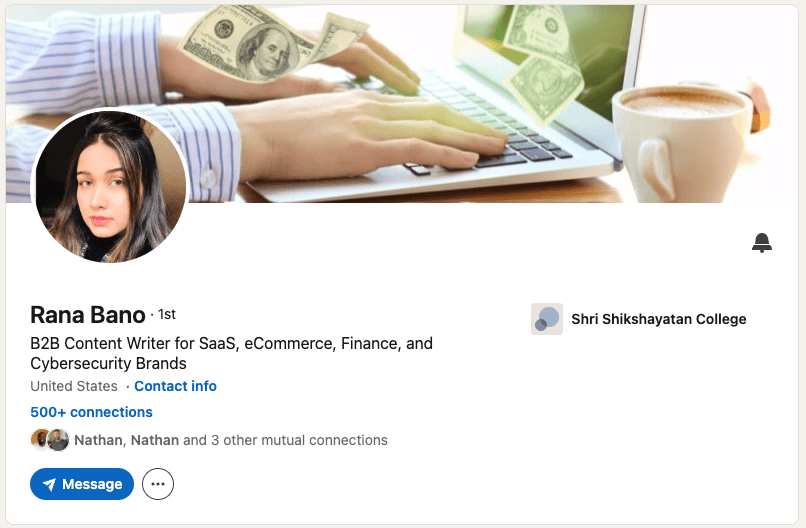
Before someone scrolls, they can see the essentials: I’m a B2B content writer, I work across SaaS, ecommerce, finance, and cybersecurity, and the profile has credibility signals like 500+ connections and education.
That’s the point of profile optimization: help people understand your relevance quickly, then give them a reason to keep reading.
2. Understand What To Post On LinkedIn
If you’re not sure what to post, start with what you already know from your work. A good LinkedIn post doesn’t need to be a big idea. It can be a practical tip, a mistake you keep seeing, a useful resource, or a lesson from a recent project.
Try one of these formats:
- Teach something: Share a checklist, shortcut, simple framework, or mistake to avoid.
- Show your process: Walk people through how you approach a task or decision. For example, “How I decide whether a blog intro is strong enough.”
- Share a lesson: Write about something work, a client, or your career taught you.
- Comment on your industry: Point out what’s changing, what people misunderstand, or what you wish more people talked about.
- Curate a resource: Post an article, report, tool, template, or podcast, then explain what you took from it.
- Ask a meaningful question: Make it specific enough that people know how to respond, like “What makes you stop reading a LinkedIn post in the first line?”
Your first line matters because LinkedIn only shows the opening before someone clicks “see more.” Make it clear and specific. Instead of “Here are some LinkedIn content ideas,” try “Most beginner LinkedIn posts fail because they start too far away from the actual point.”
After that, keep the post focused on one idea. Explain it in plain language. Add an example if it helps. End with a question, next step, or short reflection only when it feels natural.
3. Build A Consistent LinkedIn Posting Schedule
LinkedIn says members who post at least weekly can see up to 2x more engagement, so consistency is worth building early.
Start with 2–4 posts a week. Pick days you can realistically support, then decide what each post is supposed to do before you write it. Like so:
| Day | Post Focus |
|---|---|
| Monday | Share one practical lesson from recent work |
| Wednesday | Explain one problem your audience runs into |
| Friday | Share a point of view, resource, or question |
That gives you enough structure to begin. You know what kind of post you’re writing, but you’re not forcing every idea into a rigid format.
In CoSchedule, you can build this schedule directly in your marketing calendar. You can draft each LinkedIn post, attach the creative or link, and schedule it alongside your other content. CoSchedule’s Best Time Scheduling can also help you choose a stronger publishing time based on when your audience is more likely to engage.
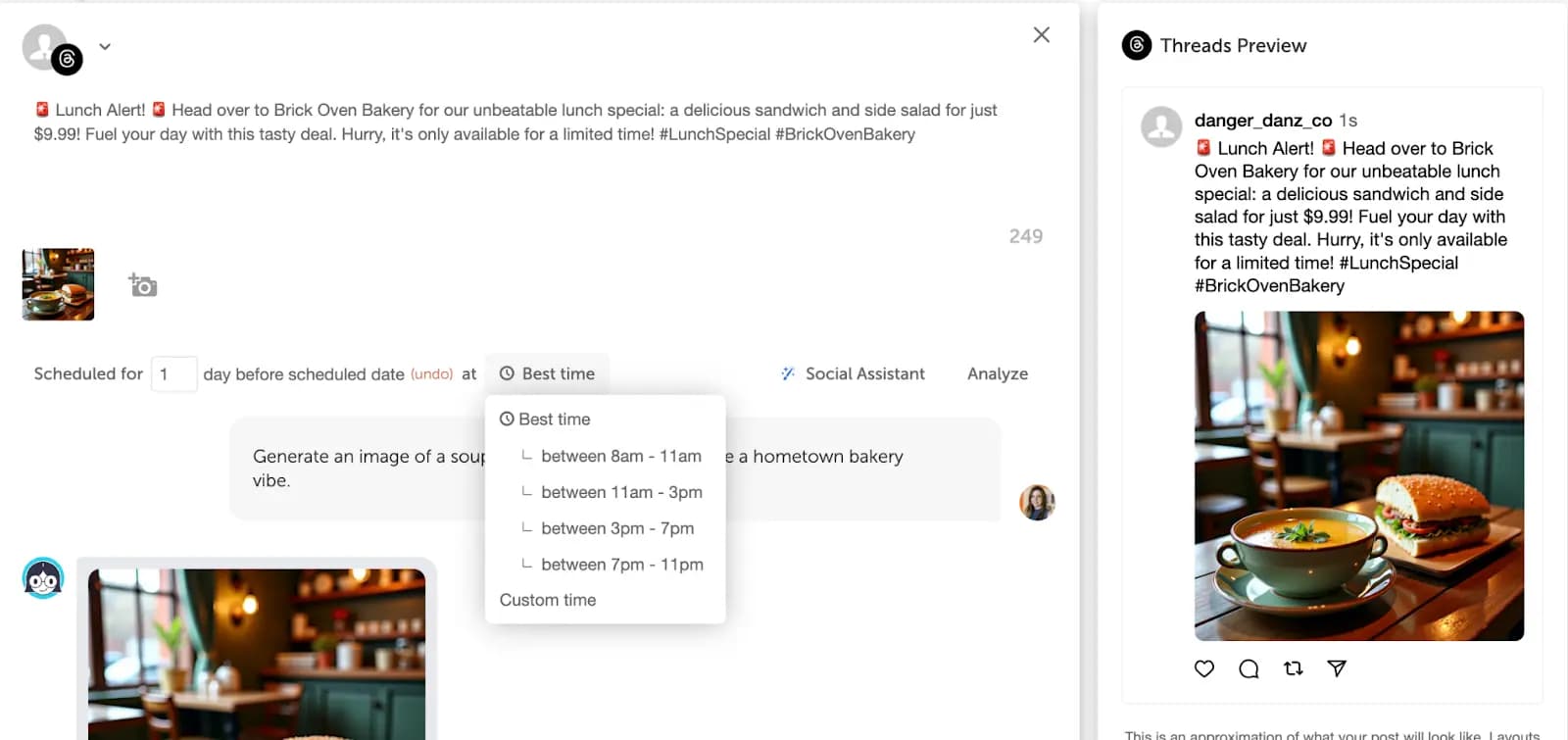
You can also use CoSchedule to repurpose larger marketing assets for LinkedIn. When you publish a new guide, for example, add a supporting LinkedIn post to the same campaign so the promotion is planned with the rest of your content.
CoSchedule also supports LinkedIn document posts, including PDFs, DOC/DOCX files, and PPT/PPTX files, so you can schedule those assets without moving them into a separate workflow.
For the first few weeks, keep the system simple. Add a few ideas to the calendar, draft before the week starts, and watch which posts get useful responses. The schedule gives you a baseline. The responses tell you what to write next.
4. Build Your Network On LinkedIn
Your network affects who sees your posts and which conversations LinkedIn starts putting you into. Don’t build it randomly.
Create a focused list of people to connect with. Search for job titles, companies, topics, and creators related to the audience you want to reach. If you want to be known for B2B content strategy, for example, look for content leads, marketing directors, SaaS founders, editors, and people who regularly comment on strong content marketing posts.
Once you connect, don’t jump straight into posting and hope the right people notice. Spend time commenting on relevant posts first. And no, low-effort comments like “Great point” don’t count.
A useful comment makes the original post more valuable. You might add a detail the writer skipped or share a short example from your own work. The point is to give people a reason to notice how you think.
Do that in a few relevant conversations each week. It helps the right people notice you before your own posts have much reach.
5. Use LinkedIn For Lead Generation
You need a path between someone noticing your work and someone being ready to talk. Build that path before you send a pitch.
Start by watching for signs of interest. Someone comments on more than one post. They view your profile after reading something practical. Or they reply to a poll, download a resource, or mention the same challenge in their own content.
None of that means you should pitch right away. It gives you a reason to follow up with context.
For example:
Thanks for commenting on the post about webinar attendance, [Name]. I’ve seen the same issue when teams promote too late or rely on one channel. Is that something your team is working through right now?
That message works because it stays close to what they already cared about. It asks one relevant question instead of trying to force a sales conversation.
You can also include calls to action, but keep them simple:
- “Comment if you want the checklist.”
- “DM me if you’re working through this.”
- “Follow me for more posts on [topic].”
- “What would you add?”
When someone replies, keep the conversation simple. Understand the problem first, and only offer your service, product, or call when there is a clear connection.
6. Use Analytics To Improve Your Next Posts
Don’t wait months to check what’s working. After a few posts, your LinkedIn analytics already shows which ideas are getting attention from the people you want to reach.
Look past basic likes. Pay attention to the posts that earn thoughtful comments, profile visits, clicks, saves, or follow-up messages. Those signals tell you more than a big impression count from the wrong audience.
CoSchedule can help you keep that review process tied to your planning. You can schedule LinkedIn posts from your marketing calendar, then use the Analytics tab to open “LinkedIn Report” and review performance by post, campaign, or time period. You can also filter by profile, date range, or content type, then share the report with clients or leadership.
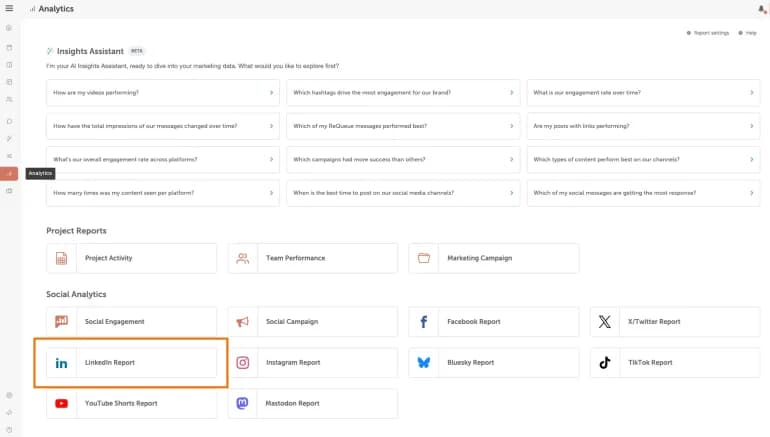
Use those notes when you plan your next posts. If Tuesday morning posts get stronger discussion, save that slot for higher-value ideas. If document posts earn more saves, use them for checklists, frameworks, or step-by-step explainers. If short text posts bring better comments, use them for opinions or quick lessons.
That’s how analytics becomes useful—by helping you publish more intentionally.
How CoSchedule Helps Beginners Manage LinkedIn Marketing
If LinkedIn is part of your marketing role, consistency gets harder to manage from memory.
You may be posting from your own profile, supporting a company page, repurposing campaign content, or coordinating with other channels. Without a calendar, LinkedIn can become the thing you remember only when the week is already busy.
CoSchedule helps you plan LinkedIn content alongside the rest of your marketing work. You can turn a blog post, launch, webinar, or customer story into LinkedIn posts, schedule them ahead of time, and see how they fit with everything else on the calendar.
That structure is especially useful when you’re still building the habit. Instead of starting from a blank page every time, you can collect ideas, assign posts to specific days, and review what actually worked.
Use CoSchedule to:
- Plan LinkedIn posts before the week starts
- Keep LinkedIn connected to campaigns and content
- Schedule posts in advance
- Review performance by post, campaign, or time period
For beginner marketers, the value is simple: LinkedIn becomes easier to manage when it has a place in your content workflow.
Try CoSchedule free to plan LinkedIn posts alongside the rest of your marketing.
