
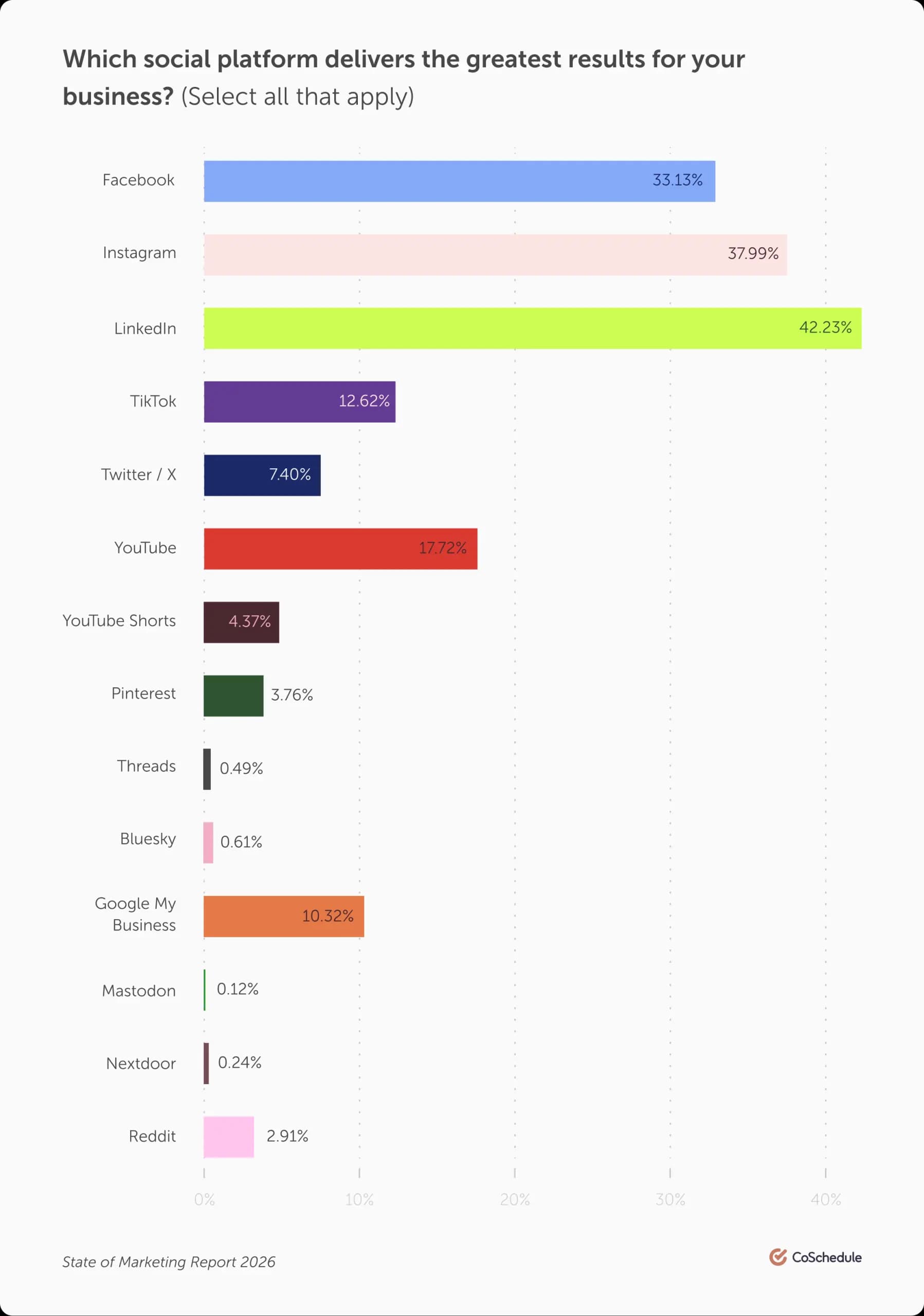
For modern marketers, LinkedIn has evolved from a simple networking site into one of the most effective channels for driving measurable business results. Recent marketing data continues to show that LinkedIn consistently ranks as a top platform for ROI: 42% of marketers say LinkedIn is delivering the best results for their business.
As competition across digital channels increases, marketers and agencies are leaning more heavily on LinkedIn to connect with decision-makers, build authority, and generate qualified leads.
In this guide, you’ll learn how to build a strong LinkedIn content strategy, create engaging content, measure performance, and use the right tools to scale your efforts effectively.
Should I Be Posting On LinkedIn?
LinkedIn is a high-performing channel to promote your brand, build professional relationships, and drive business outcomes like leads and conversions.
Unlike other social platforms, LinkedIn is built around professional intent. Users are looking for insights, solutions, and connections that can help them do their jobs better.
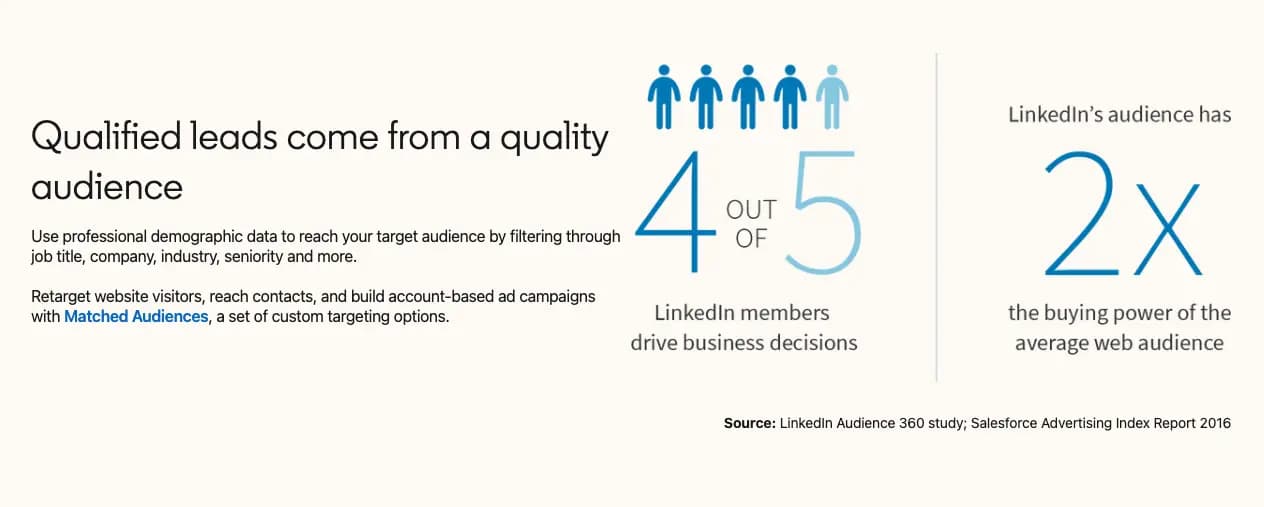
This makes LinkedIn especially powerful for B2B social media marketing. Instead of interrupting users, your content meets them in a mindset where they are already open to learning and engaging.
Because of this, success on LinkedIn often comes down to delivering value consistently and tracking the right analytics and metrics to refine your approach over time.
What To Post On LinkedIn
A strong LinkedIn content strategy starts with treating your posts like part of a larger editorial plan rather than one-off updates.
Instead of posting randomly, build your strategy around content pillars such as:
- Educational content that solves real problems
- Thought leadership that shares unique perspectives
- Case studies and real-world examples
- Behind-the-scenes insights from your team
This structure ensures consistency while helping you build authority over time.
When it comes to formats, variety plays a major role in performance. High-performing LinkedIn content often includes:
- Text-only posts with strong hooks
- Carousel-style documents for storytelling
- Short-form videos that humanize your brand
- Visual summaries or frameworks
The goal is to match your message with the format that makes it easiest to consume.
How To Increase LinkedIn Engagement
Growing organically on LinkedIn is more about building meaningful interaction and less about chasing likes.
The most effective marketers focus on:
- Actively commenting on relevant industry posts
- Engaging with their audience in the comments section
- Participating in conversations within their niche
Quality engagement matters more than vanity metrics. A post with fewer likes but meaningful discussions often drives better long-term results.
To increase interaction, experiment with:
- Polls to gather opinions and spark conversation
- Slide decks that break down ideas step by step
- Open-ended questions that invite responses
These formats naturally encourage users to engage rather than passively scroll.
Lead Generation & Conversion Strategies For LinkedIn
LinkedIn is one of the most effective platforms for generating high-quality B2B leads when used strategically.
Some proven approaches include:
- Sharing gated content like guides or templates
- Promoting webinars, events, and workshops
- Publishing newsletter-style content directly on LinkedIn
Direct messages can also be powerful, but only when used thoughtfully. Avoid generic outreach and focus on personalized, value-driven conversations. Foster real relationships, get to know what people care about, and provide real value to them.
Should I Be Advertising On LinkedIn?
While organic reach is valuable, paid LinkedIn campaigns can significantly accelerate results.
Key ad formats include:
- Sponsored Content that appears in feeds
- Message-based ads that reach users directly
- Dynamic ads that personalize content at scale
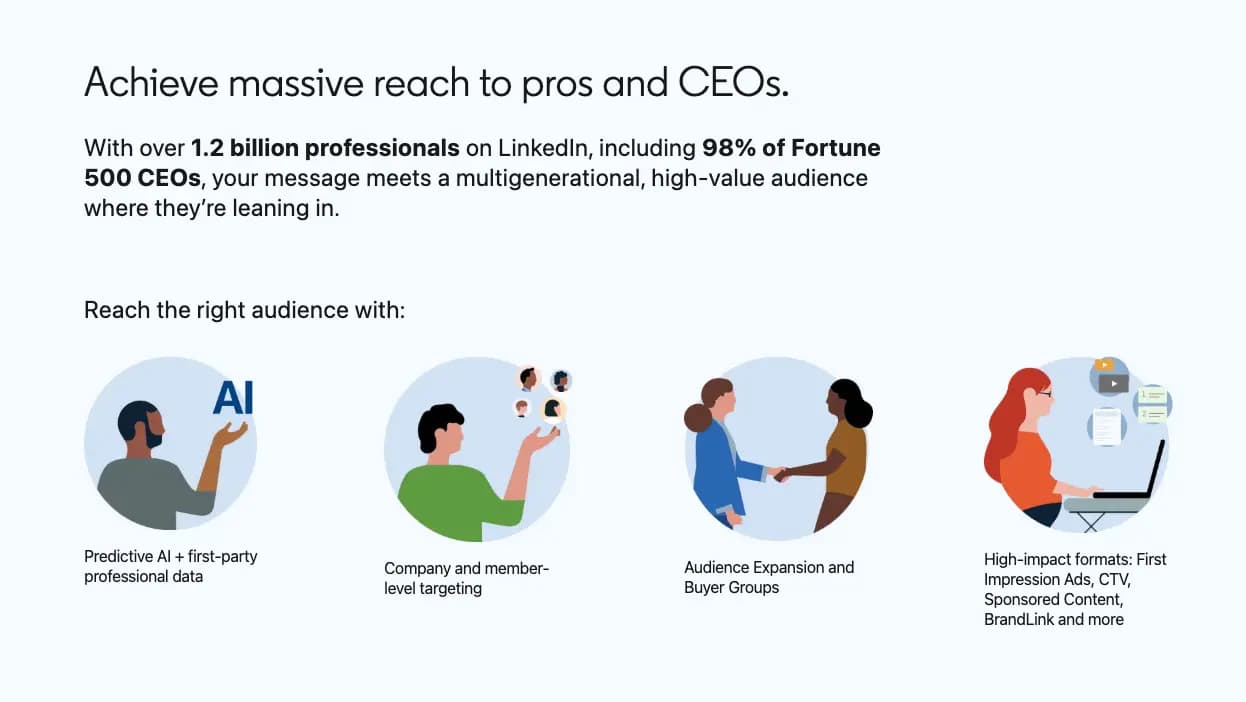
The real advantage of LinkedIn advertising lies in its targeting capabilities. Marketers can reach audiences based on job title, industry, company size, and more.
To maximize ROI:
- Align your ads with organic content themes
- Test multiple creatives and messaging angles
- Continuously refine targeting based on performance
The strongest strategies combine both paid and organic efforts to reinforce messaging and increase visibility.
How Do I Measure Performance On LinkedIn?
To improve your LinkedIn marketing, you need to track the right metrics.
Focus on performance indicators such as:
- Engagement rate to measure content resonance
- Click-through rate to evaluate interest
- Conversion rate to assess business impact
Benchmarking is equally important. Establish baseline performance, then set realistic goals for growth over time.
By consistently analyzing LinkedIn analytics and metrics, marketers can identify what works, double down on high-performing content, and eliminate what doesn’t.
The Best LinkedIn Management Tools
CoSchedule
CoSchedule stands out as the best all-in-one social media calendar for planning and publishing LinkedIn and social media content alongside all of your marketing. Teams get access to:
- Premium content calendars + scheduling tools
- Unified inbox for engagement
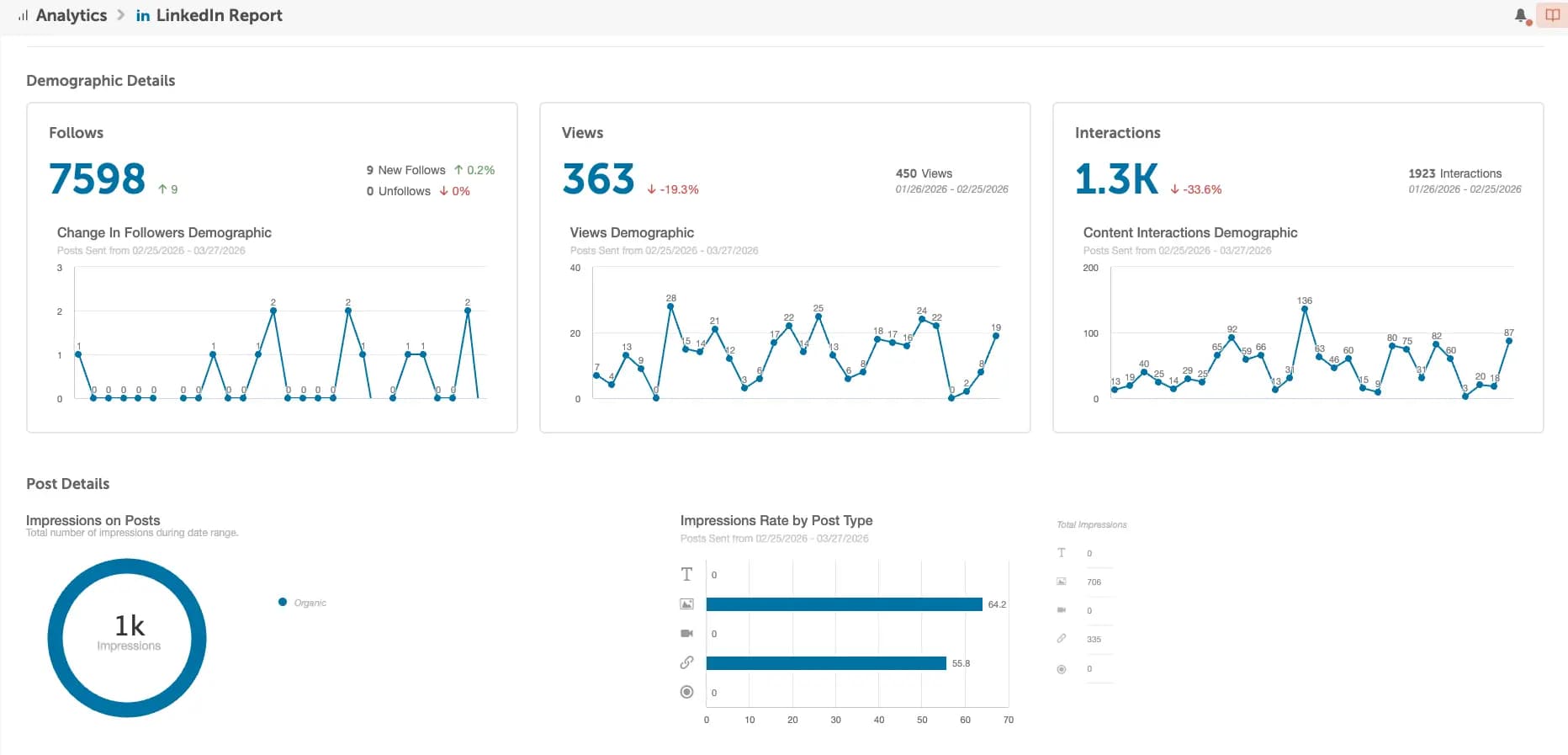
- Analytics dashboards and AI Insights Assistant for advanced performance reporting
- Easy publishing to every major network
- “ReQueue” feature to automate scheduling, reposting high-performing content where there are gaps in your scheduling
- An advanced suite of AI tools to create campaigns in seconds and optimize posts
- Drag & drop rescheduling
- Team collaboration tools
Best for
Marketing teams that need robust social scheduling capabilities, campaign-level visibility, and want to manage social alongside their other marketing efforts.
Choose CoSchedule if
- You want to execute all of your social from one place: content, workflows, approval, reporting & beyond.
- You’d benefit from having one tool to manage your entire social media strategy (as well as email, content and campaign planning).
- You need strong team collaboration features across multiple teammates, clients, etc.
Pros
- Centralized calendar for full social marketing visibility
- Advanced analytics, AI tools, and collaboration features included in every plan
- Low posting failure rates for dependable scheduling
- Real human customer support from a Midwest-based team
- Ability to coordinate LinkedIn posts with content and email campaigns
- Strong campaign planning and task management capabilities
- Marketing-operations level functionality
Considerations
- Best suited for teams managing multiple social and marketing channels
- Offers a free calendar option for individuals needing basic scheduling functionality
Pricing
CoSchedule offers flexible pricing options designed to support individuals, growing teams, and agencies without requiring expensive upgrades to unlock essential functionality.
- Free Calendar
- Includes 1 social profile, 15 posts/month, content calendar, best time publishing, AI assistant, 20 project templates.
- Starter Plan – $29/month
- Includes 3 social profiles, unlimited posts, 1600+ project templates, analytics, reports, social inbox (Facebook and Instagram), automation, bulk scheduling.
- Agency Calendar – $49/month
- Includes 5 social profiles, client calendars, social inbox (all networks), white label features, social approvals, read-only calendar sharing.
- Free Trial – 2 weeks
- All paid plans include a two-week free trial, allowing teams to explore advanced scheduling, analytics, and collaboration features before committing to a subscription.
What users say
Users frequently highlight improved organization and stronger alignment between social media publishing and broader marketing campaigns. Many teams report reduced context switching, clearer visibility into deadlines, and confidence in reliable posting performance.
Hootsuite
Hootsuite is a widely used social media management platform that allows marketers to schedule LinkedIn posts, monitor engagement, and manage multiple social accounts from a single dashboard.
Best for
Large enterprise organizations who manage major social accounts benefit from Hootsuite’s robust software.
Choose Hootsuite if
- You are managing hundreds of social media accounts.
- You work for a large, enterprise organization where you have a large team or complex processes.
- Social listening and analytics are your greatest need.
- Budget is not a concern.
Pros
- Supports scheduling across many social networks
- Includes monitoring tools for engagement and brand mentions
- Mature platform with extensive integrations
- Helpful for teams managing high posting volume
Considerations
- Social-first focus means broader marketing alignment may require additional tools
- Interface complexity can increase with multiple connected accounts
Pricing
- Standard – $199 per user/month
- Includes 10 social accounts, unlimited posts, best time scheduling, AI assistant, image and caption generator, project templates, social inbox, automations, brand mentions, competitor analysis, DM assignments.
- Advanced – $399 per user/month
- Includes unlimited social accounts, customizable analytics, saved message replies, auto-responses, bulk scheduling, message tags, post tagging.
- Free Trial – 30 days
- Paid plans include a thirty-day free trial, allowing teams to explore advanced scheduling, custom analytics, and brand competitor analysis before committing to a subscription.
What users say
Many users appreciate the ability to manage multiple social platforms without switching tools. Teams often highlight the convenience of batch scheduling and centralized monitoring.
Shield Analytics
Shield Analytics focuses specifically on LinkedIn performance insights. It helps marketers understand which content resonates with their audience and identify patterns that inform future strategy.
Pros
- Purpose-built for LinkedIn performance tracking
- Strong visibility into engagement trends over time
- Helpful for identifying top-performing content themes
- Easy-to-understand reporting dashboards
Considerations
- Focused on analytics rather than scheduling
- Best used alongside a planning or publishing platform
Pricing
- Subscription – $25 per profile/month
- Includes analytics dashboard, Shield Agent, performance tracking, invite team members, manage roles, shared dashboard.
What users say
Marketers often note improved clarity around which posts drive engagement and follower growth. Many teams use insights from Shield to refine their content mix and posting cadence.
Execute A More Effective LinkedIn Strategy
LinkedIn marketing is a core channel for B2B marketers that drives awareness, engagement, and revenue.
Success comes from treating LinkedIn as a strategic platform, not just a place to post updates. With a clear content strategy, consistent engagement, and a focus on meaningful metrics, marketers can turn LinkedIn into a reliable growth engine.
Platforms like CoSchedule make it easier to execute that strategy by bringing planning, publishing, and performance tracking into one place. From mapping out your content calendar to analyzing results, it helps ensure your LinkedIn efforts stay organized, consistent, and aligned with your broader marketing goals.
If you’re looking to scale your LinkedIn marketing, start by building a system. Then use the right tools to execute it effectively.
Frequently Asked Questions About LinkedIn Marketing
What Is The Best Time To Post On LinkedIn?
Most engagement happens Tuesday through Thursday between 8 AM and 11 AM, with a smaller peak around early afternoon. Test timing to find what works best for your audience.
How Often Should I Post On LinkedIn?
Posting 2 to 5 times per week is a strong starting point. Consistency is more important than volume.
Will My LinkedIn Content Perform Poorly If It’s Automated?
No. Scheduled posts perform just as well as manual posts when the content is relevant and engaging.
Where Can I Find A LinkedIn Content Calendar Template?
Content calendar templates are available in spreadsheets, project tools, and marketing platforms that help organize topics, dates, and campaigns.
What Is The Best LinkedIn Scheduler For Agencies?
CoSchedule helps agencies manage LinkedIn alongside all of their other marketing initiatives, with a strong calendar, collaboration features, approval workflows, analytics, and multi account management.
What Is The Best LinkedIn Scheduler For Small Businesses?
CoSchedule makes scheduling easy and provides great organization, reporting and automation tools for businesses who are small or just getting started.
What Is The Best LinkedIn Scheduler For Tourism?
CoSchedule supports tourism marketers with managing visual content, seasonal campaigns, and multi channel publishing.
How Do I Repurpose Content Across Platforms?
Turn one idea into multiple formats such as posts, videos, carousels, or graphics adapted for each platform.
What Tool Can Help Me Post Later To LinkedIn?
LinkedIn scheduling tools like CoSchedule allow you to plan posts in advance and publish automatically at the best times.
Does Posting Frequency Still Matter?
Yes. Consistent posting helps maintain visibility and build audience familiarity over time.
Are Hashtags Useful Anymore?
Yes. Use 3 to 5 relevant hashtags to improve discoverability without overloading your post.
Why Is My LinkedIn Performance Declining?
Common causes include inconsistent posting, low engagement, overly promotional content, or shifts in audience interest.
What Should I Look For In A LinkedIn Scheduling Tool?
Look for scheduling automation, an organized calendar view, analytics, and collaboration features. CoSchedule can help you.