
If you’re comparing CoSchedule vs Sprout Social, you’re probably the person who owns social for your business, or you run a small marketing team, and you want one tool to plan, publish, reply and report. Both are social media management tools. They’re built for different buyers.
CoSchedule is built on a calendar. You see the whole month, run campaigns from it and fill the gaps with evergreen posts you choose. Sprout Social is built for social teams that live in the inbox and the reports: it covers more networks in its inbox, adds keyword listening as an add-on and reports on paid social as well as organic.
The short verdict: pick CoSchedule if you plan social as campaigns on a calendar and want a plan price that doesn’t multiply with every seat. Pick Sprout Social if customer care, listening and enterprise reporting are the center of your job and your budget covers $199 or more per seat per month.
See The Full CoSchedule Vs. Sprout Social Comparison
CoSchedule Vs. Sprout Social At A Glance
CoSchedule costs less to start and prices by plan; Sprout Social prices by seat and leads on inbox, listening and reporting depth.
| CoSchedule | Sprout Social | |
|---|---|---|
| Best for | The one-person marketing department and small teams that plan social as campaigns on a calendar | Social and customer care teams that need a deep inbox, listening and enterprise reporting |
| Starting plan | Starter, $29/mo billed annually | Essentials, $79 per seat/mo billed annually |
| Pricing model | Per plan; Professional includes 2 users | Per seat |
| Free plan | Yes: 1 social profile, 15 scheduled posts at a time | None |
| Free trial | 14 days on Starter and Professional | 30 days, no credit card required |
| Standout strengths | Drag-and-drop calendar, social campaigns whose schedule moves with the launch date, ReQueue for evergreen posts, AI Campaign Assistant | Smart Inbox across 10 networks including TikTok, Reddit and WhatsApp, Listening add-on, competitor and paid reporting, CRM and help desk integrations |
See the full comparison · Try CoSchedule free for 14 days
CoSchedule Vs. Sprout Social Plans And Pricing
CoSchedule prices by plan and Sprout Social prices by seat, so the gap grows with every person you add.
CoSchedule Pricing
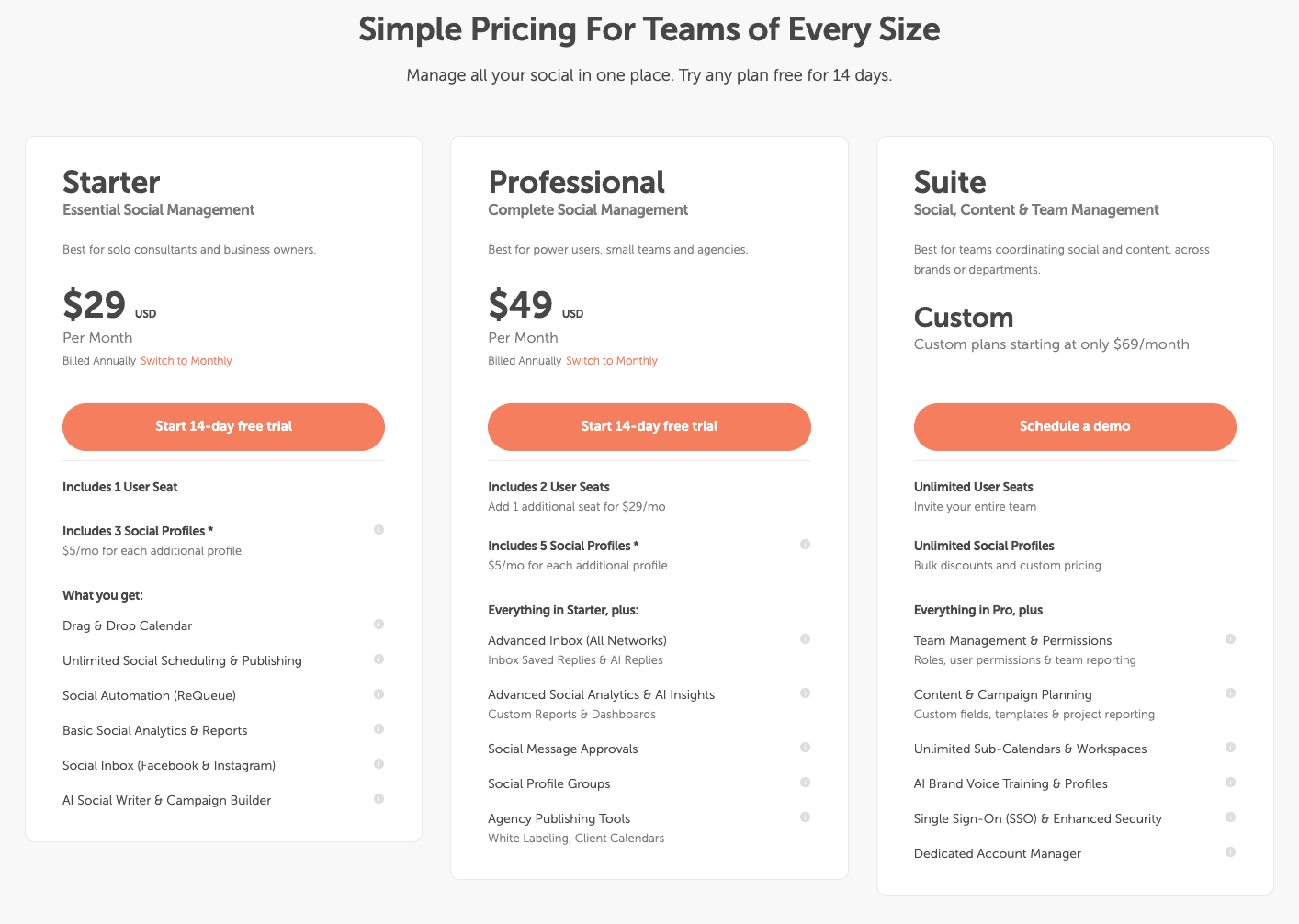
CoSchedule has three paid plans and a free plan. See current details on the CoSchedule pricing page.
| Plan | Price | Users | Social profiles |
|---|---|---|---|
| Free plan | $0 | 1 | 1 (15 scheduled posts at a time) |
| Starter | $29/mo billed annually | 1 | 3 |
| Professional | $49/mo billed annually | 2 included, up to 3 ($29/mo per extra user) | 5 |
| Suite | Custom, from $69/mo | Unlimited | Unlimited |
Extra social profiles are $5/mo each on Starter and Professional. X is a paid add-on on every paid plan, at $16 per profile per month on Starter and Professional.
Sprout Social Pricing
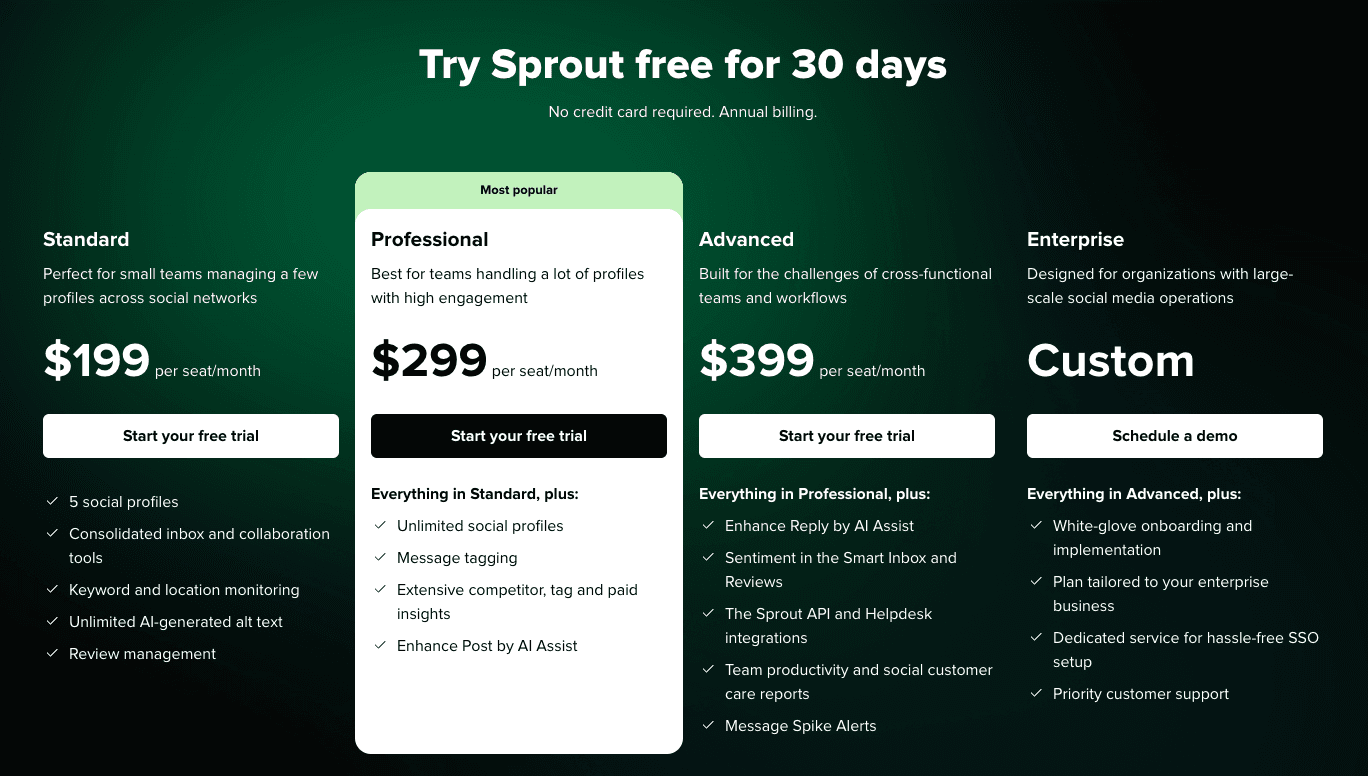
Sprout Social has four self-serve plans plus Enterprise, all priced per seat. See the Sprout Social pricing page.
| Plan | Price per seat | Social profiles | What it adds |
|---|---|---|---|
| Essentials | $79/mo billed annually | 5 | Publishing, optimal send times, profile and post reporting, Trellis AI |
| Standard | $199/mo billed annually | 5 | Consolidated inbox, collaboration tools, keyword and location monitoring, review management |
| Professional | $299/mo billed annually | Unlimited | Message tagging, competitor, tag and paid reporting, Enhance Post by AI Assist |
| Advanced | $399/mo billed annually | Unlimited | Sentiment in the inbox, Enhance Reply by AI Assist, Sprout API, help desk integrations, spike alerts |
| Enterprise | Custom | Not listed | White-glove onboarding, SSO setup service, priority support |
Listening and Premium Analytics are separate add-ons on Standard and up, and Employee Advocacy is available on Standard and up. Sprout doesn’t list prices for these; you get a quote.
What that means for a team of three. Here’s the monthly cost, billed annually, for three people who need an inbox and post approvals:
| Setup | Monthly cost |
|---|---|
| CoSchedule Professional (2 users included + 1 extra user) | $78 |
| Sprout Social Standard × 3 seats (inbox, no approval workflows) | $597 |
| Sprout Social Professional × 3 seats (inbox and approval workflows) | $897 |
Sprout’s message approval workflows start on Professional. Sprout Professional includes unlimited profiles, while CoSchedule Professional includes 5, so add $5 per extra CoSchedule profile if you manage many accounts.
Free Trials
Sprout Social offers a 30-day free trial with no credit card required. It doesn’t list a free plan.
CoSchedule offers a 14-day free trial on Starter and Professional; Suite starts with a demo. CoSchedule also keeps a free plan with 1 social profile and 15 scheduled posts at a time.
Try CoSchedule free for 14 days
CoSchedule Vs. Sprout Social Feature Review
CoSchedule is stronger at planning campaigns and keeping your calendar full; Sprout Social is stronger at handling conversations and reporting at scale.
Calendar And Campaigns
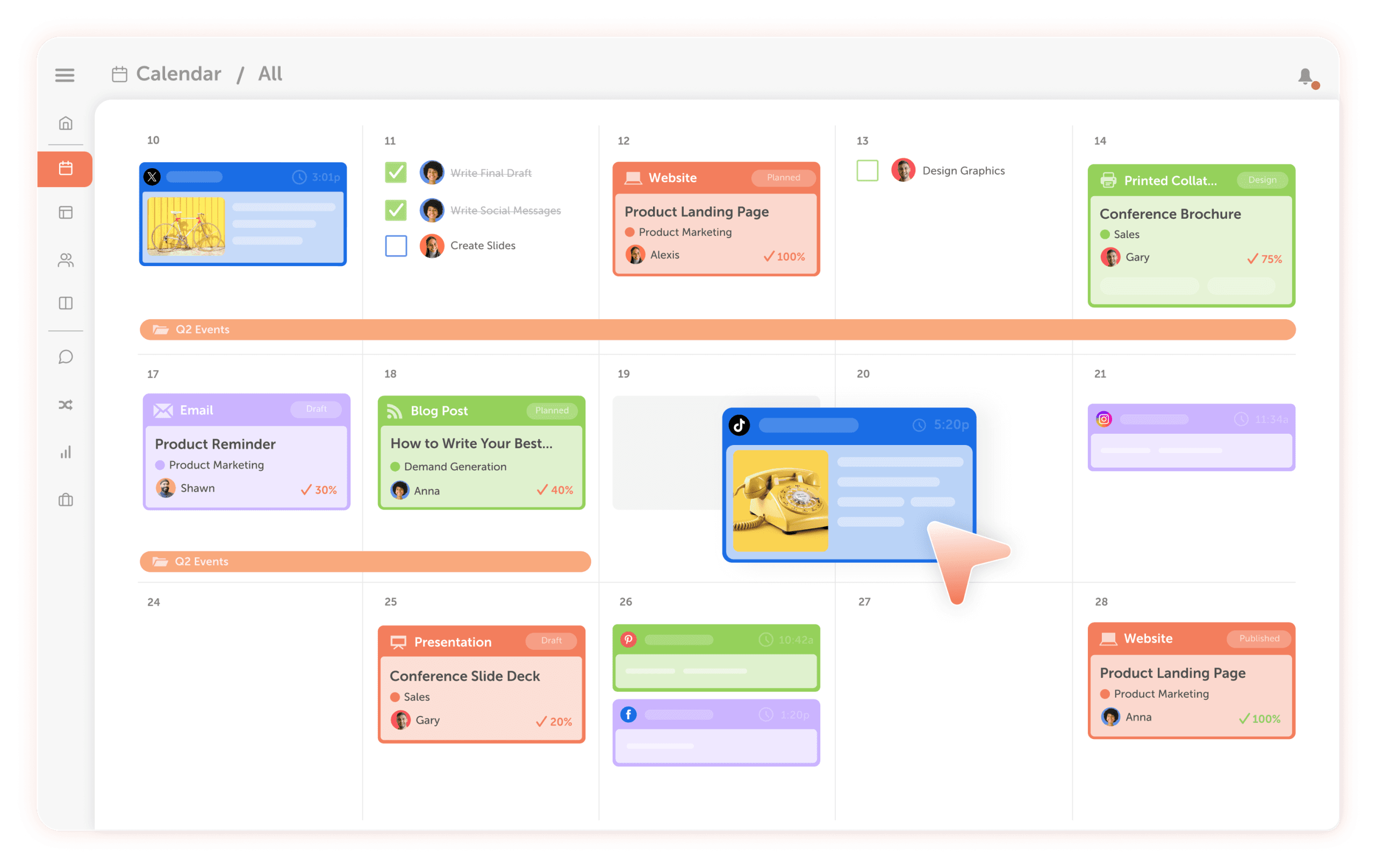
CoSchedule leads here, because the calendar is the center of the product. Every plan, Starter included, gets a drag-and-drop calendar, color labels and filtered, saved calendars. Social campaigns group the posts behind a launch or promotion: move the launch date and the campaign’s schedule moves with it. Professional adds read-only calendar sharing and white-label client calendars.
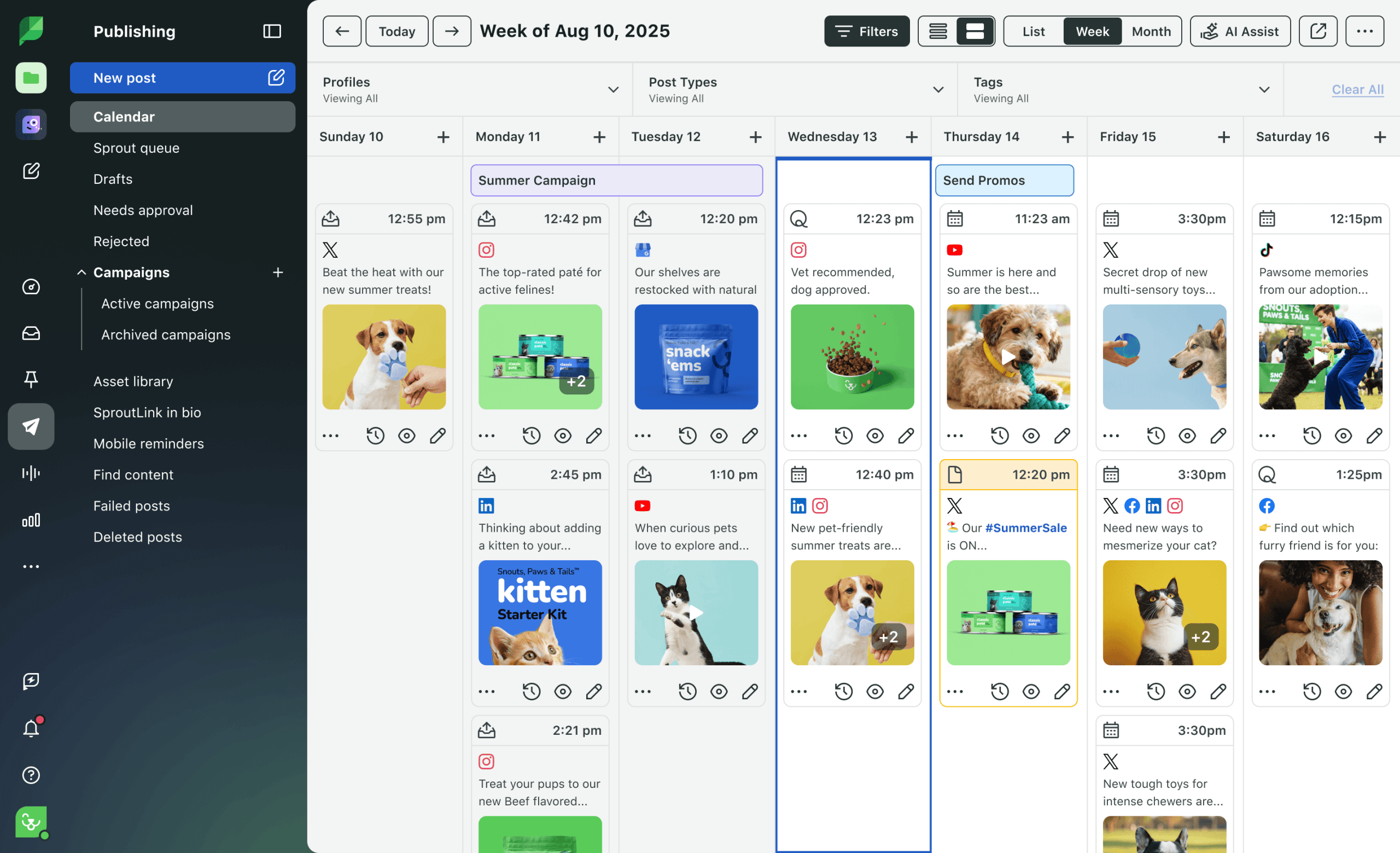
Sprout Social’s Publishing Calendar shows scheduled, queued, sent and draft posts in list, week and month views. You can drag and drop posts to reschedule, filter by profile and content type, add notes for your team and share the calendar as a PDF. Filtering by tags starts on Professional.
Takeaway: both tools have a working calendar; CoSchedule’s campaigns let you move a whole launch at once.
Collaboration And Approvals
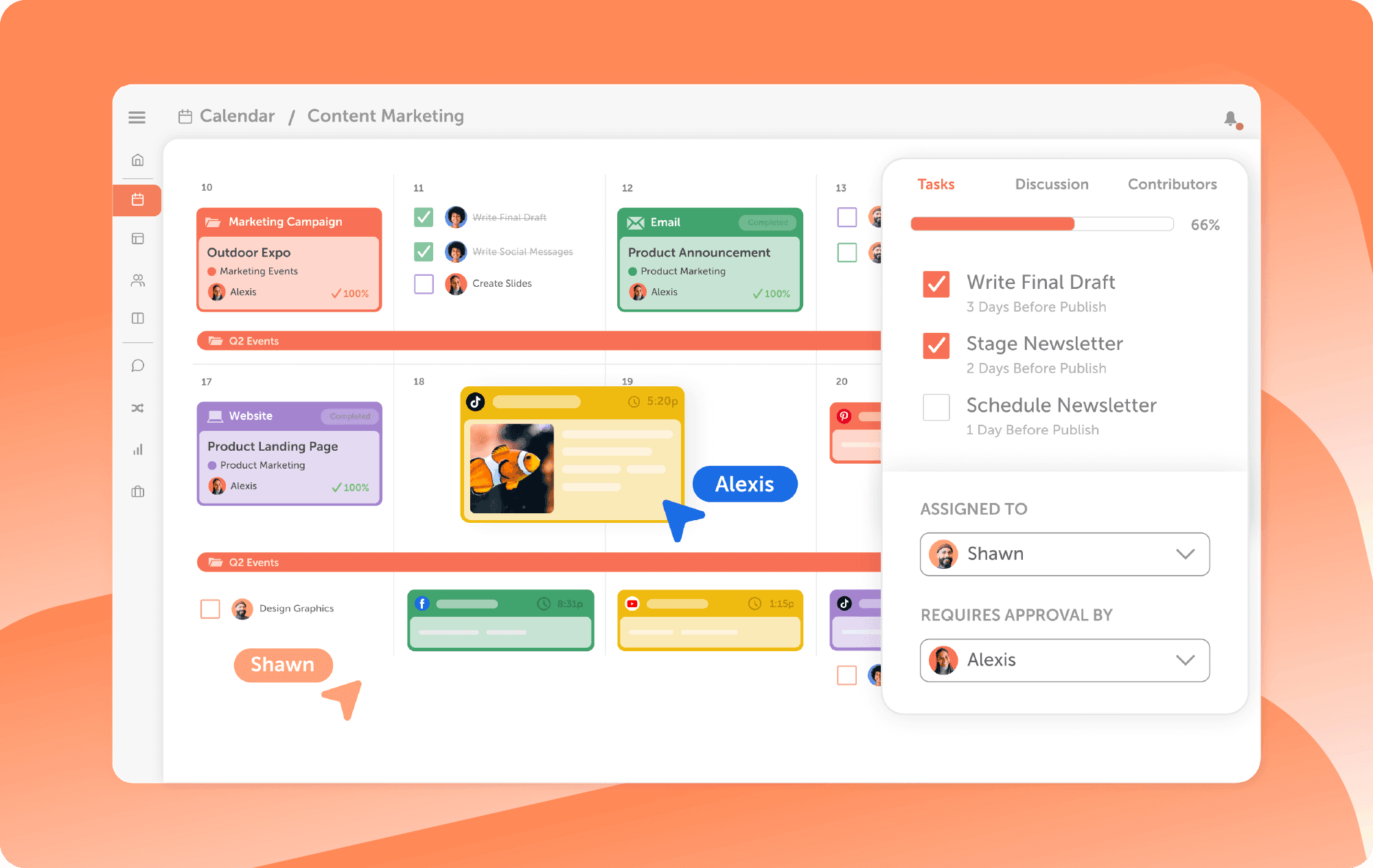
You get approvals at a much lower price on CoSchedule. Social message approvals and user roles come with Professional and Suite. Suite adds approval workflows, custom permissions and single sign-on (SSO).
Sprout Social’s Standard plan includes collaboration tools, and message approval workflows, including multi-step workflows with several approvers, start on Professional. Enterprise adds a dedicated SSO setup service.
Takeaway: approvals start at $49/mo billed annually on CoSchedule and $299 per seat on Sprout Social.
Supported Networks
The lists overlap almost completely. CoSchedule publishes to 11 social networks on every paid plan: Facebook, Instagram, LinkedIn, Pinterest, TikTok, Threads, YouTube, Google Business Profiles, Bluesky, Mastodon and X (a paid add-on). Instagram publishing needs a Business or Creator account.
Sprout Social publishes to Facebook, Instagram, X, LinkedIn, TikTok, YouTube, Pinterest, Threads, Bluesky and Google Business Profile. Its networks page also lists Reddit and Snapchat, plus Facebook Messenger and WhatsApp for messaging.
Takeaway: pick CoSchedule if you post to Mastodon; Sprout Social if you need Reddit, Snapchat or WhatsApp.
Ease Of Publishing
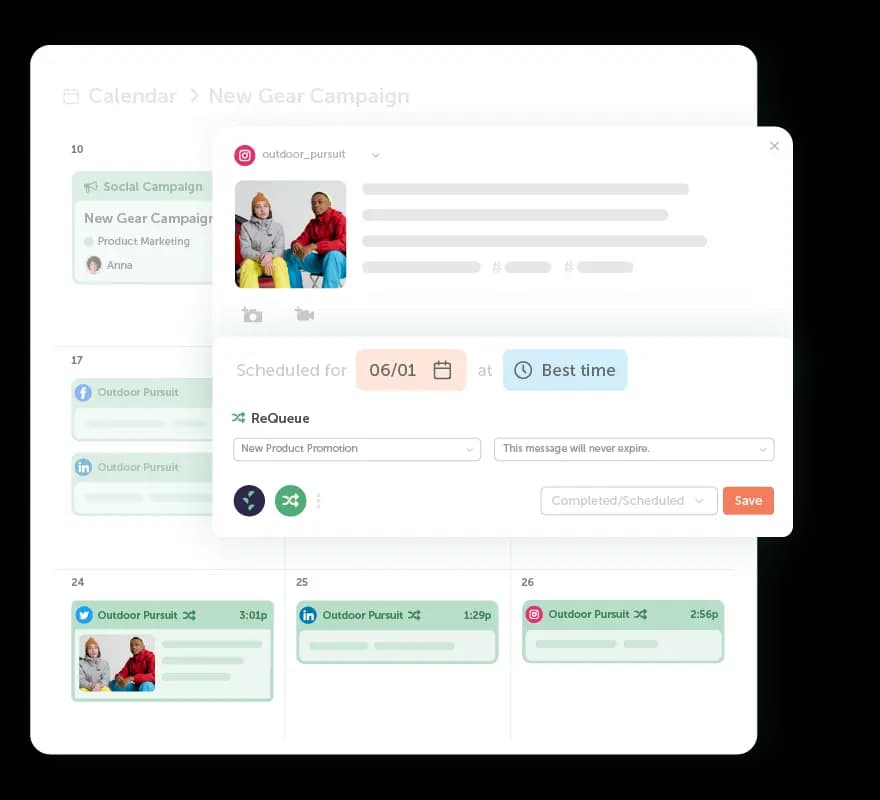
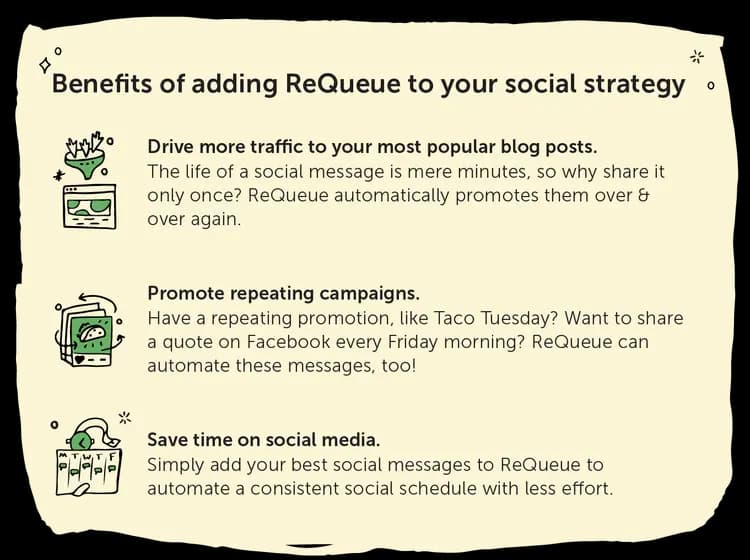
Both tools handle the everyday work well; CoSchedule does more to keep your calendar full without new posts. With ReQueue, on every plan, you choose your evergreen posts in ReQueue groups, and ReQueue reshares them to fill gaps, favoring the ones that perform best within your groups. Every plan also gets Best Time Scheduling, reusable social templates, first comment scheduling, link in bio and bulk import of up to 365 messages at once.
Sprout Social suggests optimal send times on every plan and publishes Reels, Stories, carousels, Shorts and PDF posts on LinkedIn. Bulk scheduling by CSV import starts on Professional.
Takeaway: if evergreen posts carry part of your schedule, ReQueue is the difference.
Social Inbox And Listening
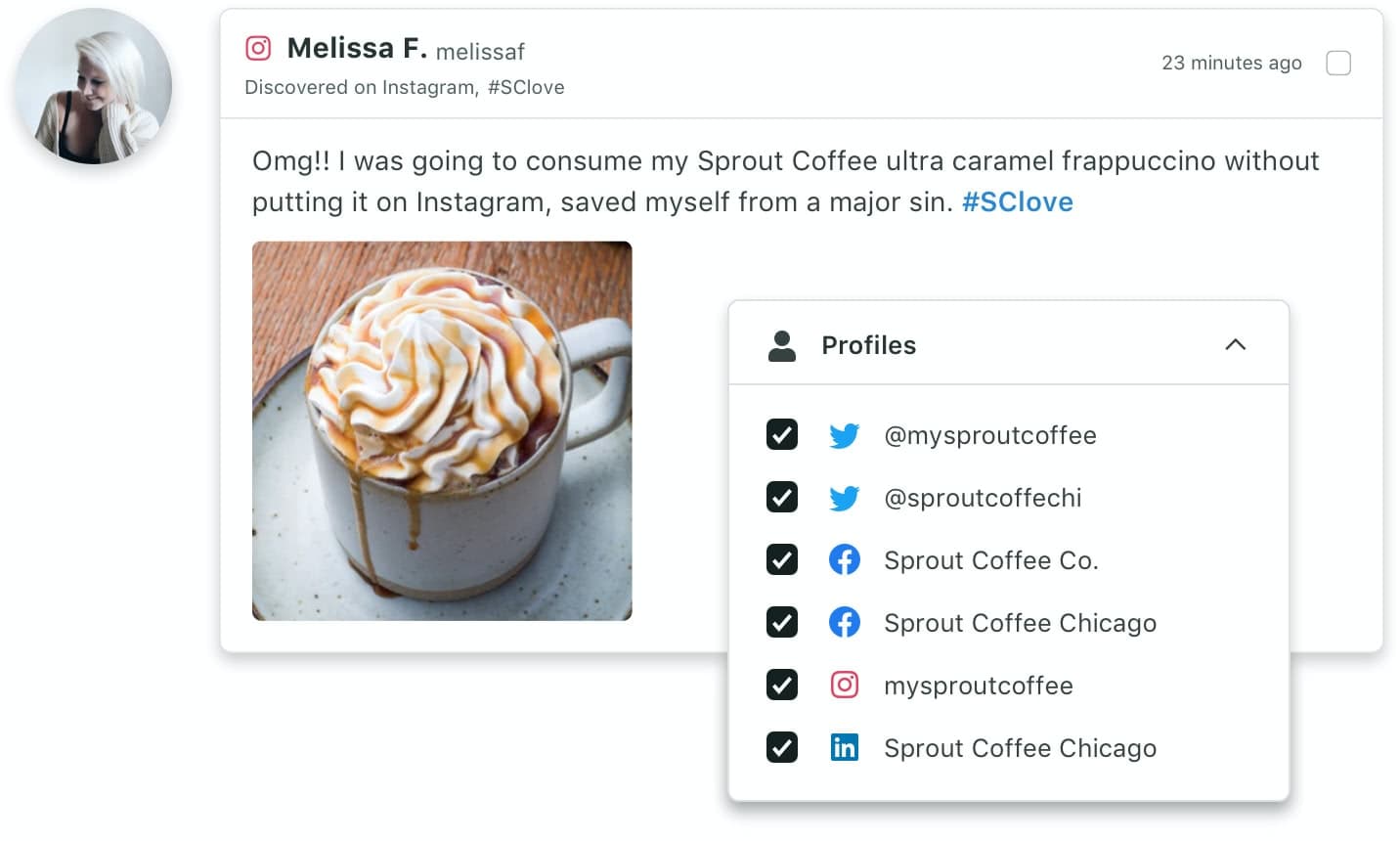
Sprout Social is stronger here, and it’s the main reason teams choose it. Its Smart Inbox pulls in messages from X, Facebook, Instagram, LinkedIn, TikTok, WhatsApp Business, YouTube, Reddit, Threads and Bluesky, including Facebook reviews and ad comments. Sentiment, message intent and automated rules start on Advanced. The inbox starts on Standard, and Listening (keyword and brand monitoring) is a paid add-on on Standard and up.

CoSchedule’s Social Inbox handles comments, mentions and DMs in the same tool, starting on Starter. Starter covers Facebook and Instagram. Professional and Suite cover Facebook, Instagram, LinkedIn Pages, Google Business Profile, X, YouTube, Bluesky, Mastodon and Threads, and add saved replies, internal discussions and AI replies. Suite adds assigned replies. There’s no TikTok or Pinterest in the inbox, and listening covers what reaches the inbox, not keyword monitoring.
Takeaway: if you run customer care on social, moderate TikTok or ad comments, or need keyword listening, Sprout Social is the better fit.
Analytics
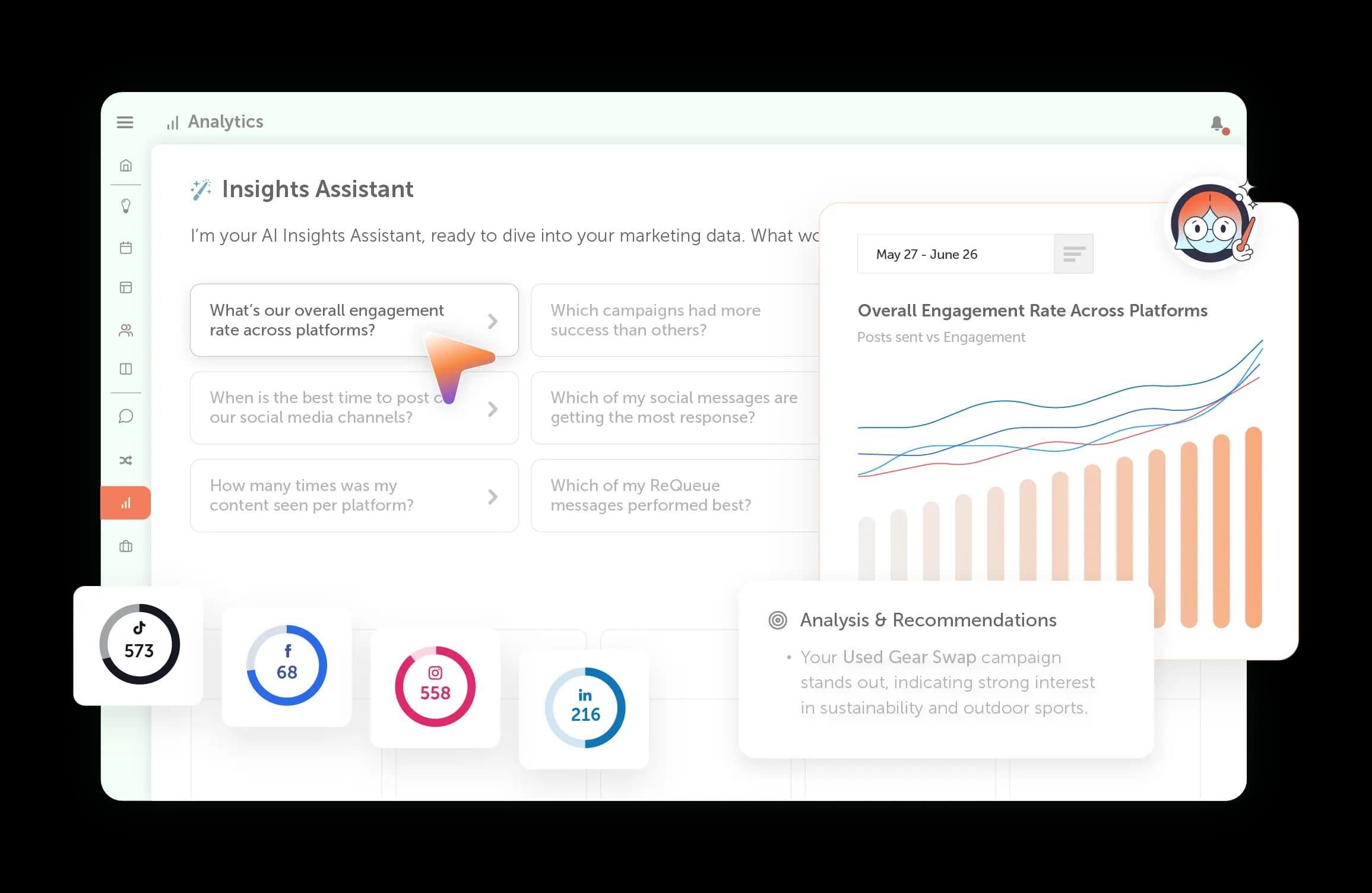
Both tools report on competitors; Sprout Social adds paid social reporting, and CoSchedule adds AI analysis of your results for far less. CoSchedule reports cover 9 networks: Facebook, Instagram, X, LinkedIn, YouTube Shorts, TikTok, Threads, Bluesky and Mastodon. Every plan can schedule reports by email. Professional adds AI Insights, custom dashboards and white-label reports. Competitor reports run in the Analytics dashboard on every plan. Reporting covers organic social, not paid ads.

Sprout Social’s network reports cover Instagram, Facebook, X, Bluesky, Threads, TikTok, LinkedIn, YouTube and Pinterest, with profile, post, tag and competitor reports. Competitor, tag and paid reporting start on Professional; team productivity and customer care reports come with Advanced; Premium Analytics is an add-on.
Takeaway: pick Sprout Social if you report on paid social; pick CoSchedule for AI Insights and client-ready white-label reports at $49/mo billed annually.
AI
CoSchedule’s AI plans whole campaigns; Sprout Social’s AI centers on analyzing your social data and polishing posts and replies. CoSchedule AI includes the AI Social Assistant and AI Campaign Assistant, unlimited on every paid plan. Campaign Assistant drafts a whole social campaign, images included, straight onto your calendar. Professional adds AI replies in Social Inbox and AI Insights on reports. Suite adds Brand Voice Training & Profiles, which writes in your voice, and AI-written alt text.
Sprout Social includes Trellis, an AI agent that answers questions about your social data, with 100 AI agent credits per seat each month on every plan. Enhance Post by AI Assist starts on Professional and Enhance Reply on Advanced. Its help center also lists AI-generated post drafts, alt text, subtitles and translations.
Takeaway: for AI that builds the plan, CoSchedule is ahead; for AI that digs into large volumes of social data, Sprout Social is.
Where CoSchedule Wins
CoSchedule wins on cost, campaign planning and keeping your calendar full, and it puts features on its first two plans that Sprout Social saves for higher tiers.
- A price that doesn’t multiply by seat. Professional is $49/mo billed annually with 2 users included, and a third user is $29/mo. Three people with an inbox and approvals cost $78/mo, versus $897/mo on Sprout Social Professional.
- An inbox from the first plan. Starter includes Social Inbox for Facebook and Instagram at $29/mo billed annually. Sprout’s consolidated inbox starts on Standard at $199 per seat.
- Approvals for small teams. Social message approvals come with Professional. Sprout’s message approval workflows start on its $299-per-seat Professional plan.
- Campaigns that move together. Social campaigns, on every plan, group the posts behind a launch: move the launch date and the campaign’s schedule moves with it.
- Evergreen posts that fill the gaps. ReQueue, on every plan, reshares the evergreen posts you choose in ReQueue groups, favoring the ones that perform best within your groups.
- AI that plans the campaign. AI Campaign Assistant, unlimited on every paid plan, drafts a whole social campaign, images included, onto your calendar. Sprout’s Enhance Post by AI Assist starts on Professional.
- Bulk scheduling on every plan. Import up to 365 messages at once on Starter and up. Sprout’s bulk scheduling by CSV starts on Professional.
- Reporting you can hand to clients. Competitor reports are on every plan, and Professional adds AI Insights, custom dashboards and white-label reports. Sprout’s competitor reports start on Professional.
- A free plan. 1 social profile and 15 scheduled posts at a time. Sprout doesn’t list a free plan.
Feature-By-Feature Chart
Here’s how the two tools line up, with the plan where each feature starts. Sprout Social facts come from its pricing, networks and integrations and analytics pages and its help center, checked Oct 2026.
| Feature | CoSchedule | Sprout Social |
|---|---|---|
| Pricing model | Per plan, users included | Per seat |
| Starting price | $29/mo billed annually (Starter) | $79 per seat/mo billed annually (Essentials) |
| Free plan | Yes | None listed |
| Free trial | 14 days (Starter and Professional) | 30 days, no card |
| Social profiles on entry plan | 3 | 5 |
| Drag-and-drop calendar | Yes, every plan | Yes |
| Campaigns that move with the launch date | Yes, every plan | Not listed |
| Read-only or shared calendar | Professional and Suite | PDF export of the calendar |
| Evergreen resharing | ReQueue, every plan | Not listed |
| Best time to post | Best Time Scheduling, every plan | Optimal send times, every plan |
| Bulk scheduling | Up to 365 messages, every plan | CSV import, Professional and Advanced |
| Post approvals | Professional and Suite | Professional and Advanced |
| Networks | 11 (X is an add-on); includes Mastodon and Google Business Profiles | 10 for publishing, including Google Business Profile; Reddit and Snapchat also listed |
| Social inbox | Facebook and Instagram on Starter; 9 networks on Professional and Suite | 10 networks from Standard, including TikTok, Reddit and WhatsApp |
| AI replies | Professional and Suite | Enhance Reply, Advanced |
| Keyword listening | No | Add-on, Standard and up |
| Review tracking | Google Business Profile reviews only, in Social Inbox, Professional and Suite | Standard and up |
| Social analytics | 9 networks, every plan | 9 networks, every plan |
| AI analysis of reports | AI Insights, Professional and Suite | Trellis AI agent, every plan |
| Custom dashboards | Professional and Suite | Not listed |
| White-label reports | Professional and Suite | Not listed |
| Competitor reports | Yes, every plan, in the Analytics dashboard | Professional and up |
| Paid social reporting | No (organic social only) | Professional and up |
| AI post writing | AI Social Assistant, every plan | Enhance Post, Professional and up |
| AI campaign planning | AI Campaign Assistant, every plan | Not listed |
| Brand voice AI | Suite | Not listed |
| Mobile app | Yes | Yes |
| SSO | Suite | SSO setup service, Enterprise |
| Support channels | Email and live chat, every plan; priority support on Suite | Live chat, email and phone (Monday–Friday) |
CoSchedule Vs. Sprout Social Integrations
CoSchedule connects to the email and content tools marketers use around social; Sprout Social connects to CRM, help desk and business intelligence systems.
CoSchedule integrates with YouTube, Mailchimp, HubSpot, Canva, Google Drive, Microsoft 365, Dropbox, Constant Contact, Campaign Monitor, ActiveCampaign, Bitly, Google Analytics, Google Calendar (ICS sync), RSS feed sync, Headline Studio and WordPress. Zapier connects it to many more.
Sprout Social integrates with Salesforce, HubSpot, Microsoft Dynamics 365, Zendesk, Marketo, Tableau, Shopify, WooCommerce, Facebook Shops, Canva, Adobe Express, Bynder, Dropbox, Google Drive, Slack, Microsoft Teams, Bitly and Google Analytics, plus review sites such as Yelp, Trustpilot and Glassdoor. The Sprout API and help desk integrations come with Advanced.
Takeaway: choose CoSchedule if social ties into your email campaigns and content; choose Sprout Social if social data has to flow into Salesforce, Zendesk or a BI tool.
CoSchedule Vs. Sprout Social Customer Service
Both tools offer live chat and email on every plan; Sprout Social adds phone support, and both reserve faster response times for their top tier.
CoSchedule offers email and live chat support on every plan, Monday through Friday during business hours, plus a knowledge base with guides and video tutorials. Suite adds priority support (an email response within 90 minutes during business hours) and Express Onboarding, with a dedicated account manager available.
Sprout Social offers live chat inside the app, an email request form and phone support, Monday through Friday on a 24-hour basis. Its Premier Success option guarantees a two-hour first reply. Enterprise adds white-glove onboarding and priority support.
Takeaway: if you want to pick up the phone, Sprout Social offers it; on a small budget, CoSchedule gets you live chat from the first plan.
CoSchedule Vs. Sprout Social Publishing Consistency
Both tools run public status pages with incident history, but neither publishes an uptime figure, so there’s no sourced basis for calling one more reliable.
CoSchedule’s status page tracks social publishing as its own component, alongside the app, email notifications and more, with an incident history. In the app, every scheduled post sits on the calendar, Social Sync adds posts you publish natively to your calendar, and you can pause all scheduled social messages and resume later.
Sprout Social’s status page tracks its web application and API, with a log of past incidents. Its help center lists the post types you still have to publish natively, such as Facebook Stories, X polls and LinkedIn polls.
Takeaway: check each tool’s status history during your trial, and test the post types you rely on.
CoSchedule Vs. Sprout Social: The Verdict
CoSchedule is the better pick if you plan social campaigns on a calendar and want your cost to stay flat as you add people. Sprout Social is the better pick if customer care, listening and enterprise reporting are most of your job.
CoSchedule Is Best For:
- The one-person marketing department that owns social for the business and wants to see the whole month at once, starting at $29/mo billed annually.
- Small teams and agencies that need approvals, a shared inbox and client calendars on Professional, with 2 users included for $49/mo billed annually.
- Campaign-driven social: launches, promotions and seasonal pushes where moving the launch date moves the campaign’s schedule with it.
- Keeping profiles active with ReQueue resharing the evergreen posts you choose.
- Teams that want AI to plan, with AI Campaign Assistant drafting whole campaigns onto the calendar.
- Larger marketing teams on Suite that want social on the same marketing calendar as their email, events and campaigns, with approval workflows and SSO.
Sprout Social Is Best For:
- Customer care teams that answer high volumes of messages, including TikTok, WhatsApp, Reddit, reviews and ad comments.
- Brands that need keyword listening and are ready to buy the Listening add-on.
- Teams that report on paid social alongside organic to leadership.
- Companies that need social data in Salesforce, Zendesk, Microsoft Dynamics 365 or Tableau.
- Businesses that manage reviews across Google Play, the App Store, Yelp, Tripadvisor and Glassdoor.
- Enterprise social teams with the budget for $299 to $399 per seat per month, billed annually.
Try CoSchedule free for 14 days · See the full comparison
See The Full CoSchedule Vs. Sprout Social Comparison
Frequently Asked Questions
Is CoSchedule Good For Social Media?
Yes. CoSchedule publishes to all the major social networks, including Instagram, TikTok, LinkedIn, Threads and Google Business Profiles, fills gaps in your schedule with ReQueue, handles replies in Social Inbox and reports on 9 networks. It’s strongest for marketers who plan social as campaigns and want to see the whole month at once.
Is Sprout Social Worth The Price?
It can be, if your team lives in the inbox and the reports. Sprout Social starts at $79 per seat per month billed annually, but the inbox starts on Standard at $199 per seat and approvals on Professional at $299 per seat, so a team of three pays $597 to $897 a month. Listening and Premium Analytics cost extra. If you mostly schedule posts, you’ll pay for a lot you don’t use.
Is There A Good Alternative To Sprout Social?
CoSchedule is a good alternative if you want calendar-first planning and a price that doesn’t climb with every seat: Professional includes two users, a shared inbox and approvals for $49/mo billed annually. If keyword listening and high-volume customer care are your top needs, compare tools built around those before you switch.
Is Sprout Social Worth It If I Only Schedule Posts?
Probably not. Sprout’s Essentials plan covers publishing and reporting for $79 per seat per month billed annually, without the inbox. CoSchedule Starter covers publishing, Social Inbox for Facebook and Instagram, analytics and ReQueue for $29/mo billed annually.
Does Sprout Social Have A Free Trial Or A Free Plan?
Sprout Social offers a 30-day free trial with no credit card required, and it doesn’t list a free plan. CoSchedule offers a 14-day free trial on Starter and Professional, plus a free plan with 1 social profile and 15 scheduled posts at a time.