
If you’re comparing CoSchedule vs SocialBee, you’re probably a marketer who wants posts going out every day without rebuilding the schedule every week. Both tools publish to the major networks, recycle evergreen posts and start under $30 a month. The difference is how you plan. SocialBee organizes posts into content categories and fills a recurring schedule from them. CoSchedule is social media management built on a calendar, so you see the whole month, plan campaigns around dates and let ReQueue fill the gaps.
The short verdict: choose CoSchedule if you plan social around launches, promotions and a team that needs to see the schedule. Choose SocialBee if you mostly run evergreen content by category and want the most profiles for the money.
CoSchedule Vs. SocialBee At A Glance
CoSchedule is built around a calendar and campaign planning; SocialBee is built around content categories and evergreen recycling, with more profiles on each plan.
| CoSchedule | SocialBee | |
|---|---|---|
| Best for | One-person marketing departments and small teams that plan social as campaigns on a calendar | Solo operators, small businesses and agencies running category-based evergreen content |
| Starting plan | Starter, $29/mo billed annually | Bootstrap, $24.20/mo billed annually |
| Free plan | Yes: 1 social profile, 15 scheduled posts at a time | No |
| Free trial | 14 days, card required | 14 days, no credit card required |
| Standout strengths | Drag-and-drop calendar, social campaigns that move with the launch date, ReQueue, AI Campaign Assistant | Content categories with recycling and expiring posts, more profiles per plan, unlimited AI content generation |
CoSchedule Vs. SocialBee Plans And Pricing
SocialBee costs less per social profile at every level; CoSchedule includes more users at the start and keeps a free plan. Pricing as of October 2026.
CoSchedule Pricing
CoSchedule has a free plan and three paid plans. See the CoSchedule pricing page for current details.
| Plan | Price (billed annually) | Users | Social profiles |
|---|---|---|---|
| Free plan | $0 | 1 | 1 (15 scheduled posts at a time) |
| Starter | $29/mo | 1 | 3 |
| Professional | $49/mo | 2 included, up to 3 ($29/mo per extra user) | 5 |
| Suite | Custom, from $69/mo | Unlimited | Unlimited |
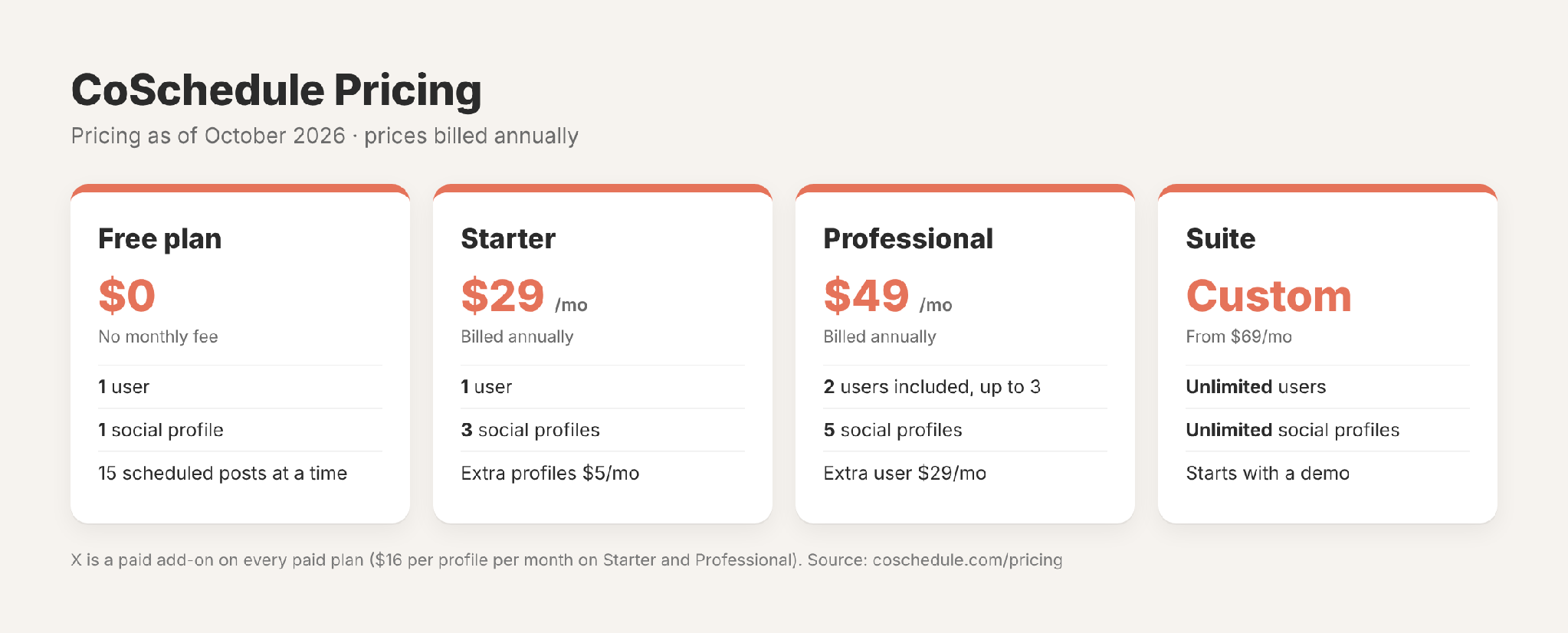
Extra social profiles are $5/mo each on Starter and Professional. X is a paid add-on on every paid plan, at $16 per profile per month on Starter and Professional.
SocialBee Pricing
SocialBee has three standard plans and three agency plans. Every plan includes unlimited AI content generation. See the SocialBee pricing page for current details.
| Plan | Price (billed annually) | Social profiles | Users and workspaces |
|---|---|---|---|
| Bootstrap | $24.20/mo | 5 | 1 user, 1 workspace |
| Accelerate | $40.80/mo | 10 | 1 user, 1 workspace |
| Pro | $82.50/mo | 25 | 3 users per workspace, 5 workspaces |
| Pro50 (agency) | $149.20/mo | 50 | 5 users per workspace, 10 workspaces |
| Pro100 (agency) | $274.20/mo | 100 | 5 users per workspace, 20 workspaces |
| Pro150 (agency) | $374.20/mo | 150 | 5 users per workspace, 30 workspaces |
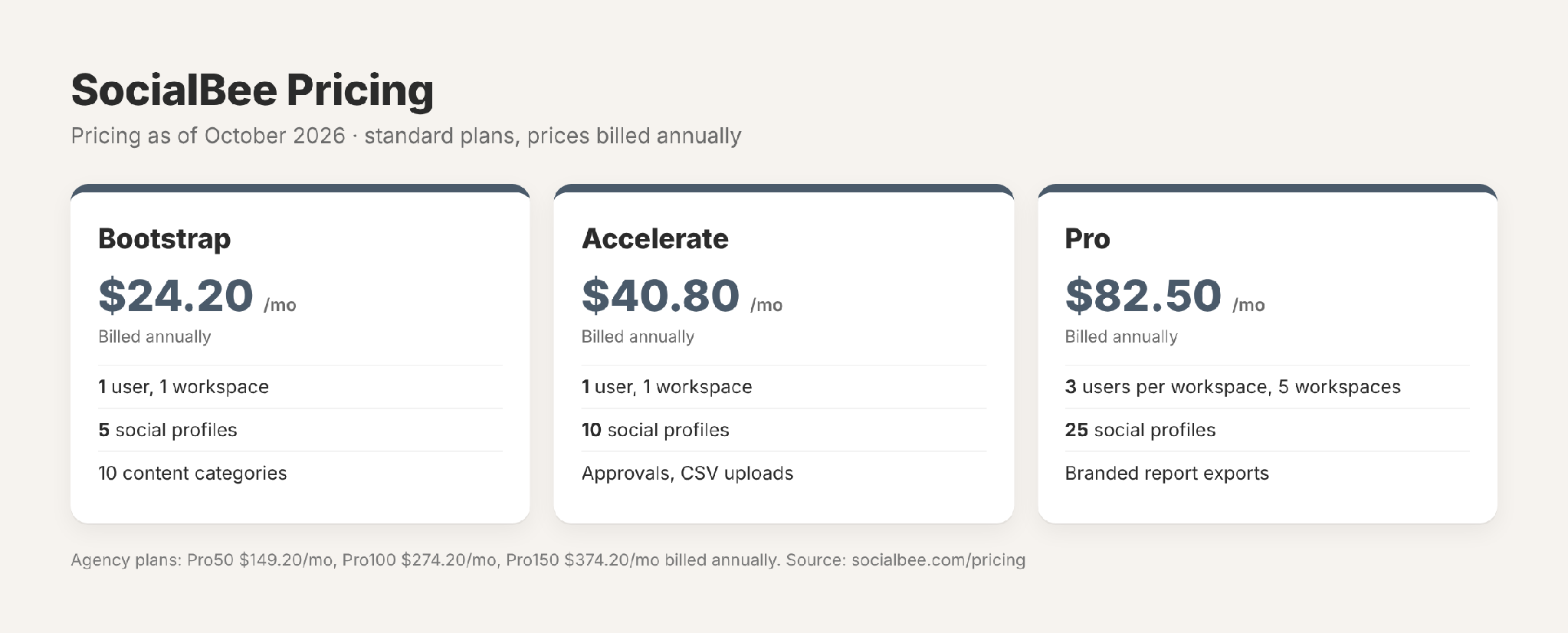
SocialBee sells add-ons by the unit: an extra user or workspace is $10/mo ($100/yr), and 5 extra profiles are $15/mo ($150/yr). Bulk editing, CSV uploads and post approvals start on Accelerate; branded report exports and internal notes start on Pro.
What a small team pays. For three people billed annually, CoSchedule Professional with one extra user is $78/mo and includes 5 social profiles. SocialBee Pro is about $82.50/mo and includes 3 users and 25 profiles. If you manage many profiles, SocialBee gives you more of them for the money. If you need a free plan or a lower single-user price with campaign planning, CoSchedule Starter fits.
Free Trials
SocialBee offers a 14-day free trial with no credit card required, plus a 30-day money-back guarantee. It has no free plan. CoSchedule offers a 14-day free trial on Starter and Professional, and a credit card is required. Suite starts with a demo. CoSchedule also keeps a free plan with 1 social profile and 15 scheduled posts at a time.
CoSchedule Vs. SocialBee Feature Review
CoSchedule is stronger on calendar planning, campaigns, team approvals and AI that builds whole campaigns; SocialBee is stronger on category-based recycling, profile volume and inbox coverage on its entry plan.
Calendar
CoSchedule’s calendar is the center of the tool. You drag posts to new dates, color-code them with labels, save filtered views, and on Professional share a read-only view with clients or leadership (how read-only sharing works). Social campaigns group a launch’s posts together: move the launch date and the campaign’s schedule moves with it (create a social campaign). SocialBee’s calendar shows posts by content category, so you can see how your mix of topics is spread across the week.
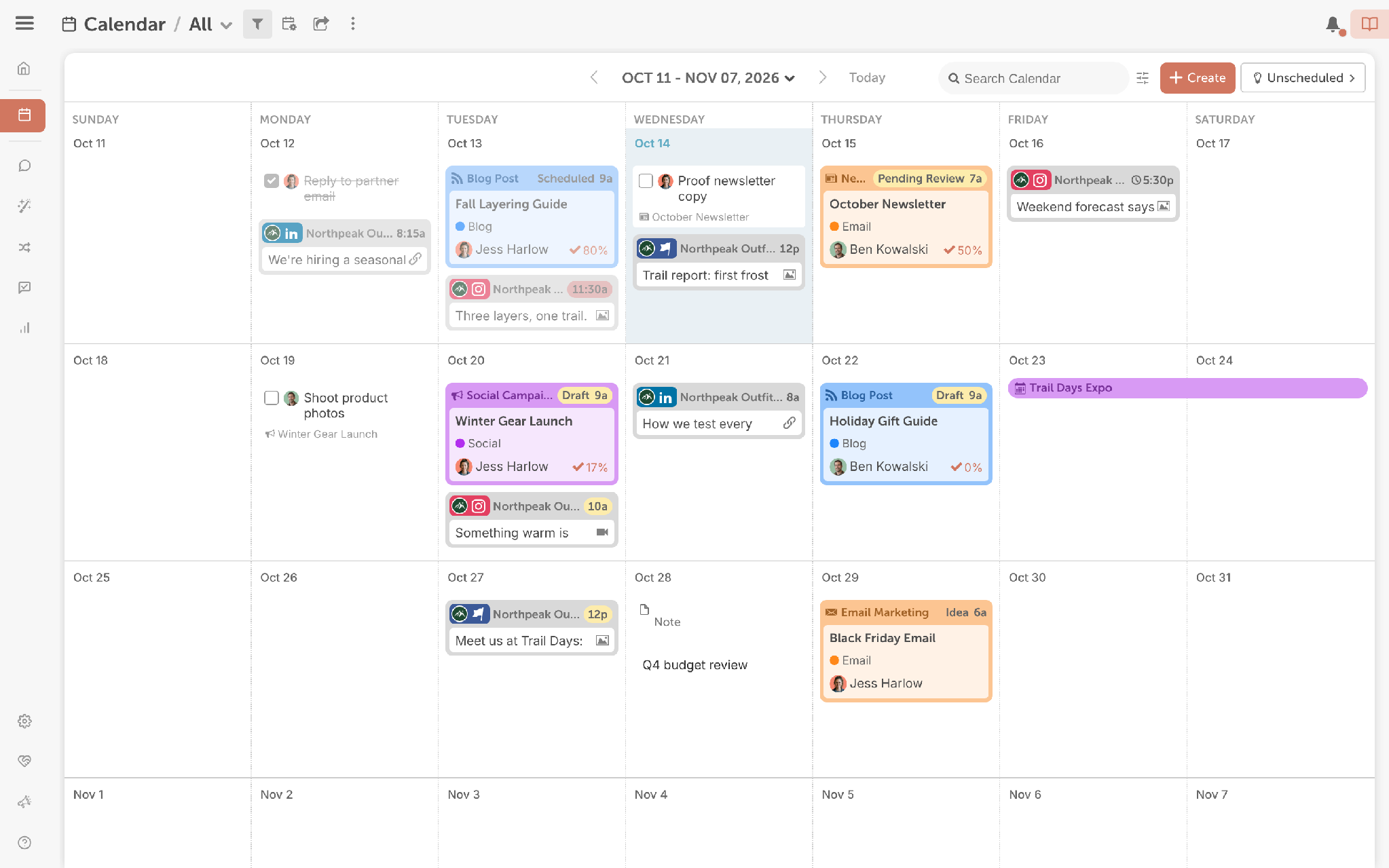
Takeaway: CoSchedule is the better fit if you plan around dates, launches and campaigns. SocialBee works well if your schedule is mostly a steady rotation of content types.
Approvals And Team Controls
CoSchedule adds social message approvals and user roles on Professional, which includes 2 users (set up social approvals). Suite adds custom permissions, Task Approvals and single sign-on (SSO). SocialBee has four roles (Owner, Manager, Publisher and Contributor) and workspaces for separating brands or clients. Post approvals start on Accelerate, but Bootstrap and Accelerate include 1 user, so working with a teammate means Pro or a $10/mo extra user. Internal notes start on Pro.
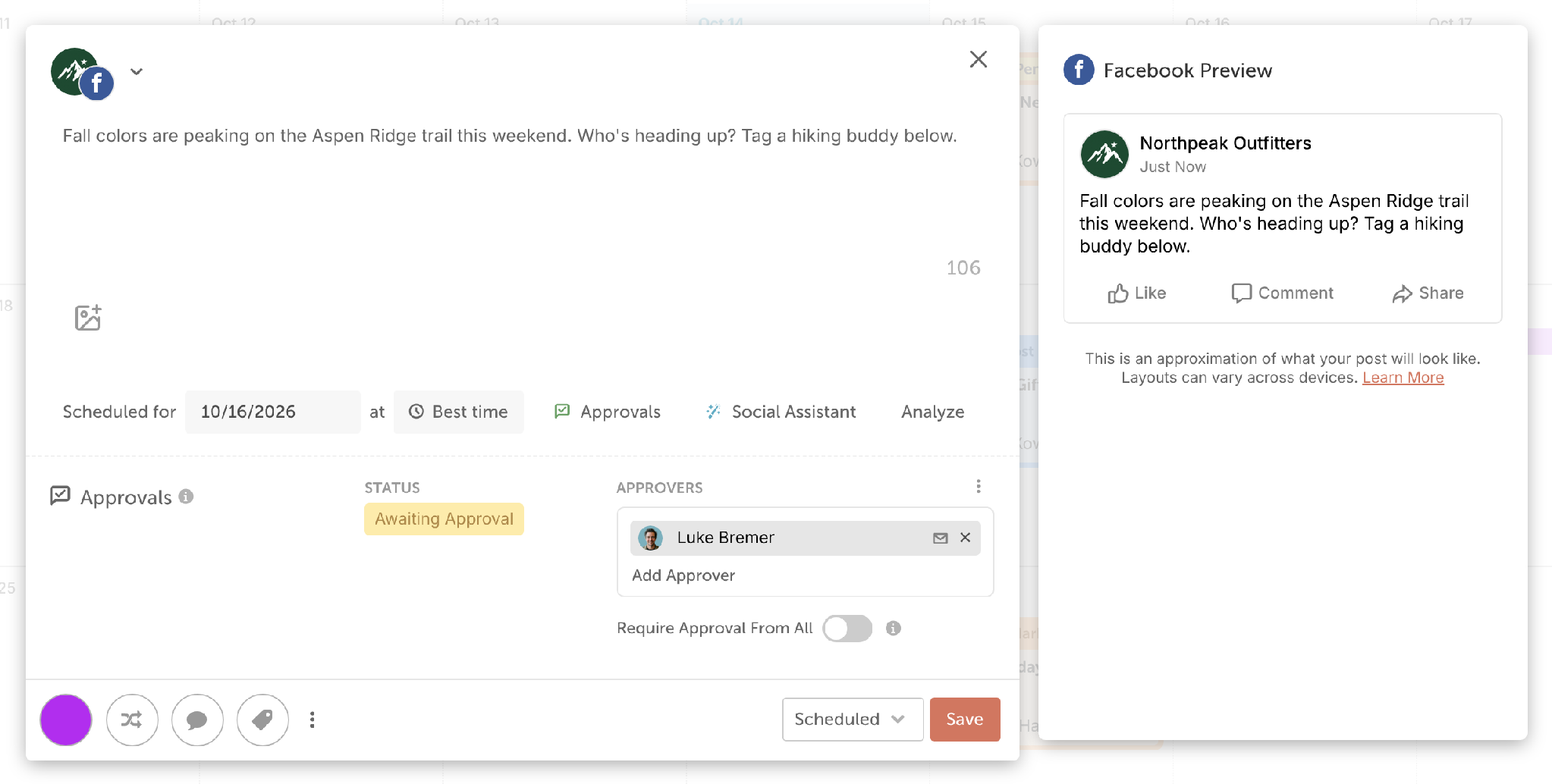
Takeaway: For a two-person team that needs approvals, CoSchedule Professional covers it in one plan. SocialBee’s workspaces suit agencies separating many clients.
Supported Networks
CoSchedule publishes to all the major social networks: Facebook, Instagram, LinkedIn, X (paid add-on), Pinterest, TikTok, Threads, Bluesky, Mastodon, Google Business Profile and YouTube. SocialBee publishes directly to Facebook Pages, Instagram Business and Creator accounts, LinkedIn profiles and Company Pages, X, Pinterest, Google Business Profile, TikTok, YouTube, Threads and Bluesky. For Facebook Groups, personal Facebook profiles and personal Instagram accounts, it sends a reminder for you to post by hand. 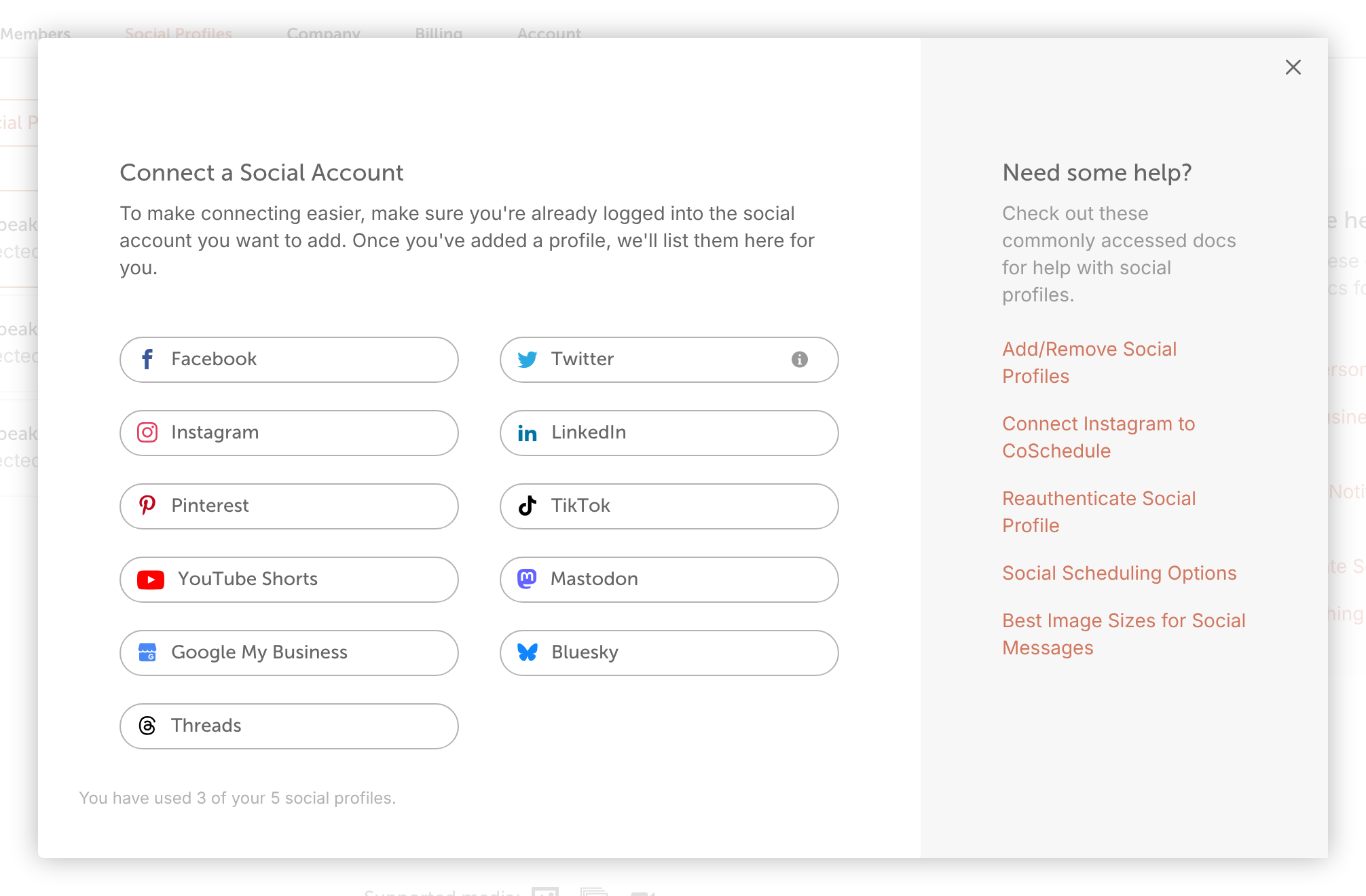
Takeaway: Coverage is close. Mastodon is on CoSchedule and not listed by SocialBee; SocialBee offers reminder-style posting for Facebook Groups and personal accounts.
Ease Of Publishing
CoSchedule gives you Best Time Scheduling, reusable social templates, first-comment scheduling, an Instagram grid preview and bulk scheduling from a CSV of up to 365 rows (upload social messages from a CSV). For evergreen posts, you choose the posts and put them in ReQueue groups; ReQueue reshares them to fill gaps in your schedule, favoring the ones that perform best within your groups (get started with ReQueue).
SocialBee’s publishing is built on content categories: you add posts to a category, set a schedule, and SocialBee recycles or expires posts as you choose. It also imports from RSS feeds, and adds a bulk editor and CSV uploads on Accelerate and Pro. SocialBee retired its browser extension in March 2026.
Takeaway: Both handle evergreen content well. SocialBee’s categories give fine control over content mix; CoSchedule pairs evergreen reposting with campaigns you can see on a calendar.
Social Inbox
CoSchedule’s Social Inbox covers Facebook and Instagram on Starter. Professional and Suite add LinkedIn Pages, Google Business Profile, X, YouTube, Bluesky, Mastodon and Threads, plus AI replies, saved replies and internal discussions (get started with Social Inbox).
SocialBee includes its inbox on every plan: comments, mentions and DMs for Facebook Pages and Instagram Business; comments and mentions for Threads, LinkedIn Company Pages and X; and YouTube comments. It doesn’t list an inbox for Google Business Profile, Bluesky or TikTok business accounts.
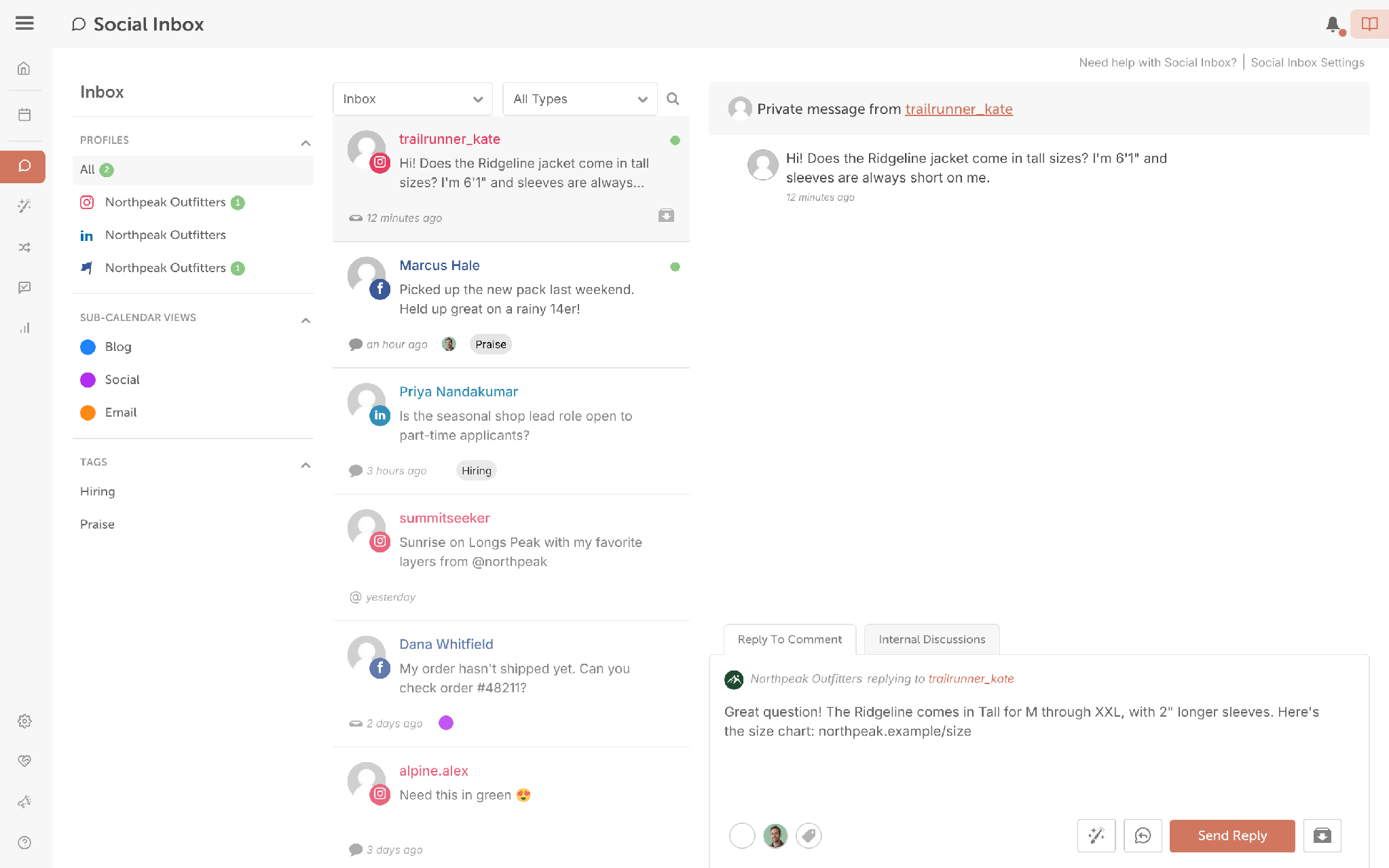
Takeaway: On the entry plan, SocialBee’s inbox covers more networks. On Professional, CoSchedule covers more networks and adds AI replies.
Analytics
CoSchedule reports on Facebook, Instagram, X, LinkedIn, YouTube Shorts, TikTok, Threads, Bluesky and Mastodon. Starter includes social network reports and report scheduling; Professional adds AI Insights, custom dashboards and white-label reports.
SocialBee keeps 3 months of analytics on Bootstrap and 2 years on Accelerate and Pro, with advanced analytics from Accelerate. Branded PDF exports are on Pro and the agency plans and cover one profile at a time. SocialBee doesn’t offer analytics for Bluesky.
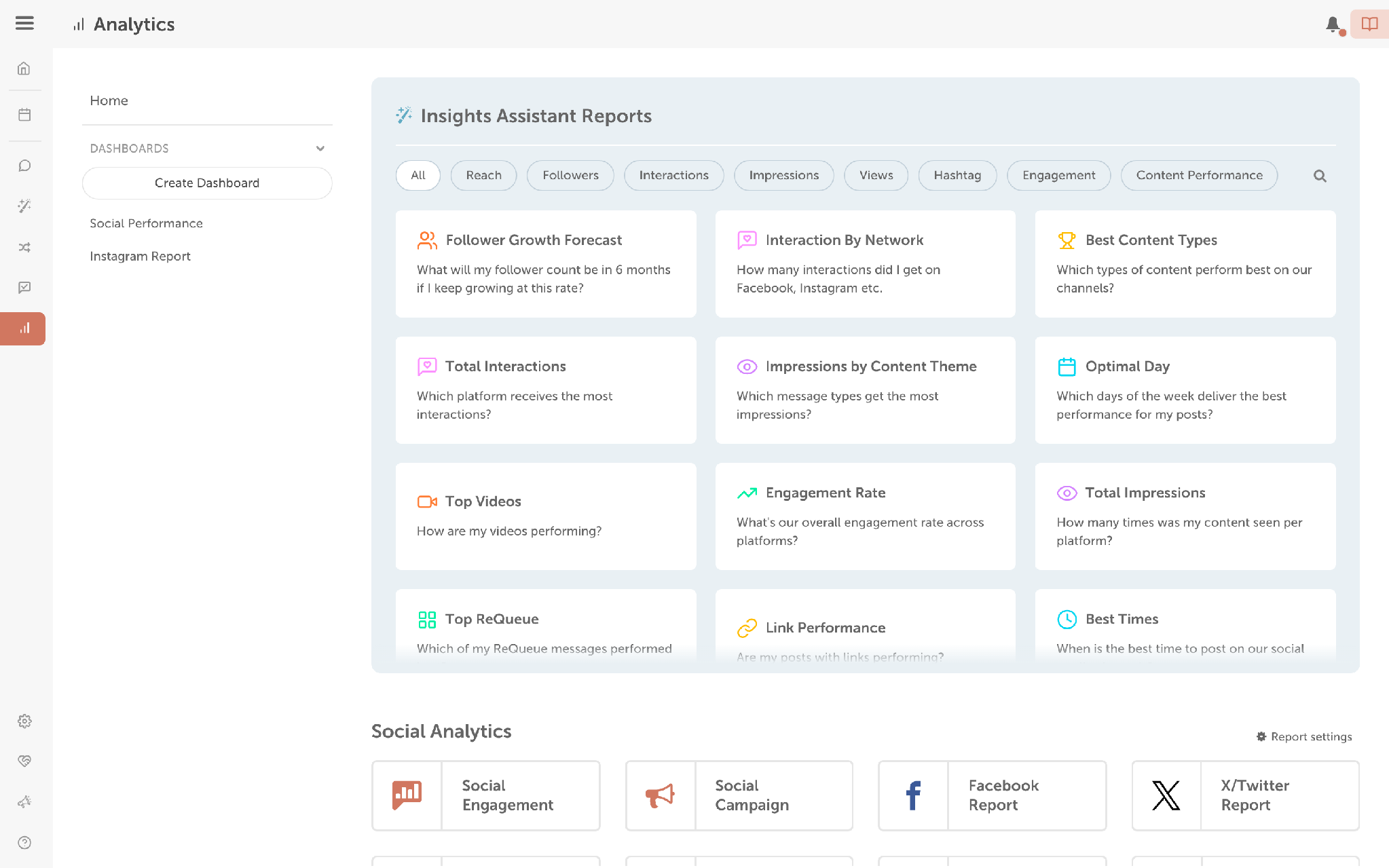
Takeaway: CoSchedule gives you AI-powered analysis and white-label reports at a lower plan level. SocialBee is fine for single-profile reporting.
AI
CoSchedule AI includes the AI Social Assistant for writing posts and the AI Campaign Assistant, which drafts a whole social campaign (schedule, copy and images) onto your calendar; both are unlimited on every paid plan. Professional adds the AI Reply Assistant in Social Inbox and AI Insights in reports, and Suite adds Brand Voice Training & Profiles.
SocialBee’s Copilot scans your website and suggests networks, content categories and draft posts, and its Post Assistant writes text and creates images. AI content generation is unlimited on every plan.
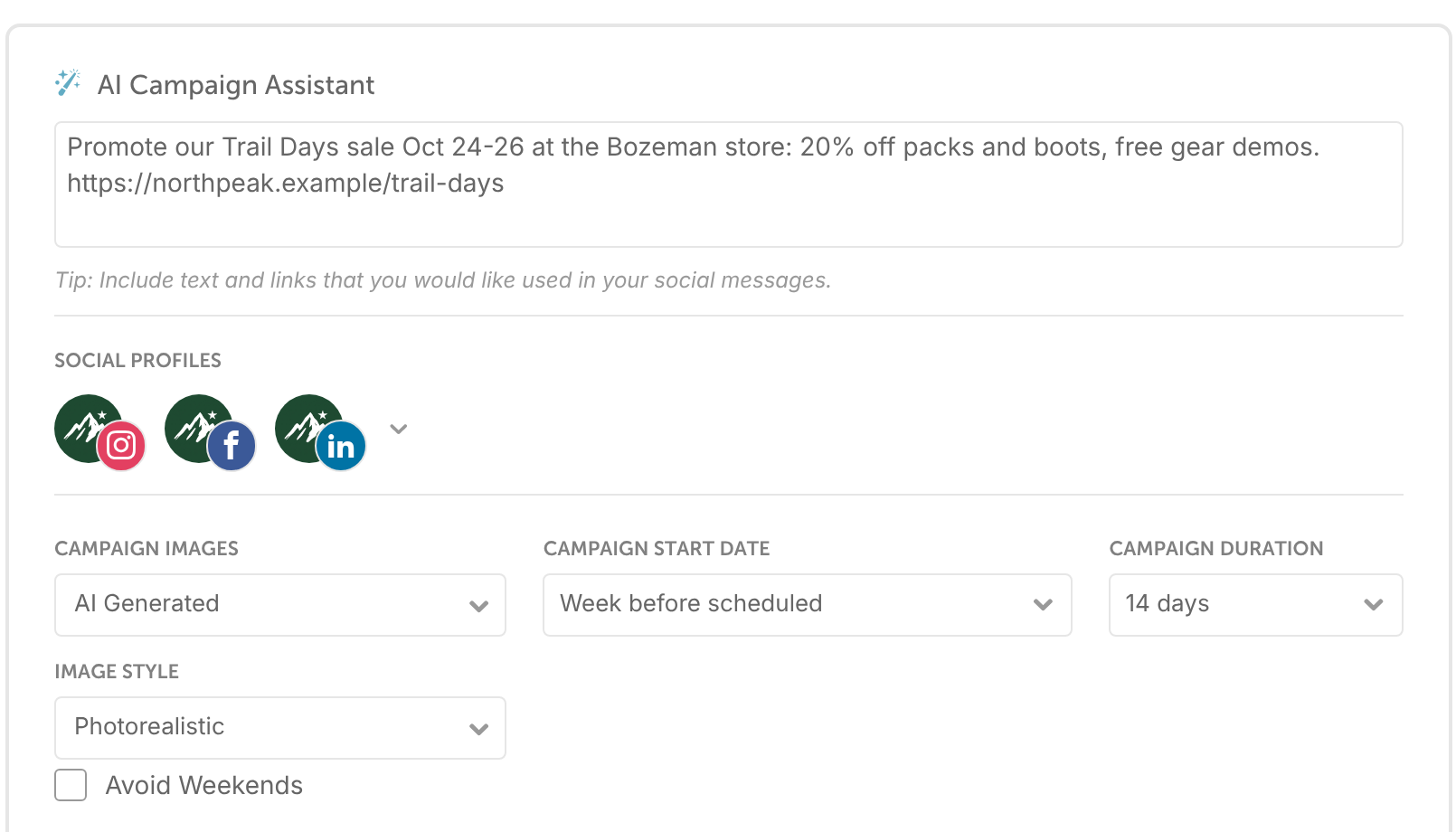
Takeaway: SocialBee’s AI helps you set up a content strategy. CoSchedule’s AI goes further into the day-to-day: it plans campaigns, answers your inbox and reads your reports.
Feature-By-Feature Chart
Here’s how the two tools line up, with the plan where each feature starts. SocialBee details are from its pricing page and help center, checked October 2026.
| Feature | CoSchedule | SocialBee |
|---|---|---|
| Pricing model | Per plan, users included | Per plan, users per workspace |
| Starting price | $29/mo billed annually | $24.20/mo billed annually |
| Free plan | Yes | No |
| Free trial | 14 days, card required | 14 days, no card |
| Drag-and-drop calendar | Yes, every paid plan | Not listed |
| Campaigns that move with the launch date | Yes, every paid plan | Not listed |
| Evergreen reposting | ReQueue, every paid plan | Content categories, every plan |
| Bulk scheduling (CSV) | Yes, every paid plan | Accelerate and up |
| Post approvals | Professional and up | Accelerate and up |
| Read-only calendar sharing | Professional and up | Not listed |
| Social networks | 11, including Mastodon | 10 direct, plus reminder posting |
| Social Inbox | Facebook and Instagram on Starter; 9 networks on Professional | Facebook, Instagram, Threads, LinkedIn, X and YouTube on every plan |
| AI replies in the inbox | Professional and up | Not listed |
| Analytics | 9 networks; AI Insights on Professional | Advanced analytics on Accelerate and up |
| White-label or branded reports | Professional and up | Pro and up |
| AI campaign builder | AI Campaign Assistant, every paid plan | Copilot strategy and post suggestions, every plan |
| Mobile app | Yes | iOS app |
| SSO | Suite | Not listed |
CoSchedule Vs. SocialBee Integrations
CoSchedule connects more with email and content tools; SocialBee connects more with content-curation and link-shortening tools. CoSchedule integrates with YouTube, Mailchimp, Constant Contact, ActiveCampaign, Campaign Monitor, HubSpot, Canva, Google Analytics, Bitly, Google Drive, Dropbox, Microsoft 365, Google Calendar, RSS feeds, Zapier and WordPress.
SocialBee integrates with Canva, Unsplash, GIPHY and Quuu for content, Bitly, Rebrandly and several other link shorteners, and Zapier, Make and Pabbly for automation.
Takeaway: If you want your email campaigns and blog on the same calendar as social, CoSchedule fits. If you curate a lot of third-party content and use branded short links, SocialBee covers more of those tools.
CoSchedule Vs. SocialBee Customer Service
Both tools offer email and live chat; SocialBee adds bookable calls and a monthly demo webinar. CoSchedule answers questions by email and live chat, always open, on Starter, Professional and Suite. Suite adds priority support.
SocialBee offers email, live chat (an AI assistant answers first and can hand you to a person), bookable calls and a monthly demo webinar. SocialBee is rated 4.7 out of 5 from 477 reviews on G2 and 4.4 out of 5 from 39 reviews on Capterra. Reviewers often praise its categories and evergreen recycling; some mention a learning curve and mixed response times.
Takeaway: Both give small teams real people to talk to. If you want a scheduled call to get set up, SocialBee offers one on every plan.
CoSchedule Vs. SocialBee Publishing Consistency
Neither tool publishes an uptime figure, and both keep a public status page you can check before you buy. CoSchedule’s status page is status.coschedule.com. SocialBee’s is status.socialbee.com.
Takeaway: Look at each status page’s incident history during your trial, especially for the networks you post to most.
CoSchedule Vs. SocialBee: The Verdict
CoSchedule is the better choice when you plan social around dates and campaigns and want a team to see the schedule; SocialBee is the better choice when you run steady evergreen content across many profiles on a tight budget.
CoSchedule Is Best For:
- Marketers who plan launches, promotions and seasonal pushes on a calendar
- Teams that want a campaign’s posts to move together when the date changes
- Two- or three-person teams that need approvals without jumping to an agency plan
- Anyone who wants AI to draft a full campaign onto the calendar
- Teams that report to leadership with AI Insights and white-label reports
- Marketers who want a free plan to start
SocialBee Is Best For:
- Solo marketers and small businesses that run mostly evergreen content
- Anyone who organizes posts by content category and wants fine control over the mix
- Accounts that need many social profiles at a low price
- Agencies that want a separate workspace per client
- Teams that need inbox coverage for Threads, LinkedIn, X and YouTube on the entry plan
- Brands that curate a lot of third-party content with Quuu and RSS
Frequently Asked Questions
Is CoSchedule Good For Social Media?
Yes. CoSchedule is social media management software that publishes to 11 social networks, reshares evergreen posts with ReQueue, and includes a Social Inbox and analytics. Its calendar lets you see the whole month, including the gaps.
Is SocialBee Worth The Price?
For a solo marketer or small business that mostly recycles evergreen content, SocialBee is good value: Bootstrap starts at $24.20/mo billed annually with 5 profiles and unlimited AI content generation. It’s less of a fit if you need several users on a budget, since Bootstrap and Accelerate include 1 user.
Is There A Good Alternative To SocialBee?
CoSchedule is a strong alternative if you want evergreen reposting plus campaign planning on a calendar. ReQueue reshares the evergreen posts you choose, and social campaigns keep a launch’s posts together. Professional includes 2 users and approvals.
Does SocialBee Have A Free Plan?
No. SocialBee offers a 14-day free trial with no credit card required, then a paid plan. CoSchedule has a free plan with 1 social profile and 15 scheduled posts at a time.
Which Is Better For Evergreen Content, CoSchedule Or SocialBee?
Both handle it well in different ways. SocialBee recycles posts by content category on a set schedule. CoSchedule’s ReQueue reshares the posts you put in ReQueue groups to fill gaps around your scheduled campaigns, favoring the ones that perform best within your groups.