
If you’re comparing CoSchedule vs Sendible, you’re probably weighing a tool for your own brand against one built for agencies. Both schedule posts to the major networks, include a social inbox and reports, and start around $30 a month billed annually.
The difference is who they’re shaped around. Sendible gives every plan unlimited users and grows by workspaces, one per client or brand. CoSchedule is social media management built on a calendar, so you plan campaigns around dates, see the gaps in your month and fill them with evergreen posts.
The short verdict: choose CoSchedule if you’re an in-house marketer or small team that plans social as campaigns. Choose Sendible if you’re an agency that needs unlimited seats, a workspace per client and white-label options.
CoSchedule Vs. Sendible At A Glance
CoSchedule is built around a calendar and campaign planning; Sendible is built for agencies, with unlimited users and a workspace per client.
| CoSchedule | Sendible | |
|---|---|---|
| Best for | One-person marketing departments and small teams that plan social as campaigns on a calendar | Agencies and multi-location brands managing many clients or locations |
| Starting plan | Starter, $29/mo billed annually | Core, $30/mo billed annually |
| Free plan | Yes: 1 social profile, 15 scheduled posts at a time | No |
| Free trial | 14 days, card required | 14 days; a card is requested when the trial ends |
| Standout strengths | Drag-and-drop calendar, social campaigns that move with the launch date, ReQueue, AI Campaign Assistant | Unlimited users on every plan, a workspace per client, Client Connect, white label on Elite and Enterprise |
CoSchedule Vs. Sendible Plans And Pricing
The two tools start at about the same price; Sendible adds unlimited users on every plan, while CoSchedule puts approvals on a lower-priced plan and keeps a free plan.
CoSchedule Pricing
CoSchedule has a free plan and three paid plans. See the CoSchedule pricing page for current details.
| Plan | Price (billed annually) | Users | Social profiles |
|---|---|---|---|
| Free plan | $0 | 1 | 1 (15 scheduled posts at a time) |
| Starter | $29/mo | 1 | 3 |
| Professional | $49/mo | 2 included, up to 3 ($29/mo per extra user) | 5 |
| Suite | Custom, from $69/mo | Unlimited | Unlimited |
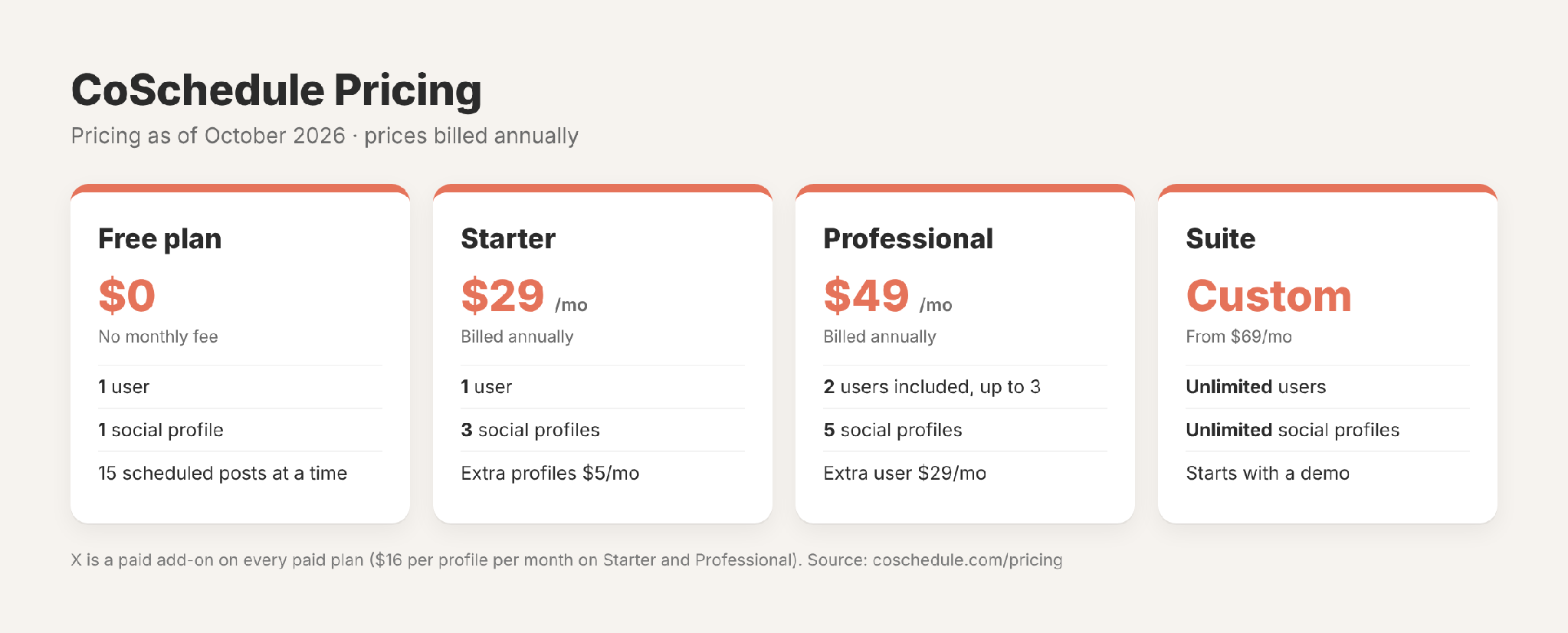
Extra social profiles are $5/mo each on Starter and Professional. X is a paid add-on on every paid plan, at $16 per profile per month on Starter and Professional.
Sendible Pricing
Sendible has five plans, all with unlimited users. Plans grow by workspace: each workspace is a separate space for a client, brand or location with 6 social profiles. Annual billing saves 15%. See the Sendible pricing page for current details.
| Plan | Price (billed annually) | Workspaces | Social profiles | Users |
|---|---|---|---|---|
| Core | $30/mo | 1 | 6 | Unlimited |
| Plus | $84/mo | 3 | 18 | Unlimited |
| Premium | $169/mo | 7 | 42 | Unlimited |
| Elite | $254/mo | 15 | 90 | Unlimited |
| Enterprise | $638/mo | 50 | 300 | Unlimited |
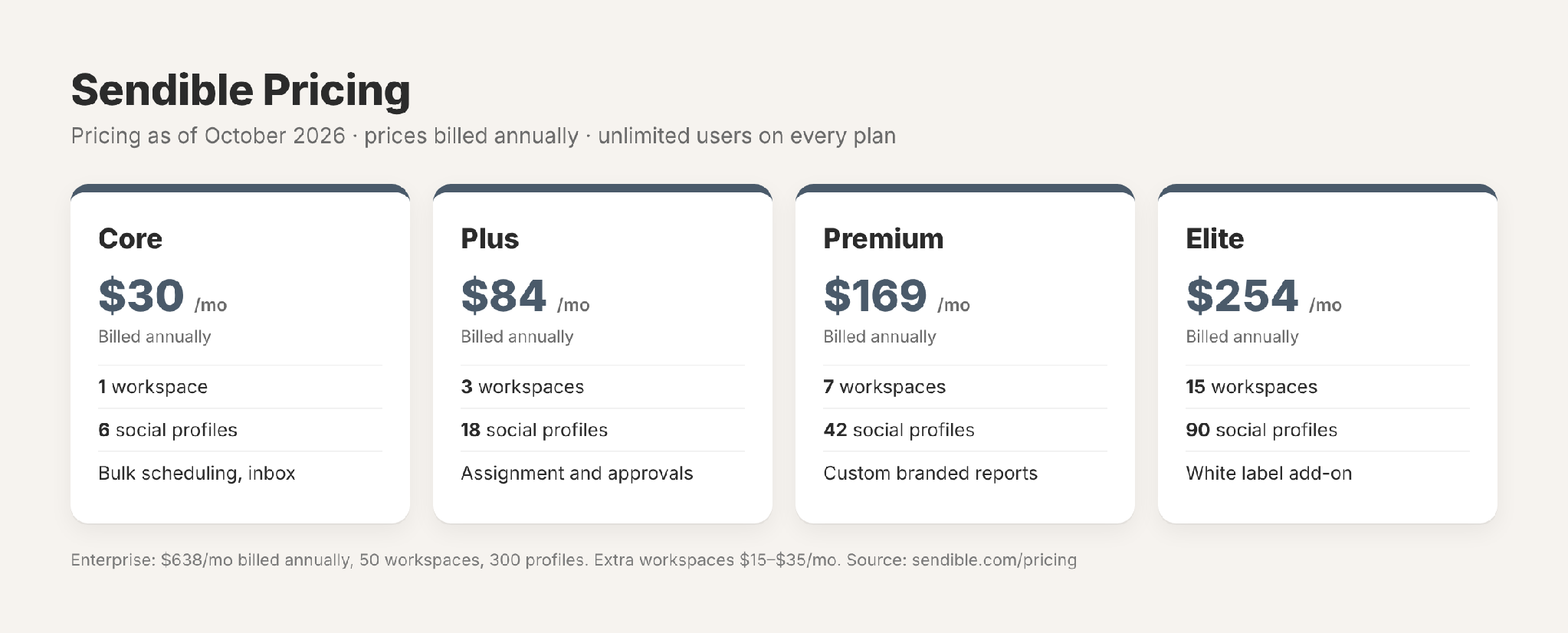
You can add workspaces without changing plans: each one adds 6 social profiles and costs $15 to $35/mo, depending on your plan. Approvals start on Plus; content libraries, custom branded reports, campaigns and a dedicated account manager start on Premium. White label is a paid add-on on Elite and Enterprise, starting at $349/mo and $800/mo.
What a small team pays. For three people billed annually, CoSchedule Professional with one extra user is $78/mo, with approvals and 5 social profiles. Sendible Core is $30/mo for unlimited users and 6 profiles, but approvals start on Plus at $84/mo. If your team doesn’t need approvals, Sendible Core is the cheaper way to add seats. If it does, CoSchedule Professional costs less.
Free Trials
Sendible offers a 14-day free trial and asks for a credit card when it ends. It has no free plan.
CoSchedule offers a 14-day free trial on Starter and Professional, and a credit card is required. Suite starts with a demo. CoSchedule also keeps a free plan with 1 social profile and 15 scheduled posts at a time.
CoSchedule Vs. Sendible Feature Review
CoSchedule is stronger on calendar planning, campaigns, evergreen reposting and AI; Sendible is stronger on client management, unlimited seats and white-label options for agencies.
Calendar
CoSchedule’s calendar is where you work. You drag posts to new dates, color-code them with labels, save filtered views, and on Professional share a read-only view with clients or leadership (how read-only sharing works). Social campaigns keep a launch’s posts together: move the launch date and the campaign’s schedule moves with it (create a social campaign).
Sendible’s calendar has month, week and day views, with filters by status, network, user, profile, queue and campaign. Drag-to-reschedule arrived in beta in March 2026 as part of a redesigned calendar. Each workspace has its own calendar.
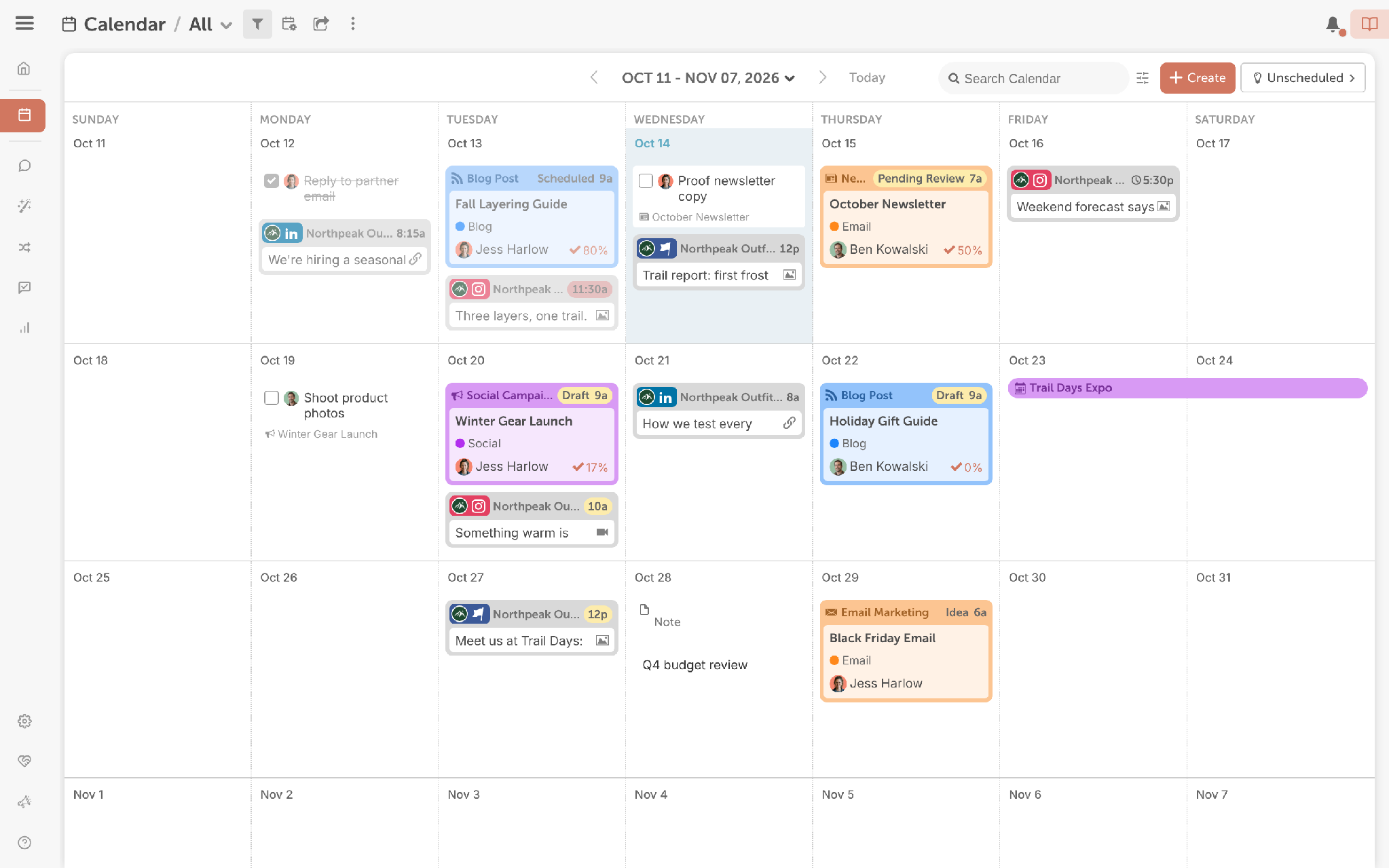
Takeaway: Sendible’s per-client calendars suit agencies. CoSchedule’s calendar goes further for campaign planning, because a campaign’s posts move with its date.
Approvals And Team Controls
CoSchedule adds social message approvals and user roles on Professional, which includes 2 users (set up social approvals). Professional also includes white-label client calendars. Suite adds custom permissions, Task Approvals and single sign-on (SSO).
Sendible includes unlimited users on every plan, with Admin, Team member and Client roles. Assignment and approvals start on Plus, custom approval workflows on Premium, advanced user permissions on Elite and SSO on Enterprise. Client Connect lets clients link their social accounts without sharing passwords.
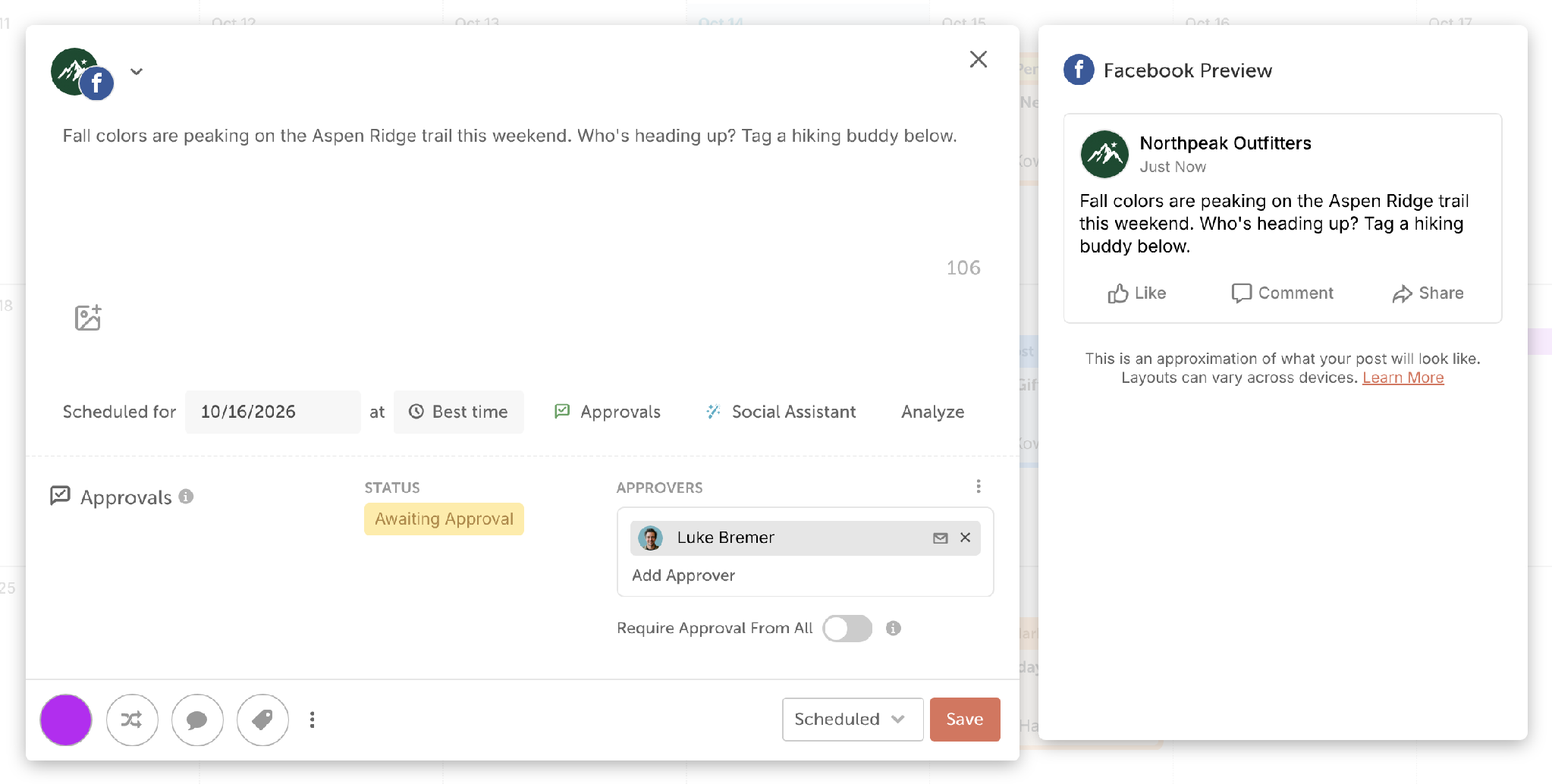
Takeaway: Sendible is built for agencies bringing many clients into one account. CoSchedule covers approvals for a small in-house team at a lower price.
Supported Networks
CoSchedule publishes to all the major social networks: Facebook, Instagram, LinkedIn, X (paid add-on), Pinterest, TikTok, Threads, Bluesky, Mastodon, Google Business Profile and YouTube.
Sendible publishes to Instagram, Facebook, TikTok, X, LinkedIn, Google Business Profile, YouTube, Threads and Bluesky, and to WordPress blogs. Pinterest and Mastodon aren’t listed.
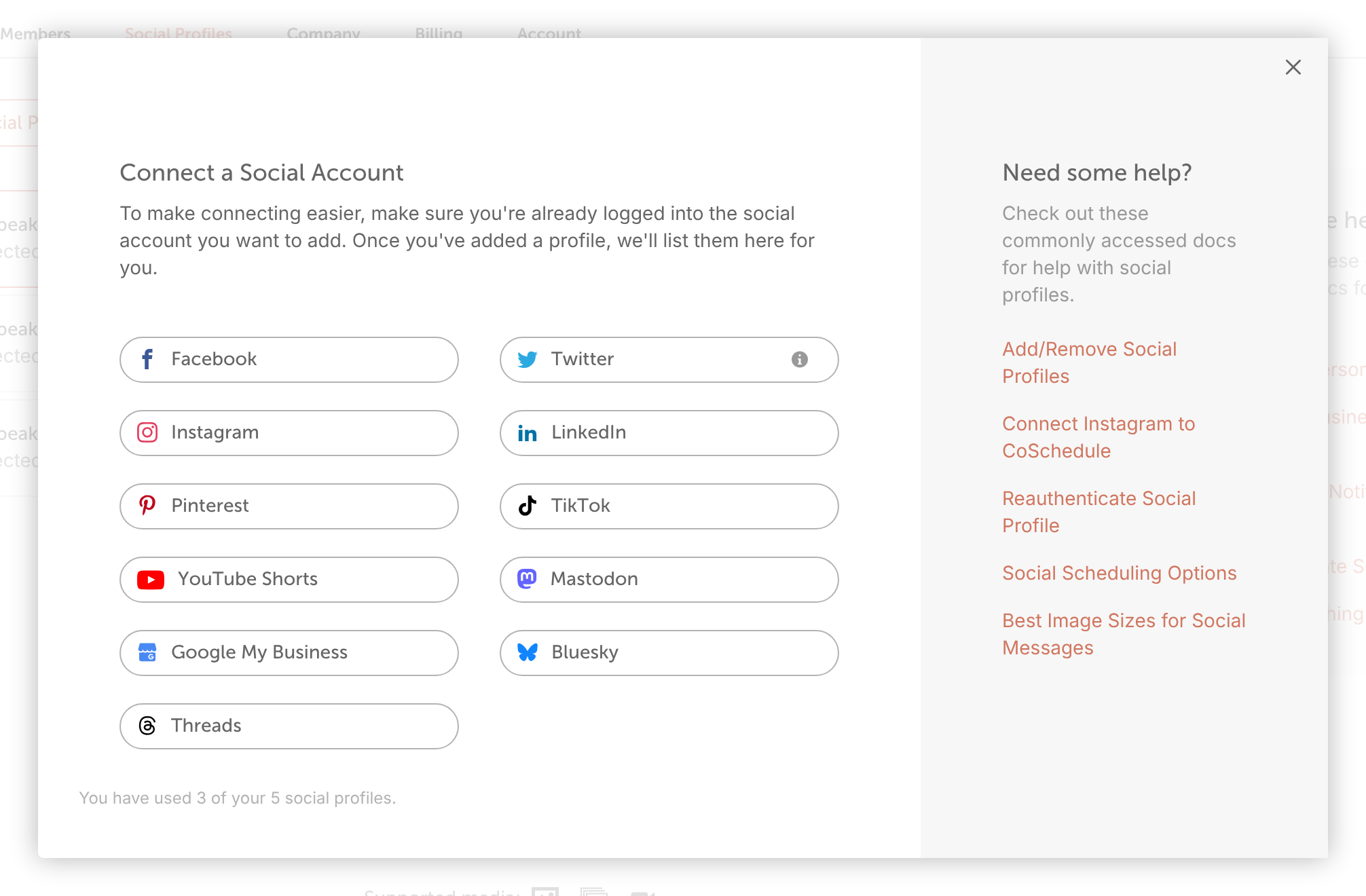
Takeaway: If you post to Pinterest or Mastodon, CoSchedule covers both. Sendible doesn’t list Mastodon, and its help center says Pinterest is only available to some users.
Ease Of Publishing
CoSchedule gives you Best Time Scheduling, reusable social templates, first-comment scheduling, an Instagram grid preview and bulk scheduling from a CSV of up to 365 rows on every paid plan (upload social messages from a CSV). For evergreen posts, you choose the posts and put them in ReQueue groups; ReQueue reshares them to fill gaps in your schedule, favoring the ones that perform best within your groups (get started with ReQueue).
Sendible includes bulk scheduling by CSV, smart queues (10 on Core up to unlimited on Elite), optional recycling that sends a published post back to the end of its queue, an RSS auto-poster and a Chrome extension. Each workspace can send 100 to 500 posts a day, depending on plan.
Takeaway: Both handle bulk and evergreen posting. Sendible’s queues recycle in order; CoSchedule’s ReQueue fills gaps around your scheduled campaigns.
Social Inbox
CoSchedule’s Social Inbox covers Facebook and Instagram on Starter. Professional and Suite add LinkedIn Pages, Google Business Profile, X, YouTube, Bluesky, Mastodon and Threads, plus AI replies, saved replies and internal discussions (get started with Social Inbox).
Sendible’s Priority Inbox is on every plan. It brings in Facebook Page comments, replies and direct messages, Facebook ad comments, Instagram Professional comments, LinkedIn Company Page replies and YouTube comments. It doesn’t include X, Google Business Profile, TikTok or Instagram direct messages, and messages can take 1 to 2 hours to appear because Sendible analyzes their sentiment first.
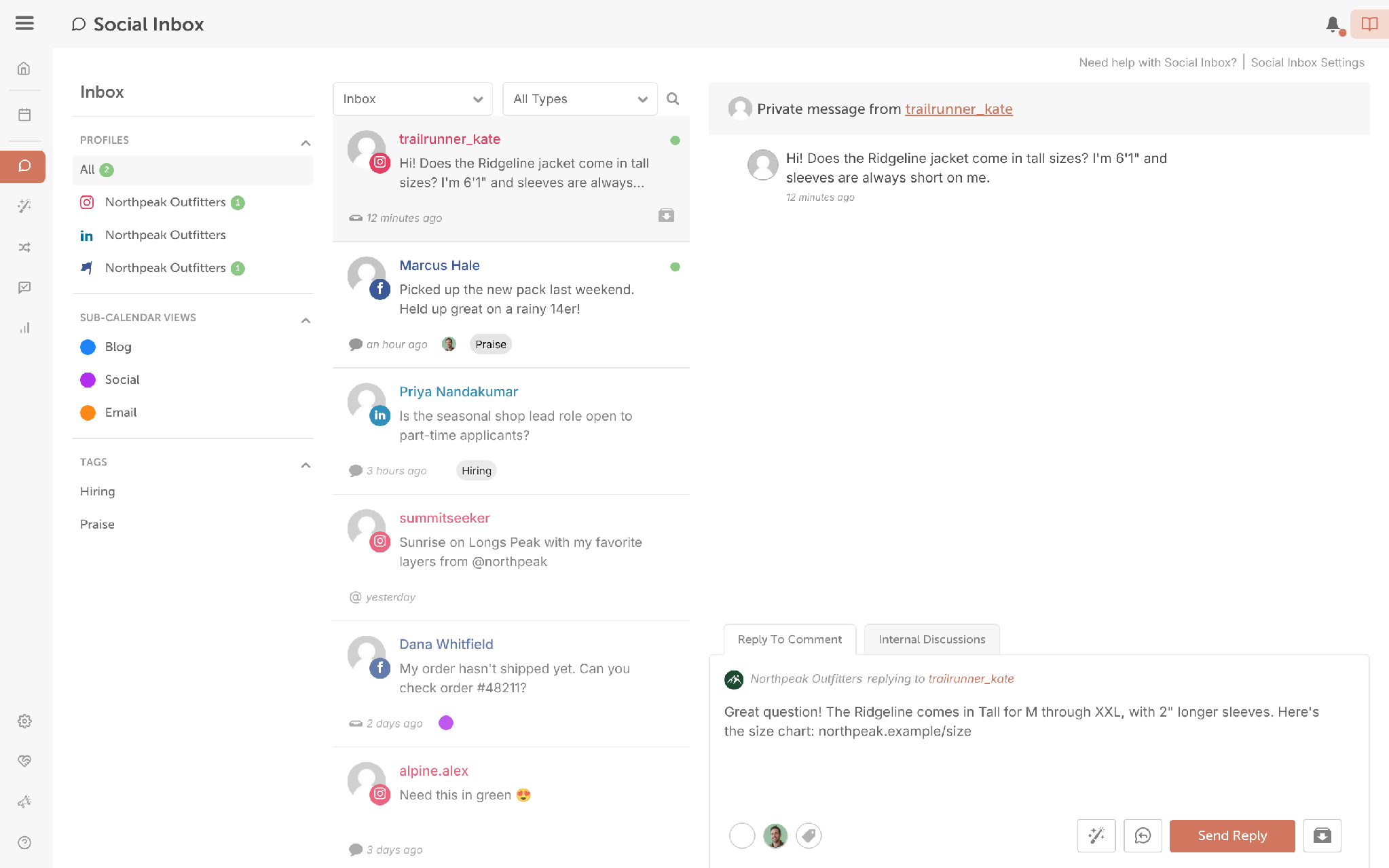
Takeaway: Sendible handles Facebook ad comments. CoSchedule replies to Instagram DMs on every paid plan, and on Professional adds X, Google Business Profile, Threads, Bluesky and Mastodon, plus AI replies.
Analytics
CoSchedule reports on Facebook, Instagram, X, LinkedIn, YouTube Shorts, TikTok, Threads, Bluesky and Mastodon. Starter includes social network reports and report scheduling; Professional adds AI Insights, custom dashboards and white-label reports.
Sendible includes quick reports with Google Analytics on every plan, plus PDF reports, emailed reports and live report links. Its drag-and-drop custom report builder starts on Premium with 2 branded reports per workspace. Google Business Profile reports aren’t available.
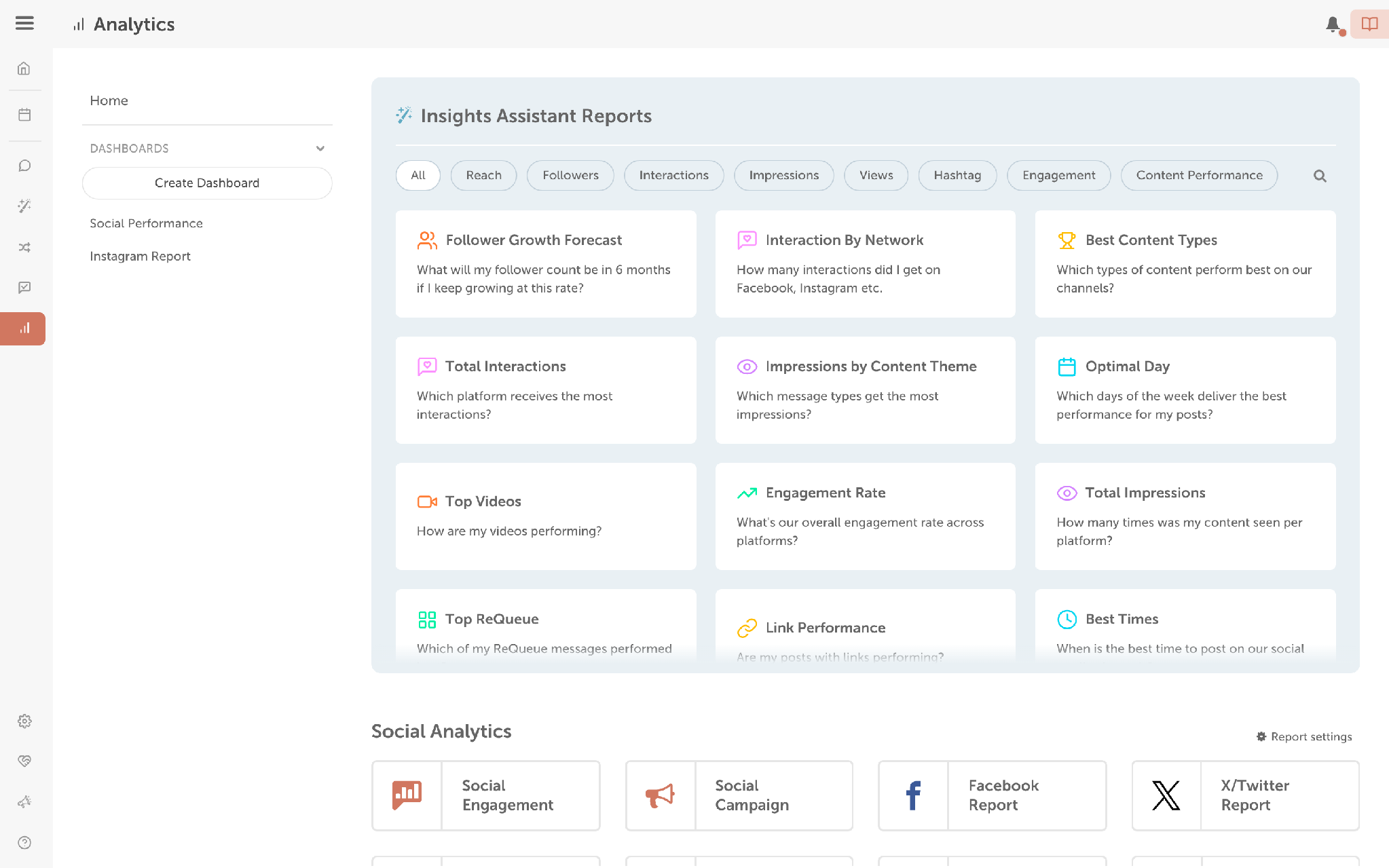
Takeaway: Sendible’s report builder suits agencies sending branded client reports. CoSchedule adds AI-powered analysis and white-label reports on a lower-priced plan.
AI
CoSchedule AI includes the AI Social Assistant for writing posts and the AI Campaign Assistant, which drafts a whole social campaign (schedule, copy and images) onto your calendar; both are unlimited on every paid plan. Professional adds the AI Reply Assistant in Social Inbox and AI Insights in reports, and Suite adds Brand Voice Training & Profiles.
Sendible’s AI Assist writes and rewrites captions in the post editor, with a chosen tone and audience, per-network versions and hashtags. Credits are unlimited on every plan. It doesn’t create images.
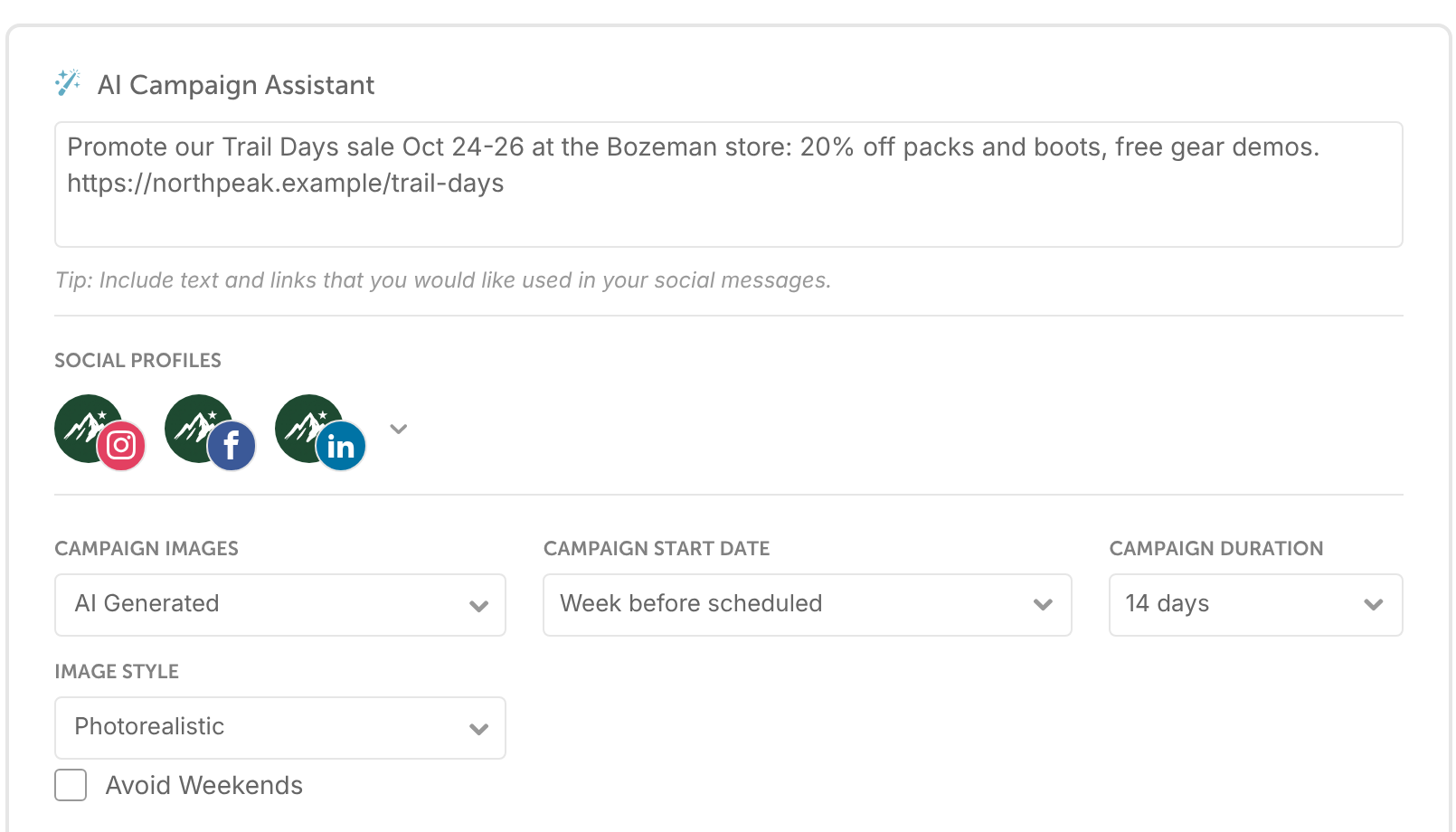
Takeaway: Sendible’s AI helps write individual posts. CoSchedule’s AI plans whole campaigns, answers your inbox and reads your reports.
Feature-By-Feature Chart
Here’s how the two tools line up, with the plan where each feature starts. Sendible details are from its pricing page and help center, checked October 2026.
| Feature | CoSchedule | Sendible |
|---|---|---|
| Pricing model | Per plan, users included | Per plan, unlimited users, grows by workspace |
| Starting price | $29/mo billed annually | $30/mo billed annually |
| Free plan | Yes | No |
| Free trial | 14 days, card required | 14 days |
| Drag-and-drop calendar | Yes, every paid plan | In beta since March 2026 |
| Campaigns that move with the launch date | Yes, every paid plan | Campaigns on Premium |
| Evergreen reposting | ReQueue, every paid plan | Queue recycling, every plan |
| Bulk scheduling (CSV) | Every paid plan, up to 365 rows | Every plan |
| Post approvals | Professional and up | Plus and up |
| Client account connection | White-label client calendars on Professional | Client Connect |
| Social networks | 11, including Pinterest and Mastodon | 9, plus WordPress |
| Social Inbox | Facebook and Instagram on Starter; 9 networks on Professional | Facebook, Instagram comments, LinkedIn Company Pages and YouTube, every plan; no Instagram DMs |
| AI replies in the inbox | Professional and up | Not listed |
| Analytics | 9 networks; AI Insights on Professional | Quick reports with Google Analytics; custom reports on Premium |
| White-label reports or platform | White-label reports on Professional | Branded reports on Premium; white-label platform add-on on Elite and Enterprise |
| AI | Unlimited on every paid plan, including campaign drafting | Unlimited caption writing, every plan |
| SSO | Suite | Enterprise |
CoSchedule Vs. Sendible Integrations
CoSchedule connects more with email marketing and content tools; Sendible keeps a shorter list focused on design, storage and analytics.
CoSchedule integrates with YouTube, Mailchimp, Constant Contact, ActiveCampaign, Campaign Monitor, HubSpot, Canva, Google Analytics, Bitly, Google Drive, Dropbox, Microsoft 365, Google Calendar, RSS feeds, Zapier and WordPress.
Sendible integrates with Canva, Google Drive, Dropbox, Google Analytics, Bitly branded links and Zapier, which it added in January 2026. Enterprise includes custom integrations.
Takeaway: If you want email campaigns on the same calendar as social, CoSchedule fits. For a design-and-publish workflow, both cover Canva, cloud storage and Zapier.
CoSchedule Vs. Sendible Customer Service
Both offer live chat and email on every paid plan; Sendible adds group training, office hours and, from Premium, 1:1 onboarding and a dedicated account manager.
CoSchedule answers questions by email and live chat, always open, on Starter, Professional and Suite. Suite adds priority support.
Sendible offers live chat from 9am to 10pm GMT on every plan, with an average email response time of 6 business hours on Core and 5 on higher plans, plus live group training, webinars and expert office hours. Premium and up add 1:1 onboarding and a dedicated account manager. Sendible is rated 4.5 out of 5 from 904 reviews on G2 and 4.6 out of 5 from 137 reviews on Capterra. Reviewers often praise its ease of use and support; some mention profiles that need reconnecting.
Takeaway: Sendible has a strong support reputation and adds group training and office hours. CoSchedule’s email and live chat are always open.
CoSchedule Vs. Sendible Publishing Consistency
Neither tool publishes an uptime figure; CoSchedule keeps an official status page, and Sendible’s status is tracked by third-party monitors.
CoSchedule’s status page is status.coschedule.com. We couldn’t find an official Sendible status page; its help center points to release notes instead. Independent monitors such as Entireweb track reported problems. Sendible also sets a daily posting limit per workspace (100 to 500 posts, depending on plan) to keep accounts within the networks’ posting rules.
Takeaway: During your trial, schedule posts to the networks you use most and confirm they publish on time in each tool.
CoSchedule Vs. Sendible: The Verdict
CoSchedule is the better choice for in-house marketers and small teams that plan campaigns on a calendar; Sendible is the better choice for agencies that need unlimited seats, a workspace per client and white-label options.
CoSchedule Is Best For:
- Marketers who plan launches, promotions and seasonal pushes on a calendar
- Teams that want a campaign’s posts to move together when the date changes
- Small teams that need approvals without paying for an agency plan
- Brands that post to Mastodon, or that need Pinterest on every paid plan
- Teams that want AI to draft whole campaigns and analyze their reports
- Marketers who want a free plan to start
Sendible Is Best For:
- Agencies managing many clients, each in its own workspace
- Teams that need unlimited users on every plan
- Agencies that want clients to connect accounts with Client Connect
- Agencies reselling social media management under their own brand
- Teams that moderate Facebook ad comments
- Teams that want group training and 1:1 onboarding
Frequently Asked Questions
Is CoSchedule Good For Social Media?
Yes. CoSchedule publishes to 11 social networks, reshares evergreen posts with ReQueue, and includes a Social Inbox and analytics. Its calendar lets you see the whole month, including the gaps.
Is Sendible Worth The Price?
For agencies, often yes: every plan includes unlimited users, and Premium at $169/mo billed annually adds custom branded reports and a dedicated account manager. For a small in-house team, the jump from Core ($30/mo) to Plus ($84/mo) for approvals can make it pricier than it first looks.
Is There A Good Alternative To Sendible?
CoSchedule is a good alternative for in-house marketers and small teams. Professional includes approvals and 2 users for $49/mo billed annually, and you plan campaigns on a calendar with ReQueue filling the gaps.
Does Sendible Support Pinterest?
Pinterest isn’t on Sendible’s list of supported networks, and its help center says it’s only available to some users. CoSchedule publishes to Pinterest on every paid plan.
Does Sendible Have A Free Plan?
No. Sendible offers a 14-day free trial and asks for a credit card when it ends. CoSchedule has a free plan with 1 social profile and 15 scheduled posts at a time.