
If you're comparing CoSchedule vs Loomly, you probably want a social media calendar your whole team can work from, and you're weighing what each plan includes for the price. Both tools are built around a calendar. Loomly packs approvals, analytics and an inbox into its entry plan. CoSchedule is social media management software built on a calendar, with evergreen publishing, campaigns and AI that help you fill it.
Here's the short answer. Choose Loomly if you need 12 accounts and 3 users with approvals on one entry plan. Choose CoSchedule if you want a lower starting price, ReQueue for evergreen content and campaigns that move with the launch date.
Below, we compare pricing, features, integrations, support and publishing, with a source for every fact about Loomly.
CoSchedule Vs. Loomly At A Glance
Loomly packs more accounts and users into its entry plan. CoSchedule starts lower and adds evergreen publishing and campaign planning.
| CoSchedule | Loomly | |
|---|---|---|
| Best for | The one-person marketing department and small teams that plan campaigns on a calendar | Small teams that want approvals and 12 accounts from day one |
| Starting price | $29/mo billed annually (Starter) | $49/mo billed yearly (Starter) |
| Free plan | Yes: 1 profile, 15 scheduled posts at a time | Not listed |
| Free trial | 14 days on Starter and Professional | Free trial, no card |
| Standout strengths | ReQueue, campaigns that move with the launch date, AI Campaign Assistant, AI Insights | 12 accounts and 3 users on Starter, approval workflows on every plan, assigned conversations |
CoSchedule Vs. Loomly Plans And Pricing
At $49/mo billed annually, Loomly includes more accounts and users than CoSchedule. CoSchedule's Starter plan costs $20 less.
Pricing as of November 2026.
CoSchedule Pricing
CoSchedule has a free plan and three paid plans. See CoSchedule pricing for the full list.
- Free plan: 1 social profile and 15 scheduled posts at a time.
- Starter: $29/mo billed annually ($39 billed monthly). 1 user, 3 social profiles and unlimited posts.
- Professional: $49/mo billed annually ($59 billed monthly). 2 users (up to 3), 5 social profiles, unlimited posts, Social Approvals, AI Insights and white-label reports.
- Suite: custom pricing for larger marketing teams. Talk to sales.
Extra social profiles cost $5/mo each, and extra seats on Professional cost $29/mo. Publishing to X is an add-on at $16 per profile per month on Starter and Professional.
Loomly Pricing
| Plan | Billed yearly | Billed monthly | Social accounts | Users |
|---|---|---|---|---|
| Starter | $49/mo | $65/mo | 12 | 3 |
| Beyond | $249/mo | $332/mo | 60 | Unlimited |
| Enterprise | Custom | Custom | 61+ | Unlimited |
Every plan includes unlimited calendars, approval workflows, analytics and an inbox. Beyond adds custom roles and workflows, scheduled reports and more AI usage. Yearly plans save 25% but can't be ended early, and nonprofits get 50% off. See Loomly pricing.
Free Trials
CoSchedule gives you 14 days on Starter or Professional. A card is required, and it's charged when the trial ends unless you cancel first (how CoSchedule trials work). CoSchedule also has a free plan.
Loomly offers a free trial with no card required. Its pricing page doesn't list a free plan.
What You'd Pay: Two Examples
Prices billed annually.
- One marketer, 5 profiles, no approvals: CoSchedule Starter costs $39/mo ($29 plus 2 extra profiles at $5). Loomly Starter costs $49/mo.
- A team of 3, 12 accounts, approvals: CoSchedule Professional costs $113/mo ($49, plus 1 extra seat at $29 and 7 extra profiles at $5). Loomly Starter costs $49/mo.
CoSchedule costs less for one marketer. Loomly costs less for a team of three with many accounts.
CoSchedule Vs. Loomly Feature Review
Loomly includes more team features on its entry plan. CoSchedule is stronger on filling the calendar: evergreen content, campaigns and AI without a monthly limit.
Calendar
Both tools are built around a calendar. CoSchedule adds campaign planning and automatic timing.
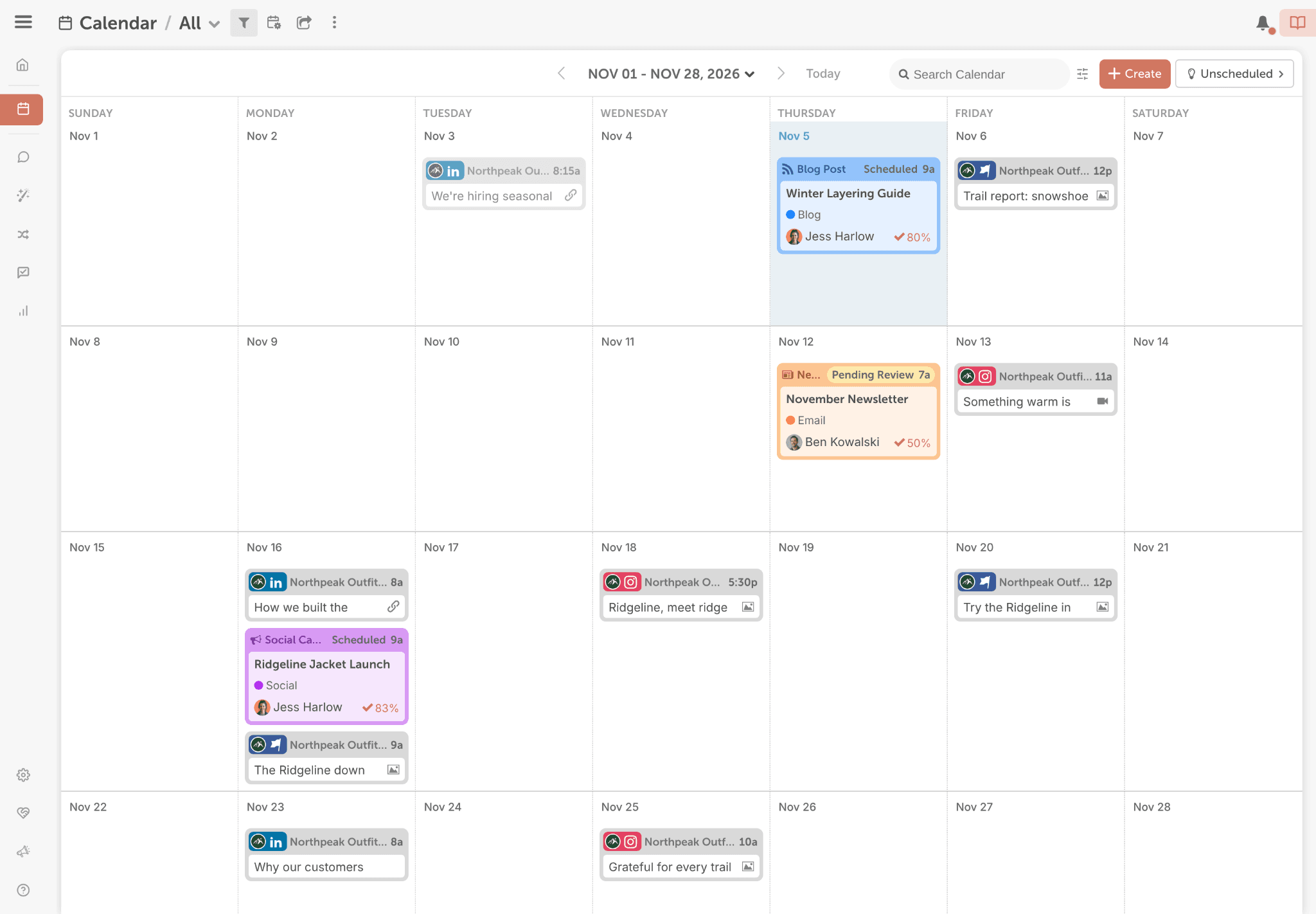
In CoSchedule, every social post, campaign and project sits on one drag-and-drop calendar. Color labels and saved, filtered calendars let you see one brand, network or campaign at a time. Best Time Scheduling picks a time for each post. Professional adds read-only calendar sharing, custom sub-calendars and client-branded calendars.
Loomly includes unlimited calendars on every plan, plus post inspiration and an ideas board for planning content.
Takeaway: Loomly works well for separate calendars by client. CoSchedule works well for planning campaigns across one calendar.
Approvals And Team Controls
Loomly includes approvals sooner.
Loomly's approval workflows come with every plan, including Starter at $49/mo billed yearly with 3 users. Beyond adds custom roles and workflows.
CoSchedule's Social Approvals come with Professional at $49/mo billed annually. You add one or more approvers in the composer, and they approve from one Approvals page. A post that isn't approved doesn't publish. Approver roles let clients log in and approve.
Takeaway: If a team of three needs approvals today, Loomly Starter gives you more for $49.
Supported Networks
CoSchedule publishes to 11 social networks: Facebook, Instagram, LinkedIn, Pinterest, TikTok, Threads, Bluesky, Mastodon, Google Business Profile, YouTube (including Shorts) and X (as an add-on). Instagram needs a Business or Creator account.
Loomly lists Instagram, LinkedIn, Facebook, TikTok, YouTube, Threads, Google Business Profile, Pinterest and Snapchat.
Takeaway: Loomly covers Snapchat. CoSchedule covers Bluesky and Mastodon.
Ease Of Publishing
Both tools make day-to-day publishing straightforward. Try both before you decide.
CoSchedule has no post limit on any paid plan. It schedules posts in bulk, previews each post for every network, schedules first comments, and picks a time with Best Time Scheduling.
Loomly's plans list no post limit. It gives you post ideas and inspiration to start from, and its own link shortener with click analytics.
Takeaway: This one is close. Use your trial to schedule a week of posts in each.
Evergreen Content And Campaigns
This is where CoSchedule pulls ahead.
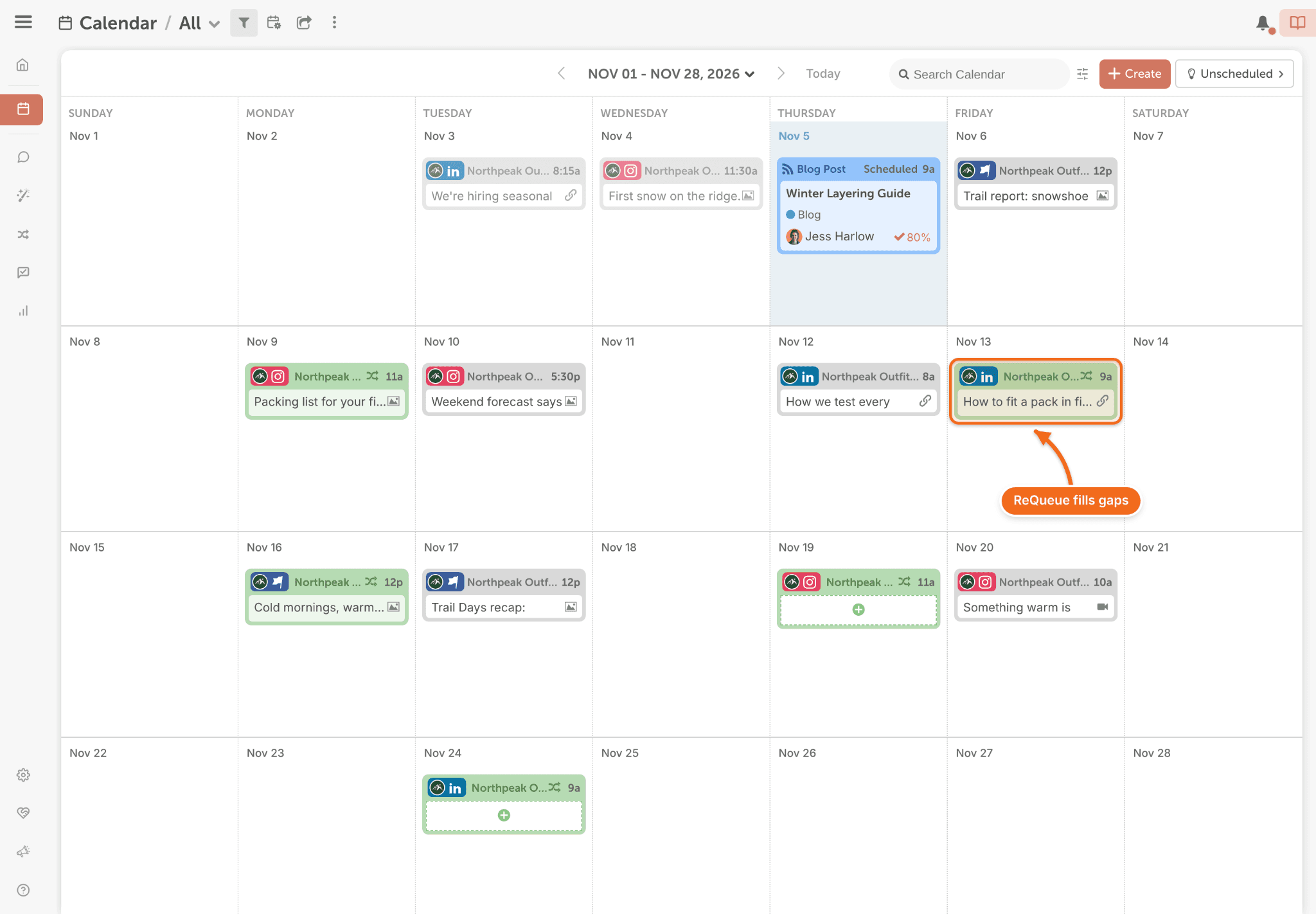
ReQueue fills the gaps on your calendar with your best-performing evergreen posts. You choose the posts, and ReQueue picks the one most likely to earn engagement in each open slot. Starter includes 5 ReQueue groups and Professional includes 10.
"ReQueue is the most amazing feature. It totally takes away the scheduling pain." — Zale T., G2, 2021
Social Campaigns group every post that promotes a launch or event. Move the launch date and the campaign's schedule moves with it. AI Campaign Assistant drafts a whole campaign onto your calendar, with the schedule, copy and images.
We didn't find evergreen recycling on Loomly's pricing page.
Takeaway: If you want your best posts to keep working, or you plan around launches, CoSchedule is the better fit.
Social Inbox
Loomly includes conversation assignment on its entry plan. CoSchedule includes AI-drafted replies and private team notes on Professional.
Loomly's inbox, on every plan, lets you reply to interactions, use saved replies and assign conversations to teammates. It also drafts replies with AI.
CoSchedule Social Inbox comes with every paid plan. Starter covers Facebook and Instagram. Professional adds LinkedIn Pages, Google Business Profile, X, YouTube, Bluesky, Mastodon and Threads, plus AI Reply Assistant, Saved Replies and Internal Discussions. Assigned Replies come with Suite. It doesn't cover TikTok or Pinterest.
Takeaway: If you assign conversations to teammates, Loomly includes it sooner.
Analytics
Both tools include analytics. CoSchedule tells you what the numbers mean.
Every CoSchedule paid plan includes social network reports for 9 networks, and you can schedule reports to send automatically. Professional adds AI Insights, which answers questions about your results with charts and written recommendations, plus custom dashboards and white-label reports.
Loomly Starter includes advanced analytics, a post dashboard, report export, link shortener analytics and AI analytics. Scheduled reports start on Beyond.
Takeaway: CoSchedule schedules reports on every paid plan and adds client-branded reports at $49. Loomly waits until Beyond for scheduled reports.
AI
CoSchedule's AI has no monthly cap. Loomly limits AI use on Starter.
CoSchedule's AI Social Assistant and AI Campaign Assistant come with every paid plan, with no monthly limit. You also get AI image generation, more than 1,600 marketing prompts, and a choice of OpenAI or Anthropic models.
Loomly's AI Assistant writes posts, drafts replies and analyzes results. Starter has limited monthly AI usage, and Beyond extends it. Loomly also includes 2 social listening searches a month on Starter and 5 on Beyond.
Takeaway: If you draft with AI every day, CoSchedule saves you from watching a limit. If you want social listening, Loomly includes some.
Feature-By-Feature Chart
| Feature | CoSchedule | Loomly |
|---|---|---|
| Starting price | $29/mo billed annually | $49/mo billed yearly |
| Free plan | Yes | Not listed |
| Free trial | 14 days | Yes, no card |
| Users on the entry plan | 1 | 3 |
| Accounts on the entry plan | 3 | 12 |
| Approvals | Professional and Suite | Every plan |
| Social inbox | Every paid plan | Every plan |
| Assigned conversations | Suite | Every plan |
| Analytics | Every paid plan; AI Insights on Professional | Every plan |
| Scheduled reports | Every paid plan | Beyond and Enterprise |
| White-label reports | Professional and Suite | Not listed |
| Evergreen recycling | ReQueue | Not listed |
| Campaigns that move with the launch date | Yes | Not listed |
| AI limits | No monthly cap | Limited monthly usage on Starter |
| Social listening | Through Social Inbox only | 2 or 5 searches a month |
| Networks | 11 (X is an add-on) | 9 listed, including Snapchat |
CoSchedule Vs. Loomly Integrations
Both tools connect to Canva, Google Drive and Zapier. Loomly adds Slack and Microsoft Teams. CoSchedule adds email marketing and HubSpot.
Every CoSchedule paid plan connects to Canva, Google Drive, Dropbox, Microsoft 365, Zapier, HubSpot, Bitly and Google Analytics. Mailchimp, Constant Contact, Campaign Monitor and ActiveCampaign put your email campaigns on the same calendar as your social posts. You can also sync with Google Calendar, pull in RSS feeds and connect WordPress.
Loomly connects to Zapier, Slack and Microsoft Teams for workflow, and to Canva, Google Drive, Giphy and Unsplash for content.
Takeaway: Loomly fits teams that live in Slack or Teams. CoSchedule fits marketers who run email and social on one calendar.
CoSchedule Vs. Loomly Customer Service
CoSchedule offers email and live chat on every paid plan. Loomly offers a help center and a contact page.
CoSchedule's support team answers by email and live chat, Monday through Friday during business hours, on Starter, Professional and Suite. Suite adds priority support.
Loomly points customers to its help center, a contact page and a status page.
Takeaway: If live chat matters to you, CoSchedule offers it on every paid plan.
CoSchedule Vs. Loomly Publishing Consistency
We didn't find an independent source that ranks either tool as more reliable, so we won't claim one is.
Both companies keep public status pages. CoSchedule's status page tracks social publishing as its own component. Loomly's status page showed all systems running when we checked.
Takeaway: During your trial, schedule a few posts to every network you use and confirm they publish as planned.
CoSchedule Vs. Loomly: The Verdict
Both tools give you a social media calendar to plan from. Loomly gives a small team more seats, accounts and approvals at its entry price. CoSchedule costs less for one marketer and does more to keep your calendar full.
CoSchedule Is Best For
- The one-person marketing department that wants to start at $29/mo billed annually
- Anyone who wants evergreen posts to keep publishing with ReQueue
- Campaigns tied to a launch or event date that might move
- Marketers who draft with AI every day
- Agencies that send client-branded reports
Loomly Is Best For
- Small teams of three that need approvals from day one
- Agencies managing a dozen or more accounts on one plan
- Teams that assign conversations in the inbox
- Nonprofits, which get 50% off
Want a calendar that fills itself with your best posts? Start a free 14-day trial of CoSchedule.
Frequently Asked Questions
Is CoSchedule Good For Social Media?
Yes. CoSchedule is social media management software built on a calendar. You plan and publish to all the major social networks, keep profiles active with ReQueue, reply from Social Inbox and see what's working in the same tool. Paid plans start at $29/mo billed annually, and there's a free plan.
Is Loomly Worth The Price?
For a small team that needs approvals and a dozen accounts, it often is: Starter includes 12 accounts, 3 users, approvals, analytics and an inbox for $49/mo billed yearly. Know the next step up before you grow: Beyond costs $249/mo billed yearly.
Is There A Good Alternative To Loomly?
CoSchedule is a strong alternative if you work alone or with one teammate and want a lower price, evergreen publishing with ReQueue, and campaigns that move with the launch date. Starter costs $29/mo billed annually.
Does Loomly Have A Free Plan?
Loomly's pricing page doesn't list a free plan. It offers a free trial with no card required. CoSchedule has a free plan for 1 social profile with 15 scheduled posts at a time.
How Much Does Loomly Cost Per Month?
Loomly Starter costs $65/mo billed monthly or $49/mo billed yearly. Beyond costs $332/mo billed monthly or $249/mo billed yearly. Enterprise is custom.
Sources
All checked November 2026.